How to Secure AI Agents: 10 Critical Security Best Practices
AI agent security requires treating agents as first-class identities with scoped access, isolated environments, and complete monitoring. This guide covers important practices including identity management, file access controls, sandboxing, dependency scanning, and human oversight. This guide covers ai agent security best practices with practical examples.

Why AI Agent Security Matters: ai agent security best practices
AI agents interact with sensitive data, make autonomous decisions, and access external systems. Without proper security controls, agents become attack vectors. According to recent security research, 85% of AI security incidents involve data exposure. Agent file access ranks as the primary attack vector in autonomous systems. The core challenge: AI agents need broad capabilities to be useful, but those same capabilities create risk. Secure agents balance autonomy with control. Security is not just about checking boxes on a features list. It requires encryption at rest and in transit, granular access controls, and comprehensive audit logging. Look for platforms that build security into the architecture rather than bolting it on as an afterthought.
Helpful references: Fast.io Workspaces, Fast.io Collaboration, and Fast.io AI.
The Three Security Principles
Effective AI agent security rests on three foundations:
Well-defined human controllers. Every agent must have clear ownership and accountability. No orphaned agents making decisions without oversight.
Carefully limited powers. Agents get only the permissions they need for their specific tasks. Broad admin access is a security failure.
Observable actions and planning. You can't secure what you can't see. All agent activity must be logged, monitored, and available for review. Security is not just about checking boxes on a features list. It requires encryption at rest and in transit, granular access controls, and comprehensive audit logging. Look for platforms that build security into the architecture rather than bolting it on as an afterthought.
1. Treat Agents as First-Class Non-Human Identities
The most effective way to control an AI agent is to control its identity. If the agent lacks a permission, it can't use that permission, even if its reasoning is compromised. Each agent should have its own scoped identity rather than sharing API keys or inheriting broad roles from a service account. When agents share credentials, you lose accountability and can't revoke access granularly.
What this looks like in practice:
- Agent registers its own account with unique credentials
- No sharing of API keys across multiple agents
- Role-based access control at the agent level
- Ability to revoke a single agent without affecting others
Fast.io implements this with dedicated agent accounts. AI agents sign up for their own storage, create workspaces, and manage permissions independently. When you need to disable an agent, you revoke that identity specifically without touching other systems.
2. Apply Least Privilege Access
Least privilege is foundational. Agents receive the minimum necessary permissions to accomplish their assigned tasks. Start narrow and expand only when justified. Granting broad access "just in case" creates unnecessary risk. If an agent only needs to read files from a specific folder, don't give it write access to the entire organization.
Granular permission levels:
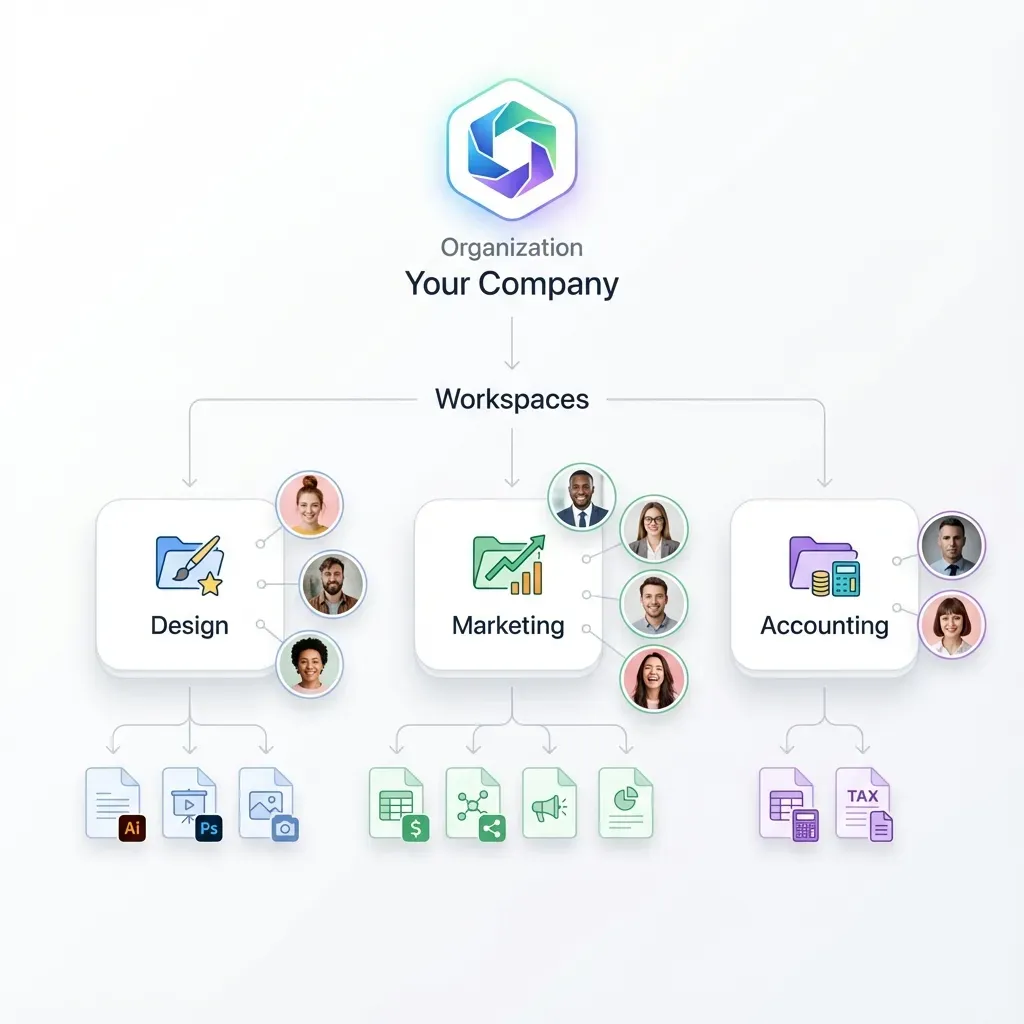
- Organization level: Can the agent see all workspaces or only specific ones?
- Workspace level: Read-only, comment-only, or full edit access?
- Folder level: Access to specific project folders only
- File level: Some files should be completely off-limits
With Fast.io, you set permissions at organization, workspace, folder, and file levels. An invoice-processing agent gets read access to the "Invoices" workspace but can't touch the "Legal Contracts" workspace.
3. Isolate Agent Environments
Run agents in sandboxed environments where possible. Segment their network access to prevent lateral movement if one agent is compromised. Isolation limits blast radius. A compromised agent in a sandbox can't pivot to other systems or access resources outside its designated boundaries.
Key isolation practices:
- Container-based execution environments
- Network segmentation for agent traffic
- Separate storage namespaces per agent or project
- Limited access to production databases
Agents using Fast.io operate in their own workspace context. Files uploaded by one agent remain isolated from other agents unless explicitly shared. This workspace-level isolation prevents accidental data leakage between unrelated agent tasks.
4. Secure File Access and Storage
File handling is the most common security gap in agent systems. Agents download sensitive files, process them locally, upload outputs, and leave artifacts scattered across temporary directories.
File security checklist:
- Encrypt files at rest and in transit (minimum standard)
- Use scoped file access tokens that expire
- Implement file locks for concurrent multi-agent access
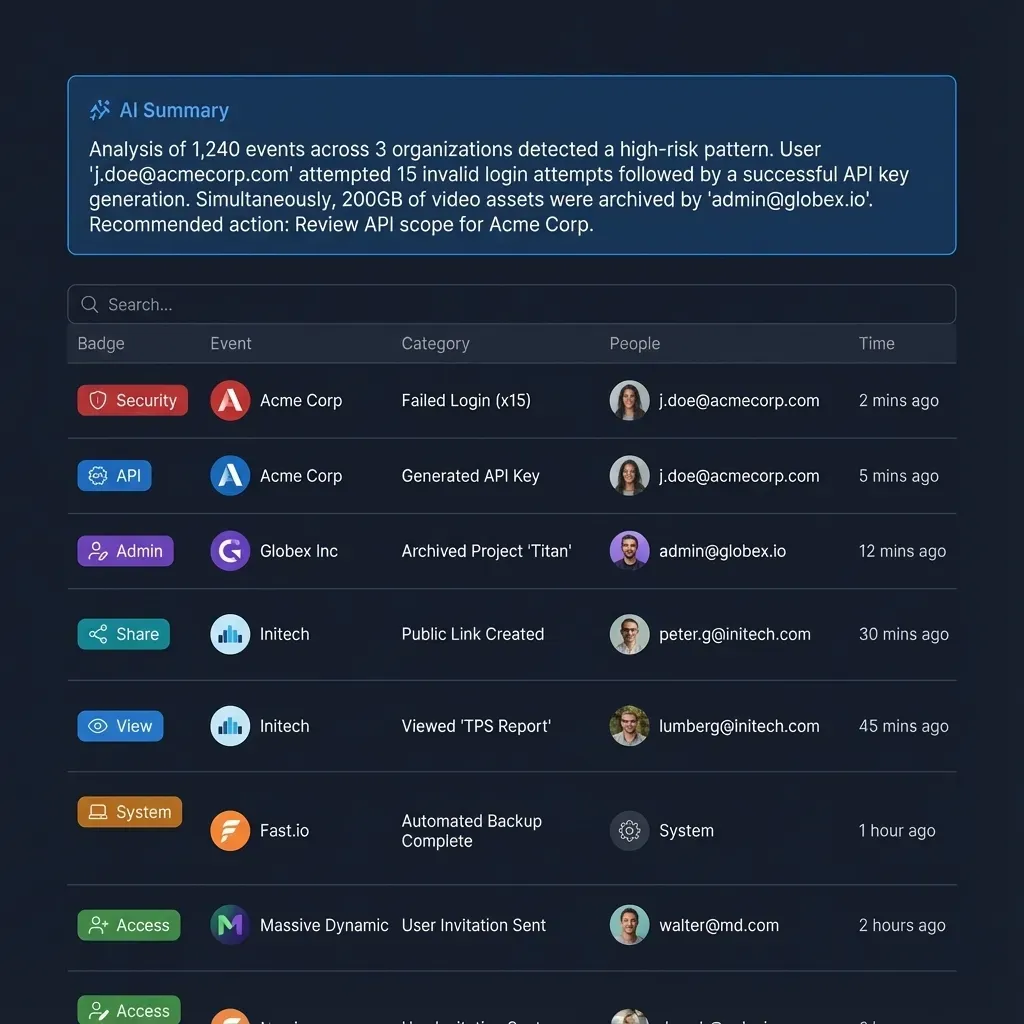
- Track who accessed what files and when
- Control whether agents can download or only view files
Fast.io provides encryption in transit and at rest as standard. File locks prevent race conditions when multiple agents work on shared documents. The audit log tracks every file access with agent identity, timestamp, and action type. For agent file operations, consider:
- Can the agent upload to any workspace or just designated ones?
- Should downloads be watermarked for traceability?
- Do certain file types need additional approval before agent access?
5. Implement Complete Monitoring
AI agents should be treated like production-grade microservices. This means monitoring, alerting, and automated rollback paths when they behave outside expected norms.
What to monitor:
- API call patterns (sudden spikes may indicate compromise)
- File access patterns (unusual access to restricted files)
- Error rates and failure modes
- Resource consumption (CPU, memory, network)
- Credential usage (detect stolen credentials)
Set up alerts for anomalies. If an agent that normally processes a modest number of files per day suddenly tries to access thousands of files, you want to know immediately. Fast.io audit logs provide a complete activity trail. Track workspace joins, file uploads, permission changes, and download activity. Export logs to your SIEM for correlation with other security events.
6. Scan Dependencies and Code
AI agents rely on large stacks of dependencies that change frequently and can introduce new vulnerabilities. Code and dependency scanning is mandatory for production agents. Integrating static analysis tools like Semgrep into your CI/CD pipeline helps catch insecure patterns, outdated dependencies, and logic flaws early in the development cycle.
Security scanning best practices:
- Automated dependency vulnerability scanning on every build
- Regular updates to agent framework versions
- Static code analysis for common security flaws
- Review of third-party libraries before integration
- Monitoring for new CVEs affecting your stack
Don't wait for production to discover that your agent framework has a critical RCE vulnerability. Automated scanning catches issues before deployment.
7. Establish Human Oversight and Approval Workflows
Human oversight remains important for AI agents. In certain scenarios, it's not just good practice but a legal requirement.
When to require human approval:
- High-value financial transactions
- Deletion of files or data
- Changes to access control policies
- Communication with external parties
- Accessing personally identifiable information (PII)
Set up approval workflows for sensitive operations. An agent can draft the invoice but a human must approve before sending. An agent can identify files for deletion but can't execute the delete without confirmation. Fast.io's ownership transfer capability supports agent-to-human workflows. An agent builds a complete data room with files and permissions, then transfers ownership to a human who reviews before sharing with external parties.
8. Use Webhooks for Reactive Security
Polling for security events creates lag. Webhooks enable real-time response to suspicious activity. With webhook-based security monitoring, you receive instant notifications when agents perform sensitive actions. This enables immediate response rather than discovering problems hours later in log reviews.
Security webhook use cases:
- Alert when an agent accesses a restricted workspace
- Notify security team of bulk file downloads
- Trigger review workflows for sensitive file modifications
- Log agent credential usage to external SIEM
Fast.io supports webhooks for file uploads, modifications, and access events. Build reactive security workflows without constantly polling the API. Security is not just about checking boxes on a features list. It requires encryption at rest and in transit, granular access controls, and comprehensive audit logging. Look for platforms that build security into the architecture rather than bolting it on as an afterthought.
9. Implement Rate Limiting and Quotas
Rate limiting prevents runaway agents from exhausting resources or triggering expensive API calls. Set quotas on:
- API requests per minute/hour
- File uploads per day
- Storage capacity per agent
- Bandwidth consumption limits
When an agent hits a rate limit, investigate why. Legitimate workload increases should be expected and planned. Sudden spikes often indicate bugs or compromise. Fast.io's credit-based system naturally rate-limits agent activity. Agents on the free tier get 5,000 credits per month. Once exhausted, the agent stops consuming resources until the next billing cycle or you add credits. Consider how this fits into your broader workflow and what matters most for your team. The right choice depends on your specific requirements: file types, team size, security needs, and how you collaborate with external partners. Testing with a free account is the fast way to know if a tool works for you.
10. Maintain an Agent Inventory and Lifecycle
You can't secure agents you don't know about. Maintain a complete inventory of all agents, their purposes, owners, and access scopes.
Agent lifecycle management:
- Creation: Document purpose, owner, and intended access scope
- Operation: Regular access reviews to verify permissions are still appropriate
- Rotation: Update credentials on a schedule
- Decommission: Disable agents no longer needed, revoke all access
Orphaned agents are a security risk. When a developer leaves the company, ensure their experimental agents are identified and disabled. Treat agent credentials like any other identity. Rotate API keys quarterly. Review access permissions monthly. Disable agents that haven't been active in several months.
Security Checklist for Production Agents
Before deploying an AI agent to production, verify:
- Agent has a unique, non-shared identity
- Permissions follow least privilege (can list what the agent CANNOT do)
- Runs in an isolated environment (container, sandbox, or separate workspace)
- All file access is logged with agent identity and timestamp
- Dependencies scanned for vulnerabilities
- High-risk operations require human approval
- Rate limits and quotas configured
- Monitoring and alerting active
- Documented owner and business justification
- Incident response plan includes agent compromise scenarios
This checklist helps you catch security gaps before they become incidents.
Building Secure Agent File Workflows
File operations are where many agents spend most of their time. Securing this workflow is critical. A secure agent file workflow looks like this:
1. Agent authentication: Agent uses its dedicated account, not a shared key
2. Permission check: Before accessing a file, verify the agent has the required permission level
3. Audit logging: Log the access with agent identity, file path, and action (read/write/delete)
4. Encryption: File transfers use TLS, files at rest are encrypted
5. Access control: Files in different workspaces remain isolated unless explicitly shared
6. Monitoring: Track access patterns for anomalies
Fast.io implements this workflow natively. Agents authenticate via API, access is scoped to specific workspaces, all operations are logged, encryption is automatic, and workspace isolation prevents lateral access.
Frequently Asked Questions
How do you secure AI agent credentials?
Treat agent credentials like any other identity. Use unique API keys per agent (never share keys across agents), rotate credentials quarterly, store secrets in secure vaults (not hardcoded), and set up automatic revocation when agents are decommissioned. Each agent should authenticate with its own identity so you can track activity and revoke access granularly.
What are the biggest security risks with AI agents?
The top risks are excessive permissions (agents with more access than needed), shared credentials (multiple agents using one API key), lack of monitoring (can't detect compromise), dependency vulnerabilities (outdated libraries with known CVEs), and insufficient isolation (one compromised agent affecting others). File access is the most common attack vector.
Should AI agents run in sandboxed environments?
Yes, whenever possible. Sandboxing limits the blast radius if an agent is compromised. Use container-based execution, network segmentation, and separate storage namespaces. An isolated agent can't pivot to other systems or access resources outside its designated boundaries. For file storage, workspace-level isolation prevents agents from accessing unrelated data.
How do you monitor AI agent security?
Set up complete audit logging of all agent actions (file access, API calls, permission changes), configure anomaly detection for unusual patterns (sudden spikes in activity, access to restricted resources), export logs to a SIEM for correlation with other security events, and set up real-time alerts for high-risk operations. Treat agents like production microservices with full observability.
What is the principle of least privilege for AI agents?
Least privilege means agents receive only the minimum permissions needed for their specific tasks. Start with narrow access and expand only when justified. If an agent processes invoices, grant read access to the invoices folder only, not write access to the entire organization. Review permissions quarterly to ensure they're still appropriate.
Do AI agents need human oversight?
Yes, especially for high-risk operations like financial transactions, data deletion, permission changes, or communication with external parties. Human-in-the-loop workflows require approval before sensitive actions execute. This isn't just best practice but often a legal requirement when handling regulated data or making decisions with significant business impact.
How do you handle file security for AI agents?
Encrypt files at rest and in transit, use scoped access tokens that expire, use file locks for concurrent access, track all file operations in audit logs, and control whether agents can download files or only view them. Use workspace isolation to prevent agents from accessing unrelated files. Review file access patterns for anomalies.
What should be in an AI agent security incident response plan?
Your incident response plan should include procedures for detecting compromised agents (monitoring alerts, log analysis), immediate containment steps (revoke credentials, disable agent, isolate affected systems), investigation workflow (identify scope of breach, affected data), remediation (patch vulnerabilities, rotate credentials), and communication plan (notify stakeholders, document lessons learned).
Related Resources

Run Secure AI Agents 10 Critical Security Best Practices workflows on Fast.io
Fast.io gives AI agents their own accounts with 50GB free storage, granular permissions, comprehensive audit logs, and workspace isolation. Free tier includes 5,000 monthly credits with no credit card required.