How to Build an AI Document Processing Workflow
An AI document processing workflow automates the ingestion, extraction, validation, and routing of documents using machine learning models. This guide covers practical architectures from OCR to agentic workflows, including storage integration and delivery patterns.

What is an AI Document Processing Workflow?
An AI document processing workflow automates the complete lifecycle of documents, from ingestion through extraction, validation, and delivery. Unlike basic OCR tools that only read text, a complete workflow handles classification, data extraction, validation, and routing without human intervention. According to AWS, intelligent document processing combines optical character recognition (OCR), computer vision, natural language processing (NLP), and machine learning to interpret both the content and context of documents. These systems handle structured forms, semi-structured invoices, and unstructured contracts. Modern document workflows process thousands of files daily, cutting processing time dramatically compared to manual review. This approach is essential for businesses handling large volumes of paperwork in sectors like finance, legal, and healthcare.

What to check before scaling ai document processing workflow
Document processing workflows follow four stages: upload, classify, extract, and validate. Each stage requires different AI capabilities and error handling strategies. Your file workflow should match how your team actually works, not force you into rigid processes. Look for flexibility in how you organize, review, and deliver files. The best tools adapt to your existing workflow rather than requiring you to adapt to theirs.
Your file workflow should match how your team actually works, not force you into rigid processes. Look for flexibility in how you organize, review, and deliver files. The best tools adapt to your existing workflow rather than requiring you to adapt to theirs.
1. Document Ingestion
The ingestion stage accepts documents from multiple sources and prepares them for processing. Sources include file uploads, email attachments, API submissions, and cloud storage imports. For AI agent workflows, Fast.io's URL Import feature lets agents pull files directly from Google Drive, OneDrive, Box, and Dropbox via OAuth without local I/O. Agents can also accept files through branded portals or webhooks that trigger processing automatically when files arrive.
Key considerations: File format detection, virus scanning, deduplication, and metadata extraction. Store originals separately from processing copies to preserve evidence.
2. Document Classification
Classification determines document type (invoice, contract, form, receipt) and routes it to the appropriate extraction pipeline. Vision-language models examine layout, headers, and content patterns to categorize documents. According to DeepLearning.AI, modern document AI combines agentic OCR (vision-language models that interpret visual and semantic structure) with agentic workflows (LLM-based reasoning pipelines that coordinate multi-step logic, error recovery, and decision-making).
Accuracy tip: Multi-model classification (combining layout analysis with text content) typically outperforms single-method approaches by a wide margin.
3. Data Extraction
Extraction pulls structured data from classified documents. This includes named entities (dates, amounts, names), table data, line items, and signature verification. Modern extraction uses vision-language models that understand document layout, not just text. For example, extracting an invoice total requires understanding that the number in the bottom-right corner labeled "Total" is different from line item amounts.
Storage integration: Save extracted data alongside the original document with version tracking. Fast.io's Intelligence Mode auto-indexes documents for RAG, letting you query extracted data across thousands of files with citations back to source documents.
4. Validation and Routing
Validation checks extracted data against business rules and external systems. This includes format validation (dates, currency), cross-field logic (total equals sum of line items), and external verification (vendor lookup, duplicate detection). According to Rossum.ai, by automating classification, extraction, and routing, AI systems maintain accuracy above 95 percent while manual invoice handling drops to under 10 percent. Failed validation triggers human review. Successful validation routes documents to downstream systems (ERP, accounting software, approval workflows).
Architecture Patterns
Document processing workflows use three common architectures depending on scale, latency requirements, and integration complexity. Consider how this fits into your broader workflow and what matters most for your team. The right choice depends on your specific requirements: file types, team size, security needs, and how you collaborate with external partners. Testing with a free account is the fast way to know if a tool works for you.
Consider how this fits into your broader workflow and what matters most for your team. The right choice depends on your specific requirements: file types, team size, security needs, and how you collaborate with external partners. Testing with a free account is the fast way to know if a tool works for you.
Synchronous Pipeline
Best for low-volume workflows (under 100 documents per hour) where immediate results are required. The API call waits for complete processing before returning results.
Typical flow: Upload → Classify → Extract → Validate → Return JSON response
Limitations: API timeouts for large documents, no support for long-running extraction, blocked threads during processing.
Asynchronous Queue
Ideal for high-volume processing (1000+ documents per day) with eventual consistency. Documents enter a queue, workers process them in parallel, and results are delivered via webhook or polling.
Typical flow: Upload → Queue → Worker Pool → Extraction → Validation → Webhook notification
Advantages: Horizontal scaling, retry logic, priority queues, and graceful degradation under load. Storage becomes important as documents wait in queue and results must be persisted.
Agentic Workflow
According to LlamaIndex, agentic document processing uses LLM-based reasoning pipelines that coordinate multi-step logic, error recovery, and decision-making. Agentic workflows go beyond simple extraction to reasoning about documents. An agent might:
- Detect missing required fields and request clarification
- Cross-reference multiple documents to validate data
- Route documents to different approval chains based on content
- Generate summaries and action items for human review
Storage requirements: Agents need persistent workspaces to store intermediate results, conversation history, and reference documents. Fast.io's Agent Workspaces let AI agents create and manage organized project structures with proper permissions.
Building Your First Workflow
Here's a practical implementation guide for a basic document processing workflow. We'll build an invoice processing system that accepts PDFs, extracts key fields, and delivers structured data. Your file workflow should match how your team actually works, not force you into rigid processes. Look for flexibility in how you organize, review, and deliver files. The best tools adapt to your existing workflow rather than requiring you to adapt to theirs.
Your file workflow should match how your team actually works, not force you into rigid processes. Look for flexibility in how you organize, review, and deliver files. The best tools adapt to your existing workflow rather than requiring you to adapt to theirs.
Step 1: Set Up Document Storage
Documents need persistent storage throughout the workflow. Set up a workspace structure:
/inbox- Incoming unprocessed documents/processing- Documents currently being analyzed/validated- Successfully processed documents/failed- Documents requiring human review
For AI agents, Fast.io's free agent tier provides 50GB storage, 5,000 monthly credits, and 5 workspaces. Agents sign up like human users with no credit card required.
Step 2: Implement Ingestion
Create an upload endpoint that accepts documents and stores them in the inbox. Most document processing pipelines start with a secure upload endpoint that validates files before processing. Use Fast.io's URL Import to pull files from external sources:
- Accept uploads via API or branded portal
- Extract basic metadata (filename, size, upload timestamp)
- Move file to
/inboxworkspace folder - Trigger processing webhook
Security: Validate file types, scan for malware, enforce size limits before processing.
Step 3: Add Classification and Extraction
Use a vision-language model to classify and extract data:
- Pass document to classification model (GPT-4 Vision, Claude with images, or specialized models)
- Based on document type, route to appropriate extraction template
- Extract structured fields with confidence scores
- Store extracted data as JSON alongside original document
Best practice: Keep extraction prompts in version control. When prompts change, re-extract historical documents to maintain consistency.
Step 4: Validate and Deliver
Check extracted data against business rules:
- Validate required fields are present
- Check data formats (dates, currency, email addresses)
- Cross-check totals and calculations
- Query for duplicates using semantic search
On successful validation, move the document to /validated and trigger downstream integrations. On failure, move to /failed and notify human reviewers. Fast.io's Intelligence Mode with built-in RAG makes duplicate detection easy. Ask natural language questions like "Find invoices from Acme Corp in the last 30 days" and get cited results instantly.
Storage Integration for Workflows
Document workflows have three storage requirements: file persistence, metadata management, and retrieval capabilities. Most guides focus on extraction but skip the storage architecture. Your file workflow should match how your team actually works, not force you into rigid processes. Look for flexibility in how you organize, review, and deliver files. The best tools adapt to your existing workflow rather than requiring you to adapt to theirs.
Your file workflow should match how your team actually works, not force you into rigid processes. Look for flexibility in how you organize, review, and deliver files. The best tools adapt to your existing workflow rather than requiring you to adapt to theirs.
File Persistence Requirements
Documents must be stored durably throughout the workflow lifecycle. Requirements include:
- Version tracking (original vs processed copies)
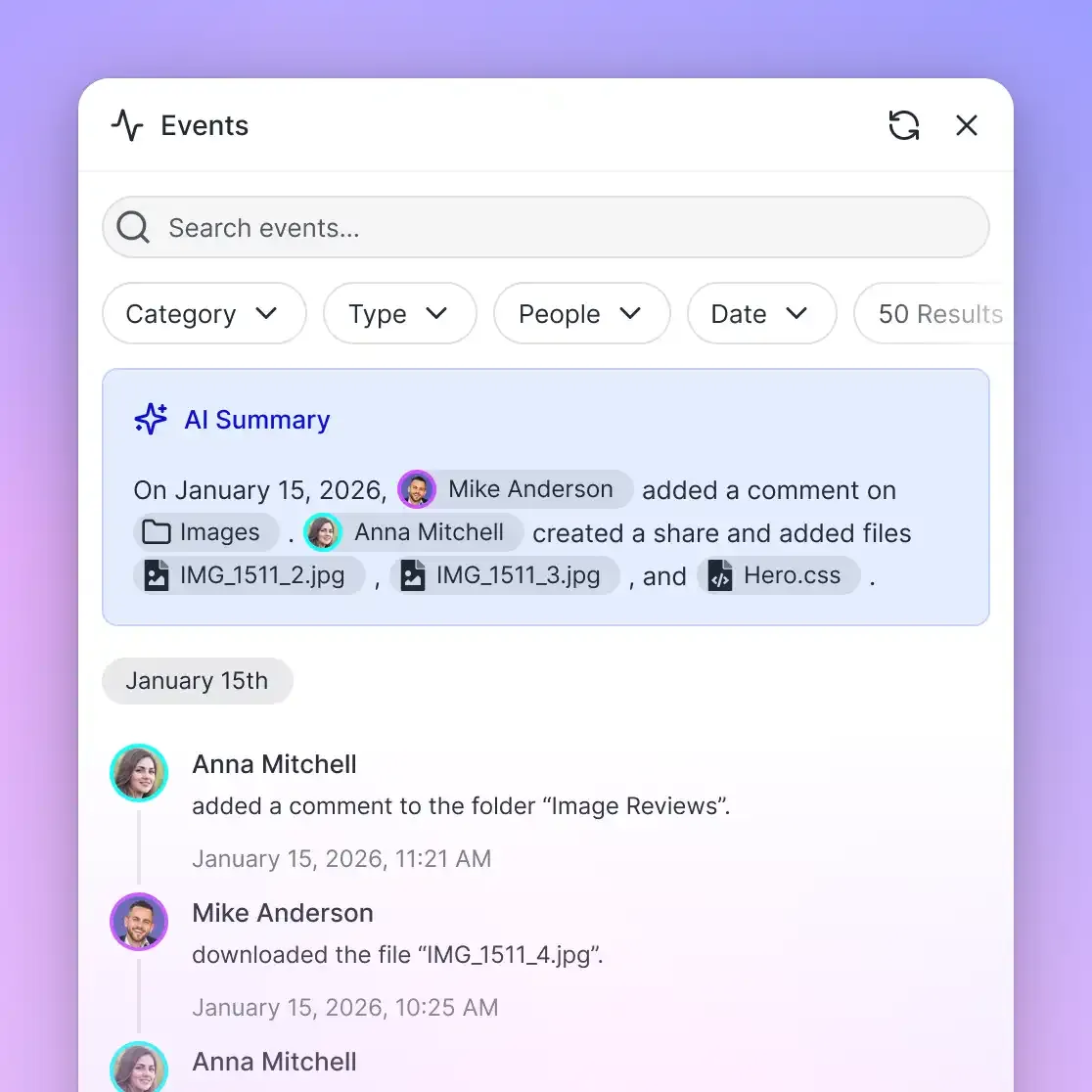
- Audit trails (who accessed, when, what changed)
- Retention policies (legal holds, automatic deletion)
- Access controls (processing agents vs human reviewers)
Unlike ephemeral storage like OpenAI's Files API (where files expire after processing), production workflows need permanent storage. Fast.io's organization-owned files persist independent of user accounts, so documents remain accessible when employees leave.
Metadata and Search
Extracted data should be searchable alongside the original documents. Fast.io's semantic search understands natural language queries, not just keyword matching. You can search for specific criteria like date ranges or amounts without exact filename matches. The built-in RAG system provides answers with citations to source documents.
Retrieval Patterns
Common retrieval patterns in document workflows:
- Batch export: Download all validated documents for a date range
- On-demand lookup: Retrieve specific documents by ID or query
- Streaming delivery: Push new documents to downstream systems as they're validated
Fast.io's webhooks trigger downstream actions automatically when files change. No polling required.
Multi-Agent Document Processing
Complex workflows benefit from multiple specialized agents working in parallel. One agent handles ingestion, another does extraction, a third validates results, and a fourth delivers to downstream systems. Your file workflow should match how your team actually works, not force you into rigid processes. Look for flexibility in how you organize, review, and deliver files. The best tools adapt to your existing workflow rather than requiring you to adapt to theirs.
Your file workflow should match how your team actually works, not force you into rigid processes. Look for flexibility in how you organize, review, and deliver files. The best tools adapt to your existing workflow rather than requiring you to adapt to theirs.
Agent Coordination Patterns
Multi-agent systems require coordination and shared state. Common patterns include:
Queue-based: Agents pull tasks from a shared queue and update document status
Event-driven: Agents subscribe to webhooks and react to document state changes
Orchestrated: A coordinator agent delegates subtasks to specialist agents
Fast.io's workspace permissions support all three patterns. Agents can share workspaces for queue-based coordination, or use separate workspaces with ownership transfer for handoffs.
File Locking for Concurrent Access
When multiple agents process the same documents, file locks prevent conflicts. Fast.io's file locking API lets agents acquire and release locks during processing. A validation agent can lock a document while checking it, preventing the delivery agent from acting on incomplete validation. Locks are automatically released if an agent crashes.
Human-Agent Handoff
Documents that fail automated processing need human review. Fast.io's ownership transfer lets an agent build a data room with failed documents and transfer it to a human reviewer. The agent keeps admin access to monitor progress and can resume automated processing once humans fix the issues. This creates a clean handoff without re-uploading files or losing context.
Error Handling and Recovery
Production document workflows must handle extraction failures, OCR errors, and edge cases gracefully. Build retry logic, human escalation, and quality monitoring from day one. Consider how this fits into your broader workflow and what matters most for your team. The right choice depends on your specific requirements: file types, team size, security needs, and how you collaborate with external partners. Testing with a free account is the fast way to know if a tool works for you.
Consider how this fits into your broader workflow and what matters most for your team. The right choice depends on your specific requirements: file types, team size, security needs, and how you collaborate with external partners. Testing with a free account is the fast way to know if a tool works for you.
Common Failure Modes
Document processing fails for predictable reasons:
- Poor image quality: Blurry scans, skewed pages, low contrast
- Unexpected formats: Documents that don't match training data
- Incomplete data: Missing required fields, partially filled forms
- Ambiguous content: Fields that could be interpreted multiple ways
Track failure rates by document type and error category. If a specific vendor's invoices consistently fail, that signals a need for custom extraction logic.
Retry Strategies
Failed documents should retry with different approaches:
Tier 1: Fast extraction with default model (handles most documents)
Tier 2: Slower, more accurate model for failures (catches most remaining cases)
Tier 3: Human review for the small percentage that automated methods miss
Each tier has higher latency but better accuracy. Don't send all documents through the slow pipeline when most succeed with fast processing.
Quality Monitoring
Sample random documents for human verification to catch systemic errors. If extraction accuracy drops below threshold, alert humans and pause automated processing. Fast.io's activity tracking provides complete audit trails at workspace, folder, and file levels. Track who uploaded files, when extraction ran, and what changed over time.
Cost Optimization for Scale
Processing thousands of documents daily requires cost awareness. Vision-language models are expensive per API call, and storage costs scale with volume. When evaluating pricing, consider the total cost of ownership rather than sticker price alone. Hidden costs from per-seat charges, overage fees, and add-on features can quickly inflate your monthly bill. A usage-based model means you pay for what you actually consume, which tends to scale more predictably as your team grows.
When evaluating pricing, consider the total cost of ownership rather than sticker price alone. Hidden costs from per-seat charges, overage fees, and add-on features can quickly inflate your monthly bill. A usage-based model means you pay for what you actually consume, which tends to scale more predictably as your team grows.
Model Selection
Choose models based on document complexity:
- Simple forms: Fast OCR + template matching (lowest cost)
- Standard invoices: Mid-tier vision model (GPT-4 Vision, Claude Haiku with images)
- Complex contracts: High-accuracy model (GPT-4o, Claude Opus)
Route documents to appropriate models based on classification. Processing a simple receipt with GPT-4o wastes money.
Caching and Deduplication
Detect duplicate documents before processing. Hash-based deduplication catches exact copies, while semantic search finds near-duplicates. Cache extraction results keyed by document hash. If the same document arrives twice, return cached results without re-processing.
Storage Credits
Fast.io's usage-based pricing charges for storage and bandwidth, not per-seat. This model tends to cost less than per-seat pricing as teams grow. The agent free tier provides 50GB storage, 5,000 monthly credits, and 5 workspaces. For production workloads, credits reset monthly and scale with usage.
Security and Compliance
Document workflows often handle sensitive data like financial records, medical forms, or legal contracts. Implement proper security controls from day one. Security is not just about checking boxes on a features list. It requires encryption at rest and in transit, granular access controls, and comprehensive audit logging. Look for platforms that build security into the architecture rather than bolting it on as an afterthought.
Security is not just about checking boxes on a features list. It requires encryption at rest and in transit, granular access controls, and comprehensive audit logging. Look for platforms that build security into the architecture rather than bolting it on as an afterthought.
Access Controls
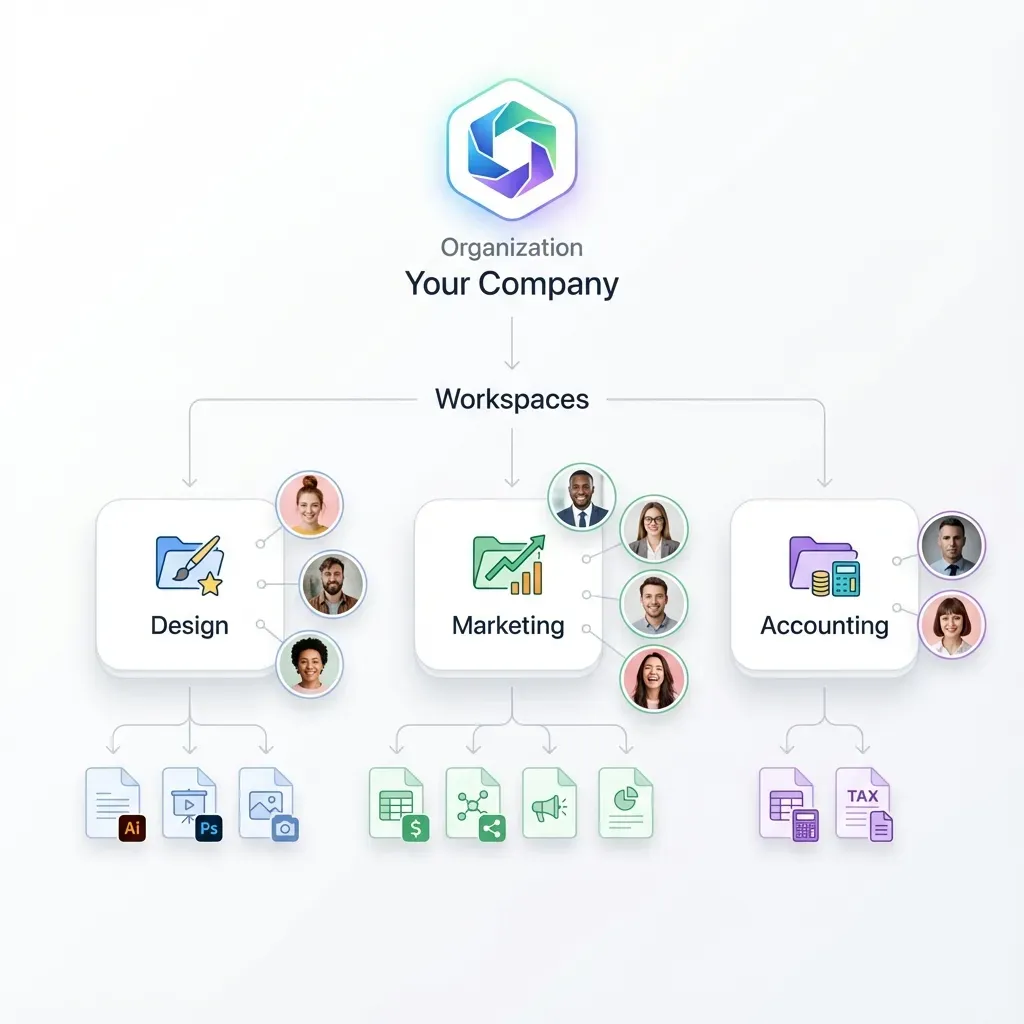
Use granular permissions to limit who can view and modify documents. Fast.io supports permissions at organization, workspace, folder, and file levels. Processing agents should have write access to /inbox and /processing but read-only access to /validated. Human reviewers need write access to /failed but shouldn't touch automated pipelines.
Encryption and Audit Logs
Fast.io encrypts files at rest and in transit. Complete audit logs track every file view, download, and permission change. For regulated industries, audit logs prove compliance with data handling requirements. Review audit logs to monitor document access patterns and ensure accountability.
Data Retention
Define retention policies based on document type and regulatory requirements. Many businesses keep financial records for extended periods to meet compliance standards, while temporary forms can be deleted sooner. Implement automated cleanup jobs that archive or delete old documents. Use workspace-level policies to enforce consistent retention across document types.
Frequently Asked Questions
How do you automate document processing with AI?
Build a workflow with four stages: ingestion (accept files from uploads, APIs, or cloud storage), classification (determine document type using vision models), extraction (pull structured data using OCR and NLP), and validation (check against business rules before delivery). Use webhooks to trigger each stage automatically and queue-based architecture for scaling to thousands of documents daily.
What is a document workflow?
A document workflow is the automated path a document takes from arrival to final storage or integration. It includes ingestion, classification, data extraction, validation, approval routing, and delivery to downstream systems. Modern workflows use AI to handle these steps without human intervention, saving significant time compared to manual processing.
What's the difference between OCR and intelligent document processing?
OCR (optical character recognition) only reads text from images. Intelligent document processing combines OCR with vision models, natural language processing, and machine learning to understand document structure, classify types, extract specific fields, validate data, and route documents to appropriate workflows. OCR is one component of IDP, not a complete solution on its own.
How do AI agents store documents in processing workflows?
AI agents need persistent storage for documents throughout the workflow lifecycle. Fast.io provides agent accounts with 50GB free storage, workspace organization, and full API access. Agents can create structured folders for different workflow stages (/inbox, /processing, /validated), acquire file locks for concurrent access, and transfer ownership to humans when building client deliverables. Unlike ephemeral storage, documents persist after processing completes.
What file formats work with AI document processing?
AI document processing handles PDFs, scanned images (JPEG, PNG), Microsoft Office files (Word, Excel), and structured data formats (CSV, JSON). Vision-language models work best with PDFs and images. For native Office files, convert to PDF first or use specialized parsing libraries before feeding to AI models.
How do you handle documents that fail automated processing?
Implement a tiered retry strategy. First, retry with a more accurate (but slower) model. Second, flag for human review and move to a dedicated workspace. Third, track failure patterns by document type and vendor to identify systemic issues. Use activity tracking and audit logs to monitor which documents require manual intervention and optimize extraction prompts based on common failure modes.
What's the accuracy rate for AI document extraction?
Production systems typically achieve high accuracy with proper model selection and validation. Simple forms with template matching tend to have the highest accuracy, standard invoices with vision models perform well but slightly lower, and complex contracts often require human review for a small percentage of cases. Accuracy improves over time as you fine-tune prompts and add domain-specific training data. Always implement validation checks before trusting extracted data.
How do you scale document processing to handle thousands of files?
Use asynchronous queue-based architecture where documents enter a queue and worker agents process them in parallel. Implement horizontal scaling by adding more workers during peak load, caching and deduplication to avoid re-processing identical documents, and tiered model selection to route simple documents to fast models. Storage should support concurrent access with file locking, webhook notifications for event-driven workflows, and batch export for downstream integration.
Related Resources

Start with AI Document Processing Workflow on Fast.io
Get free storage for AI agents with built-in RAG, MCP tools, and webhook integration. No credit card required.