5 Best Blackmagic Cloud Alternatives for Video Teams in 2026
Blackmagic Cloud works well if your entire team lives in DaVinci Resolve, but its tight ecosystem lock-in creates friction for mixed workflows, client delivery, and freelancer collaboration. This guide compares the top alternatives for video teams who need more flexibility with their cloud storage and file sharing.
Why Video Teams Look for Blackmagic Cloud Alternatives
Blackmagic Cloud is Blackmagic Design's cloud storage service built specifically for DaVinci Resolve. It syncs project libraries and proxy files between editors, making multi-user timelines possible without complex server setups. The tight integration with Resolve is both its main strength and its primary limitation.
The problem shows up the moment you step outside Resolve's ecosystem. You cannot send a branded review link to a marketing director who just wants to watch the final cut. You cannot share raw camera files with a colorist who uses Baselight. You cannot onboard a freelance editor who works in Premiere Pro.
Storage costs compound this friction. While the base rate of $15 per terabyte seems competitive, the combination of project library fees and individual user management creates unpredictable costs for growing teams. A production house with 20 editors and 100TB of archive footage faces very different math than a solo editor with a few active projects.
Video production workflows touch more people than just editors. Producers need to check cuts. Clients need to approve deliverables. Marketing teams need to pull stills. External colorists and sound designers need access to specific assets. Any cloud platform that only serves the editing room leaves gaps in the broader production pipeline.
This guide breaks down five alternatives that address these gaps in different ways. The right choice depends on whether your bottleneck is real-time editing collaboration, client delivery, raw file transfer, or general team storage.
Fast.io: Universal Cloud Storage for Production Teams
Fast.io takes a fundamentally different approach than Blackmagic Cloud. Instead of building around a single piece of software, it functions as a universal media hub for your entire organization. Editors, producers, clients, and external vendors all work from the same platform without needing specific software licenses.
No Per-Seat Pricing
Most cloud platforms charge per user, which punishes teams that collaborate widely. Fast.io uses usage-based pricing instead. The Pro plan includes 25 seats, and the Business plan includes 100 seats, with additional seats at just $1 per month. You can invite your entire post-production team, marketing department, and external clients without watching your monthly bill climb with each new person.
For a 25-person video team, traditional per-seat pricing at $18 per user would cost $450 per month just for storage access. Fast.io with equivalent storage runs closer to $60 per month, representing savings of roughly 87%.
Universal Media Engine with HLS Streaming
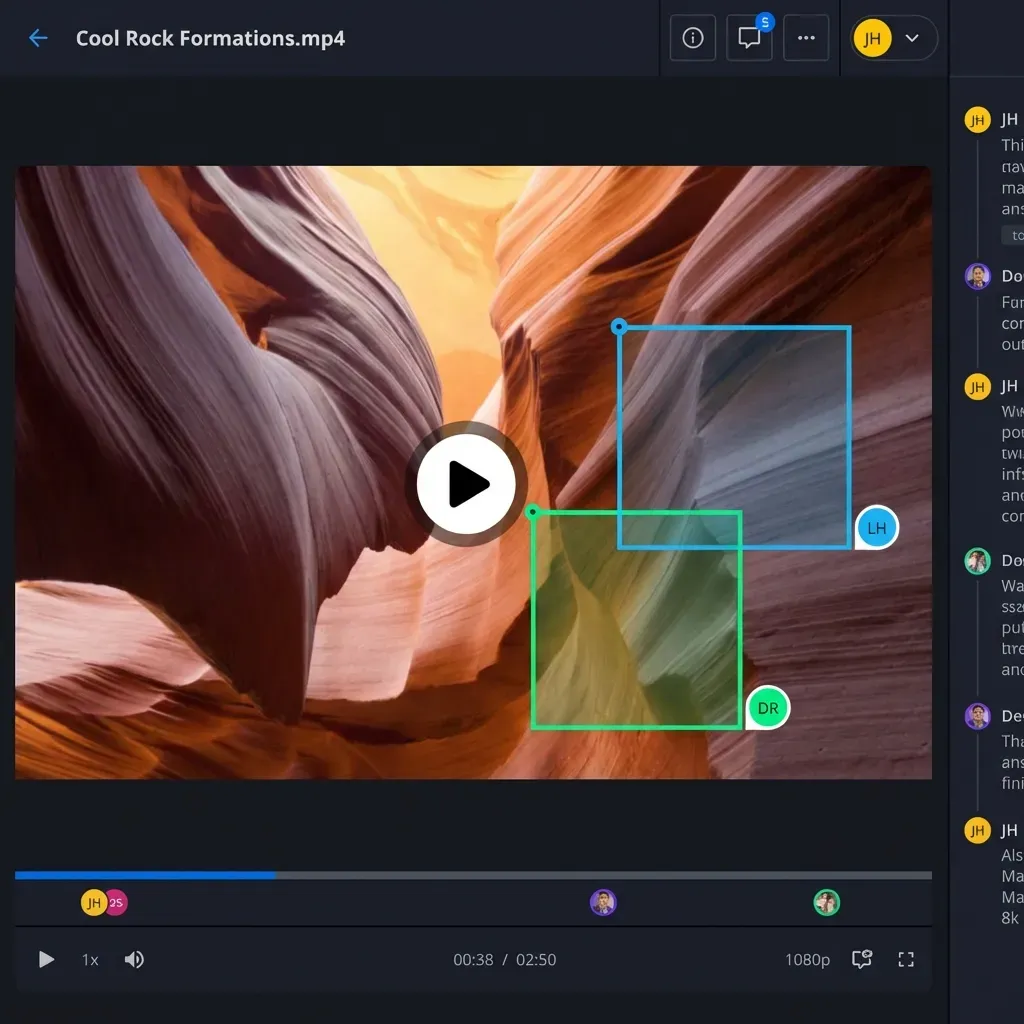
The universal media engine creates adaptive bitrate streams for your video assets, similar to how Netflix delivers content. Anyone can preview 4K footage, RAW photos, and complex design files directly in their browser. This matters most for client reviews where stakeholders want to click a link and watch, not download gigabytes and install codecs.
Video playback starts instantly and scrubs smoothly because the system transcodes proxies automatically while keeping originals intact. Your 8K RED footage stays exactly as shot, while clients see a perfectly smooth 1080p stream optimized for their connection.
Organization-Owned Files
In many cloud systems, files live in personal accounts. When a freelancer finishes a project and moves on, their files might go with them. Fast.io uses an organization-first model where the company owns all data. Your files remain accessible regardless of staff changes, project transitions, or contractor turnover.
This model also eliminates the "which version did you upload to your Drive?" confusion that plagues productions using personal cloud accounts. Everything lives in shared workspaces where the organization maintains control.
Frame.io: Best for Review and Approval Workflows
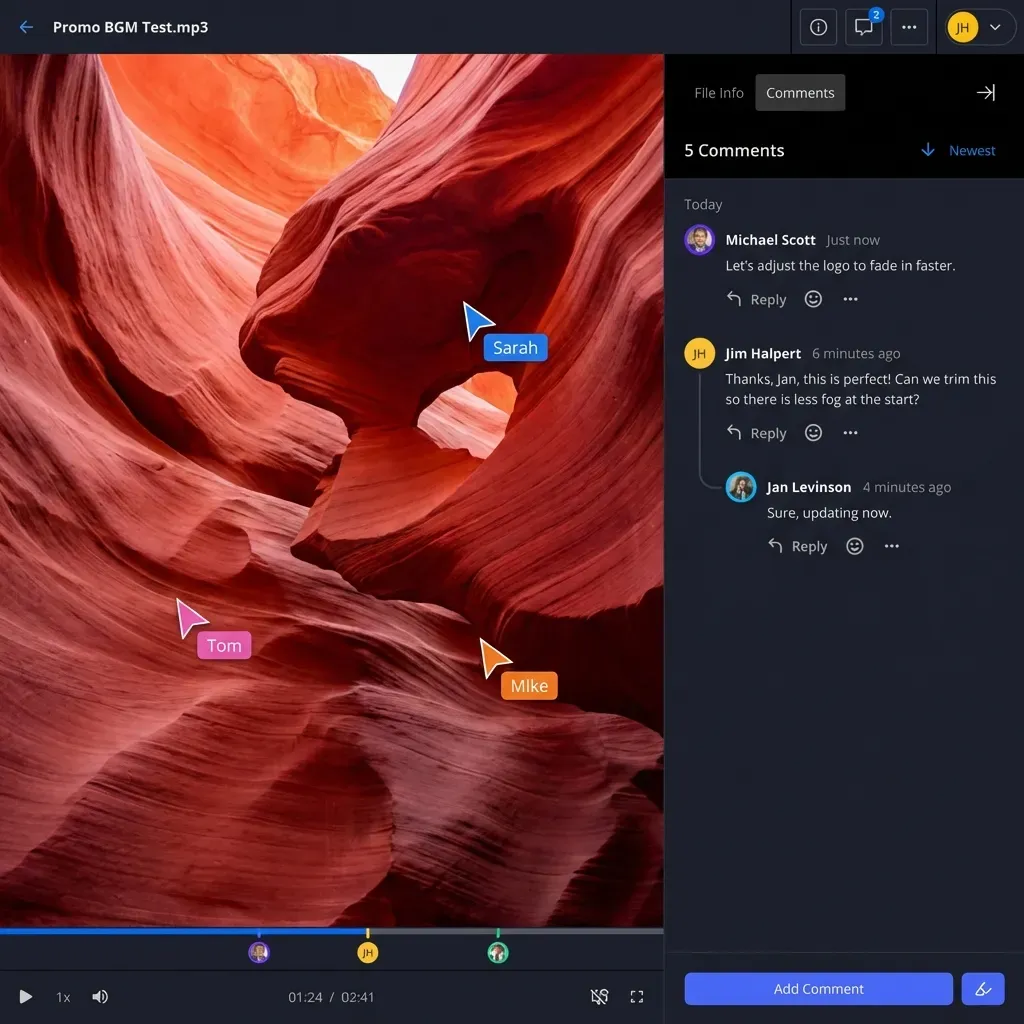
Frame.io built its reputation on one thing: making creative feedback faster. The platform excels at review and approval workflows with deep integrations into Adobe Premiere Pro, After Effects, and now Final Cut Pro through Apple's acquisition.
Strengths for Video Teams
The frame-accurate commenting system lets reviewers pin notes to specific moments in a timeline. Editors see these comments directly in their NLE without switching contexts. This tight feedback loop accelerates the approval process, especially on projects with multiple revision rounds.
Version stacking keeps every iteration organized. Reviewers can compare cuts side by side, seeing exactly what changed between rounds. The presentation feature creates polished viewing experiences for client approvals, complete with custom thumbnails and organized playlists.
Limitations to Consider
Frame.io charges per user, which adds up quickly for larger teams. The platform also focuses primarily on works-in-progress rather than long-term storage or archive management. If your needs extend beyond review workflows into general team storage or client delivery portals, you may find yourself paying for multiple platforms.
The Apple acquisition has raised questions about long-term platform neutrality. Teams heavily invested in Adobe or Avid workflows should watch how the integration story develops.
Best Fit
Frame.io works best for teams where creative feedback is the primary bottleneck. If your projects involve multiple stakeholders reviewing cuts and your editors already work in Adobe tools, the NLE integration alone may justify the per-seat cost. It is less ideal for teams that need comprehensive storage, client portals, or cross-platform collaboration beyond the editing room.
LucidLink: Cloud Storage That Acts Like a Local Drive
LucidLink takes a unique approach to cloud storage for video production. Rather than syncing files or requiring uploads, it presents cloud storage as a mounted drive that behaves like local storage. Editors can open projects directly from the cloud, scrub through timelines, and work with the same responsiveness as a local SAN.
Strengths for Video Teams
The streaming file system means large projects become accessible immediately. You do not wait for terabytes of footage to sync before starting work. The system streams data on demand, caching frequently accessed files while keeping everything else available in the cloud.
This architecture enables genuinely remote editing on projects that would otherwise require physical proximity to a central server. A colorist in London can work on the same project as an editor in Los Angeles without shipping drives or managing complex VPN configurations.
Limitations to Consider
LucidLink requires consistent, high-bandwidth internet connections. The experience degrades significantly on unreliable networks, making it less suitable for editors who work from variable locations. The per-user pricing model also means costs scale directly with team size.
The platform focuses specifically on production workflows. It lacks the client-facing features like branded portals, guest access, and presentation modes that other platforms provide. For client delivery, you would still need a separate solution.
Best Fit
LucidLink works best for post-production facilities with reliable high-speed internet and teams that need true simultaneous access to large projects. The streaming architecture genuinely changes what remote collaboration looks like for video work. It is less suitable for teams that need client delivery features or work from locations with inconsistent connectivity.
MASV: Purpose-Built for Large File Transfer
MASV focuses specifically on moving massive files quickly. The platform optimizes for transfer speed above all else, using a global network of servers to accelerate uploads and downloads of multi-gigabyte camera originals.
Strengths for Video Teams
Transfer speeds consistently outperform standard cloud services. A 100GB camera card upload that might take hours on consumer platforms completes in a fraction of the time. MASV charges based on data transferred rather than storage or users, making it economical for workflows centered on one-off deliveries.
The platform integrates with common post-production tools and offers branded portals for client uploads. Productions that frequently receive footage from multiple sources can create dedicated upload destinations that funnel everything into organized folders.
Limitations to Consider
MASV is primarily a transfer tool, not a collaboration platform. Files land in the destination, but the platform does not provide the workspace features, commenting, or preview capabilities that ongoing collaboration requires. You pay each time you move data, which can become expensive for workflows involving frequent back-and-forth.
There is no persistent storage component. MASV gets files from point A to point B, but you still need somewhere for those files to live long-term.
Best Fit
MASV excels at the specific problem of moving large files quickly. Productions receiving camera originals from multiple locations, or delivering final masters to broadcast networks, benefit from the speed optimization. It complements rather than replaces a primary storage platform.

Dropbox: The Familiar Choice with Video Limitations
Dropbox remains the most recognized name in cloud storage. Many video professionals already have accounts, and the sharing mechanics feel familiar. For simple file sharing needs, this familiarity has value.
Strengths for Video Teams
Everyone knows how Dropbox works. You do not need to train clients or external vendors on new software. The desktop sync client maintains local copies of files, which some editors prefer for their NLE workflows. Integrations exist with most business tools.
Limitations to Consider
Dropbox was designed for documents, not video. The streaming experience uses progressive download rather than adaptive bitrate streaming. This means buffering delays, no smooth scrubbing, and poor performance on large files. A client trying to review a 4K master waits for significant portions to download before playback becomes usable.
The sync-based architecture creates additional friction. Projects live on individual machines, requiring sync time before work can begin. Sync conflicts become common on collaborative projects where multiple people touch the same files. Per-user pricing at $18 per month adds up quickly for larger teams.
File ownership ties to personal accounts. When team members leave, transferring their files requires manual intervention. The "My Drive" model that works for individual productivity creates confusion and access problems in team environments.
Best Fit
Dropbox makes sense for video professionals who need simple file sharing with people already comfortable with the platform. It is not the right choice for teams needing serious video preview capabilities, real-time collaboration, or cost-effective scaling. The limitations become pronounced as projects and teams grow larger.
How to Choose the Right Alternative for Your Team
The right Blackmagic Cloud alternative depends on where your current workflow creates the most friction. Different platforms optimize for different problems.
Choose Fast.io If:
Your team needs to store large amounts of footage, share files with clients, and collaborate across departments. Fast.io works well when the people who need access extend beyond the editing room. The usage-based pricing makes it practical for teams that collaborate widely with external stakeholders. If you need a single platform for team storage, client delivery, and cross-functional collaboration without paying per-seat fees, Fast.io addresses that combination.
Stay with Blackmagic Cloud If:
Your entire production workflow happens inside DaVinci Resolve with the same core team of editors. If every person who needs access is a Resolve user working on shared timelines, the native integration outweighs the ecosystem limitations. This applies to dedicated color houses or facilities where Resolve is the only tool in use.
Choose Frame.io If:
Creative feedback is your primary bottleneck. If your projects involve extensive review rounds with multiple stakeholders, and your editors work in Adobe or Final Cut, the NLE integration and commenting system may justify the per-seat cost. This works best for agencies and production companies where the approval process slows down delivery.
Choose LucidLink If:
Your facility has reliable high-speed internet and needs true simultaneous access to large projects. The streaming file system enables remote work that would otherwise require physical proximity to a SAN. Best suited for established facilities with predictable infrastructure.
Choose MASV If:
Your main problem is getting large files from one place to another quickly. For productions receiving camera originals from multiple sources or delivering final masters, the transfer optimization provides clear value. Combine it with a separate platform for ongoing storage and collaboration.
Frequently Asked Questions
Is Blackmagic Cloud free to use?
Blackmagic Cloud offers a free tier with 2GB of storage and one project library. This works for testing but falls far short of production needs. Paid plans start at $5 per month for a project library, with cloud storage billed separately at approximately $15 per terabyte per month. Costs vary depending on how many project libraries and team members you manage.
Can I use Blackmagic Cloud with Premiere Pro or other NLEs?
No. Blackmagic Cloud is built exclusively for DaVinci Resolve. It syncs Resolve project libraries and media between users. Editors using Premiere Pro, Final Cut Pro, Avid, or other editing software need a different solution. Fast.io, LucidLink, and Dropbox all work across editing platforms since they function as general storage rather than application-specific sync tools.
What is the best way to share large video files with clients?
For client video sharing, Fast.io provides the best combination of features. It supports files of any size, offers unlimited guest access without additional per-seat costs, and includes branded portals for professional presentation. The HLS streaming means clients can preview high-quality video in their browser without downloading huge files or installing codecs. They click a link and watch, similar to streaming from Netflix.
How does Fast.io pricing compare to Blackmagic Cloud?
Fast.io uses usage-based pricing rather than per-seat fees. The Pro plan includes 25 seats with additional seats at $1 per month. Blackmagic Cloud charges for storage plus separate project library fees. For teams that collaborate widely with clients and external vendors, Fast.io typically costs less while providing more sharing flexibility. A 25-person team on traditional per-seat pricing at $18 per user pays $450 monthly, while equivalent Fast.io storage runs closer to $60 monthly.
Which alternative is best for remote video editing?
LucidLink is purpose-built for remote editing workflows. Its streaming file system presents cloud storage as a local drive, allowing editors to work directly on cloud-hosted projects without sync delays. This requires consistent high-bandwidth internet. For teams with variable connectivity or needs beyond editing, like client delivery and cross-functional collaboration, Fast.io offers more flexibility though without the direct-edit capability LucidLink provides.
Related Resources

Ready for Flexible Video Cloud Storage?
Store footage, share with clients, and collaborate across your entire production team without per-seat fees or file size limits.