Box vs Dropbox: Which Cloud Storage Is Right for Your Business?
Box focuses on enterprise content management and security, while Dropbox emphasizes personal and team file sync. Both are cloud storage, but they serve different users. This comparison breaks down pricing, storage limits, security features, and use cases so you can pick the right platform for your business.
Box vs Dropbox at a Glance
Box and Dropbox both store files in the cloud, but they were built for different markets. Box targets enterprises with 69% of Fortune 500 companies using its platform. Dropbox grew from consumer file sync and now serves over 700 million registered users.
Here's how they compare on the features that matter most:
| Feature | Box | Dropbox |
|---|---|---|
| Target market | Enterprise | Individual and teams |
| Free storage | 10 GB | 2 GB |
| Business storage | Unlimited (most plans) | 9 TB per team (Standard) |
| Max file upload | 5 GB - 150 GB | 50 GB - 250 GB |
| Block-level sync | No | Yes |
| Built-in apps | Limited | Paper, PDF Editor, Sign |
| Integrations | 1,500+ enterprise apps | 500,000+ connected apps |
The short version: Box is built for IT departments. Dropbox is built for end users.
Pricing: Per-Seat vs Per-Seat
Both Box and Dropbox use per-seat pricing for business plans, which means costs scale with headcount.
Individual Plans
- Box Individual: $10/month for 100 GB
- Dropbox Plus: $11.99/month for 2 TB
For personal use, Dropbox offers more storage at a similar price point.
Business Plans
- Box Business: $15/user/month (unlimited storage)
- Box Business Plus: $25/user/month (adds advanced features)
- Box Enterprise: $35/user/month (full security suite)
- Dropbox Standard: $15/user/month (5 TB per team, min 3 users)
- Dropbox Advanced: $24/user/month (unlimited storage)
The Real Cost of Per-Seat Pricing
At small scale, both platforms seem affordable. A 10-person team pays $150-$250/month on either platform. But costs accelerate quickly.
A 50-person team on Box Business Plus pays $1,250/month. Add contractors, clients, and external collaborators, and you're looking at $2,000+ monthly for cloud storage alone.
For teams that need to share with many external users, per-seat pricing creates a frustrating choice: pay for seats people barely use, or restrict access.
Usage-based alternatives solve this problem. Fast.io includes 25 seats in the Pro plan with extra seats at $1/month each. For a 50-person team sharing with clients, that's a 70%+ cost reduction.

Storage and File Size Limits
Box leads on total storage capacity. Most Box business plans include unlimited storage, which makes it attractive for organizations that accumulate large file archives.
Dropbox leads on individual file size. Paid Dropbox plans support uploads up to 250 GB per file, compared to Box's 5 GB to 150 GB range depending on plan tier.
When file size limits matter
- Video production: A single 4K project file can exceed 50 GB. Dropbox handles this easily. Box Business (5 GB limit) does not.
- CAD and engineering: Large assembly files often exceed 10 GB. Box requires Business Plus or higher.
- Data backups: Multi-gigabyte database exports need higher-tier plans on Box.
If you work with large individual files, check the upload limits carefully. Box's unlimited storage is misleading if you can't actually upload your files.
Free tier comparison
Box offers 10 GB free. Dropbox offers just 2 GB free. For personal or trial use, Box's free tier is more practical.
Sync Speed and Desktop Experience
Dropbox's technical edge is block-level sync. When you change part of a large file, Dropbox uploads only the modified blocks instead of re-uploading the entire file. This makes a noticeable difference with files over 100 MB.
A Principled Technologies benchmark found Dropbox syncs a 25 MB file across devices 98% faster than Box.
What this means in practice
- Editing a 500 MB Photoshop file: Dropbox syncs the change in seconds, Box takes minutes
- Saving incremental changes to large spreadsheets: Dropbox feels instant
- Collaborative design projects: Dropbox handles version churn better
Box sync has gotten faster, and actual speeds vary by file type and network. But if you edit large files often, Dropbox still wins on speed.
Resource usage
Dropbox's desktop app uses more system resources to enable this speed. On older machines with limited RAM, Box's simpler sync approach may feel lighter. Both apps run continuously in the background.

Enterprise Security and Compliance
Security is where Box built its reputation. Box positioned itself early as the "enterprise" option with features IT departments demand.
Box's security advantages
- Admin controls: Granular permissions at organization, folder, and file levels
- Compliance certifications: HIPAA, SOC 1/2, FedRAMP, GxP (important for regulated industries)
- Device restrictions: Control which devices can access company files
- Watermarking: Apply visible watermarks to prevent unauthorized sharing
- Detailed audit logs: Track every action for compliance reporting
Dropbox's security features
Dropbox has closed the gap on security. Business plans now include:
- 256-bit AES encryption at rest and in transit
- SSO and two-factor authentication
- Admin console with user management
- Audit logs (Advanced and Enterprise plans)
- Device management and remote wipe
The compliance question
If your organization operates in healthcare, finance, or government, Box's compliance certifications may be a requirement, not a preference. Check with your compliance team before choosing.
For organizations that need security features without compliance certification overhead, Fast.io offers encryption, SSO, audit logs, and granular permissions at a lower price point.
Collaboration and Workflows
Box and Dropbox approach collaboration differently.
Box treats files as content to be managed. The Box interface emphasizes organization, metadata, and workflow automation. Box integrates with 1,500+ enterprise apps including Slack, Okta, Adobe, and Microsoft 365.
Dropbox treats files as things to be shared and synced. The experience focuses on simplicity: drag, drop, share a link. Dropbox Paper provides basic document collaboration. Built-in tools like PDF Editor and Dropbox Sign reduce third-party dependencies.
Built-in productivity tools
Dropbox includes:
- Dropbox Paper: Collaborative documents
- PDF Editor: Edit PDFs without Adobe
- Dropbox Sign: Electronic signatures
- Video tools: Capture, trim, transcribe
Box includes:
- Box Notes: Basic document collaboration
- Box Sign: Electronic signatures
- Box Canvas: Digital whiteboarding
For creative teams, Dropbox's built-in video and image tools provide value without extra subscriptions. For enterprises focused on document workflows and automation, Box connects to more business apps.
What neither platform does well
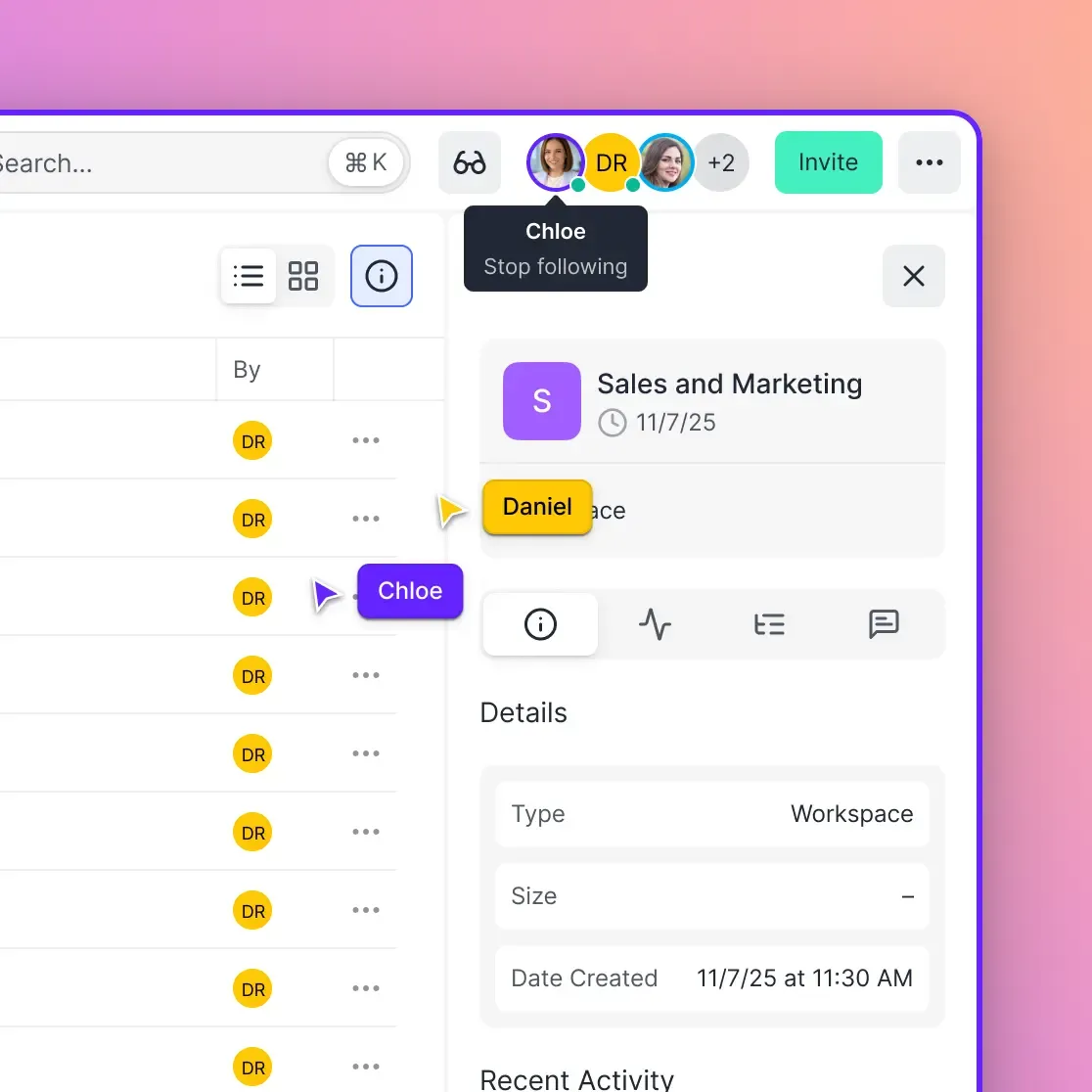
Neither Box nor Dropbox offers real-time presence awareness in file browsers. You can't see who's currently viewing a shared folder or what files teammates are looking at. This creates friction in review workflows where you need to coordinate on specific files.
Fast.io's workspace model includes multiplayer presence, showing exactly who's in a workspace and what they're viewing in real-time.
Who Should Use Box?
Box works best for:
Regulated industries: Healthcare, finance, and government organizations that need compliance certifications will find Box's HIPAA, FedRAMP, and SOC 2 compliance essential.
Large enterprises: Organizations with 500+ employees benefit from Box's admin controls, audit capabilities, and workflow automation. IT departments appreciate the centralized management.
Content management workflows: If your team treats files as managed assets with metadata, retention policies, and governance requirements, Box's content management features make sense.
Microsoft 365 environments: Box integrates tightly with Microsoft 365. If your organization standardized on Microsoft, Box provides a more enterprise-focused storage layer than OneDrive.
Box's limitations
- File upload size limits frustrate teams working with large media files
- Per-seat pricing gets expensive when sharing with external collaborators
- The interface prioritizes IT control over end-user experience
- Sync speed lags behind Dropbox for large file edits
Who Should Use Dropbox?
Dropbox works best for:
Creative teams: Video producers, designers, and photographers benefit from Dropbox's large file support, fast sync, and built-in media tools.
Cross-platform teams: If your team uses Mac, Windows, and Linux, Dropbox offers the most consistent experience across operating systems.
Fast-moving startups: Dropbox's simpler interface means less training and faster adoption. Users can share files without reading documentation.
Teams using many third-party tools: Dropbox's 500,000+ app integrations cover more use cases than Box's 1,500 enterprise integrations.
Dropbox's limitations
- Lower free storage (2 GB vs Box's 10 GB)
- Enterprise security features require expensive plans
- Per-seat pricing still adds up with external collaborators
- Video playback uses progressive download, not streaming
When Neither Box nor Dropbox Fits
Both platforms share common limitations that may push certain teams toward alternatives.
Large media files: Box caps uploads at 5-150 GB depending on plan. Dropbox handles up to 250 GB. Neither supports terabyte-scale individual files that video production workflows sometimes require.
Video review workflows: Both platforms use progressive download for video playback. You wait for buffering before watching. Teams doing frame-accurate video review need adaptive streaming with instant scrubbing.
Client delivery portals: Both offer basic link sharing, but neither provides branded portals with your logo and custom domain. Agencies and creative shops often need this professional presentation.
Scaling external access: If you have 20 internal users and 100 client reviewers, per-seat pricing means paying for 120 seats on either platform. That's $1,800-$3,000/month for cloud storage.
For these workflows, specialized platforms offer features the general-purpose cloud storage providers lack. Fast.io supports HLS video streaming, branded client portals, and usage-based pricing with unlimited guest access.
Frequently Asked Questions
Is Box better than Dropbox for business?
Box is better for large enterprises in regulated industries that need compliance certifications like HIPAA, SOC 2, and FedRAMP. Box's admin controls and audit capabilities appeal to IT departments. Dropbox is better for creative teams, startups, and organizations that prioritize fast file sync, built-in productivity tools, and a simpler user experience. The right choice depends on whether you need enterprise governance or user-friendly file sharing.
Why do companies use Box instead of Dropbox?
Companies choose Box for compliance certifications (HIPAA, FedRAMP, SOC 2), granular admin controls, detailed audit logs, and workflow automation. Box also offers unlimited storage on most business plans, which appeals to organizations with large file archives. IT departments appreciate Box's centralized management. Companies that prioritize end-user experience and fast sync typically prefer Dropbox.
What is the difference between Box and Dropbox?
Box focuses on enterprise content management with strong security features, compliance certifications, and admin controls. Dropbox focuses on file sync and sharing with faster sync speeds, built-in productivity tools (Paper, PDF Editor, Sign), and a simpler interface. Box offers more free storage (10 GB vs 2 GB) but has lower per-file upload limits. Dropbox syncs large file changes faster using block-level sync technology.
Can you use Box and Dropbox together?
Yes, many organizations use both. Some teams use Box for regulated documents requiring compliance tracking and Dropbox for everyday file sharing where speed matters more. Running both desktop apps simultaneously works but uses more system resources. Third-party tools like MultCloud can sync files between services if needed. Evaluate whether the complexity is worth the benefits for your workflow.
Is Box more secure than Dropbox?
Box offers more compliance certifications (HIPAA, SOC 1/2, FedRAMP, GxP) and more granular admin controls out of the box. Both use 256-bit AES encryption and offer SSO, MFA, and audit logs on business plans. For regulated industries requiring specific certifications, Box is the safer choice. For general business use, both provide adequate security. The difference is more about compliance documentation than underlying security.
Which is cheaper, Box or Dropbox?
At the entry level, both charge $15/user/month for business plans. Box Business includes unlimited storage while Dropbox Standard offers 5 TB per team. For individual use, Dropbox Plus ($11.99/month for 2 TB) offers more storage than Box Individual ($10/month for 100 GB). At enterprise scale with advanced features, pricing varies by negotiation. Per-seat costs add up similarly on both platforms when scaling to large teams.
Related Resources

Need better pricing and features?
Fast.io offers usage-based pricing, HLS video streaming, and branded portals without per-seat costs for external users.