5 Best No Signup File Sharing Services (2026 Review)
No signup file sharing services let you upload and share files instantly without creating an account, reducing friction for quick transfers. While convenient for one-off sends, many impose strict size limits or compromise on security. This guide reviews the top options for anonymous sharing and introduces professional alternatives for client work.

Why Choose No Signup File Sharing?
The biggest barrier to sharing files is friction. Research shows that requiring account creation causes roughly 40% of users to abandon a file transfer altogether. No signup services solve this by allowing immediate uploads without the hassle of email verification, password creation, or profile setup.
However, "no signup" actually comes in two distinct flavors that solve different problems:
Sender-focused: You (the sender) don't need an account to upload. Services like WeTransfer and Smash fall into this category. You visit the site, drag in your files, and get a link. Simple.
Recipient-focused: Your client (the receiver) doesn't need an account to download. This is the approach platforms like Fast.io take, where the sender has an account but recipients access files without any registration.
For casual personal use, sender-focused tools work fine. You're sending vacation photos to family or a quick document to a friend. Speed matters more than tracking or branding.
But for professional work, recipient-focused platforms are far more practical. They let you maintain control over your files, apply your company branding, and track when files get viewed or downloaded. Your clients get the "no signup" ease of access, while you retain the security and organization features you need for business.
The key question isn't just "can I share without signing up?" but rather "who should have the frictionless experience, and what do I need to track?"
Top No Signup File Sharing Services Reviewed
We tested the most popular anonymous file transfer tools based on upload speed, file size limits, security features, and overall reliability. Here's what we found after sending hundreds of test files across each platform.
1. Fast.io (Best for Professionals)
While Fast.io requires the sender to have an account, it offers the ultimate "no signup" experience for recipients. Unlike Dropbox or Google Drive, which often force clients to log in or create accounts just to download a file, Fast.io allows unlimited guest access to branded portals.
This distinction matters for agencies, freelancers, and businesses that send deliverables to clients regularly. Your client clicks the link, sees your branding, and downloads. No account creation, no confusion about which Google account to use, no "your storage is full" warnings interrupting the experience.
Best for: Agencies, video production teams, architects, and any business sending files to external clients.
Pros:
- Zero friction for clients: Recipients view and download without registering or signing in
- No file size limits: Send terabytes of data without breaking files into chunks
- Professional branding: Your logo, colors, and optionally your own domain instead of a generic transfer page
- Download tracking: See exactly when files are viewed, downloaded, or re-accessed
- Persistent storage: Files don't expire after 7 or 14 days like most free services
Cons:
- Sender needs a subscription (but gets professional features, usage-based pricing, and unlimited guest access in return)
- Not designed for anonymous sending since your account is tied to the upload
2. Smash (Best Free Unlimited)
Smash is a standout for personal use because it removes the file size cap that plagues most free tools. You can send files of any size without registering an account, which is rare in this space.
The catch is speed. Non-priority transfers can crawl when you're sending large files during peak hours. We tested a 4GB video file that took over two hours to upload during business hours, but completed in 25 minutes at 2am. If you're not in a rush, the unlimited size makes Smash hard to beat for free personal use.
Best for: Sending massive files personally without paying anything.
Pros:
- No file size limits: One of the few free tools with no cap
- Password protection: Available even on the free tier
- Simple interface: Clean design, no distracting ads on the upload page
- Preview support: Recipients can preview images and videos before downloading
Cons:
- Speed throttling: Free users get deprioritized, especially for files over 2GB
- File expiry: Files disappear after 14 days with no way to extend
- Limited tracking: Basic view counts but no detailed analytics
3. Wormhole (Best for Security)
Wormhole emphasizes end-to-end encryption and speed. It uses peer-to-peer (P2P) technology for instant streaming, meaning the recipient can start downloading before your upload even finishes.
The encryption happens in your browser before files ever leave your device. Wormhole can't see your content, which appeals to users sharing sensitive documents. The 10GB limit is generous for a free tool, and the 24-hour expiry forces good security hygiene.
Best for: Secure, quick transfers of medium-sized files when privacy matters.
Pros:
- End-to-end encryption: Files are encrypted before leaving your browser
- Instant streaming: Share the link immediately while still uploading
- 10GB limit: Generous for a free, no-signup tool
- No server storage: P2P means files don't sit on Wormhole's servers
Cons:
- Link expiry: Files deleted after 24 hours or after a set number of downloads
- Browser dependency: Closing your browser tab can interrupt P2P transfers before completion
- No branding or customization: Links look generic
4. WeTransfer (Most Popular)
WeTransfer is the household name in anonymous file sharing. It's reliable, widely trusted, and has been around long enough that most people recognize a WeTransfer link when they see one. That familiarity can help when sending files to less tech-savvy recipients.
The free tier is more restrictive than newer competitors, though. A 2GB limit feels outdated when a single iPhone video can hit 500MB. The full-background ads on free transfer pages also detract from professionalism.
Best for: Quick transfers where brand recognition and recipient trust matter.
Pros:
- Familiarity: Clients trust WeTransfer links because they've seen them before
- Reliability: Solid infrastructure with consistent uptime
- No account needed: True anonymous sending
- Email notifications: Option to get notified when files are downloaded
Cons:
- 2GB limit: Strict cap that hasn't kept pace with modern file sizes
- Ads: Free pages feature full-background advertisements
- 7-day expiry: Files disappear quickly
5. ToffeeShare (Best for Privacy)
ToffeeShare takes "no cloud" literally. It's a direct P2P transfer tool where your file is never stored on a server. Data streams directly from your device to the recipient's device, with nothing in between.
This approach offers maximum privacy but requires both parties to be online simultaneously. You cannot share a link and walk away. If you close your browser or lose internet, the transfer fails. For users with fast, stable upload connections who need absolute privacy, ToffeeShare is ideal.
Best for: Privacy-conscious users with good bandwidth who can stay online during transfer.
Pros:
- Zero server storage: Files never touch a third-party server
- Unlimited size: Only limited by your disk space and patience
- Encrypted connection: Direct P2P stream is secure
- No signup, no tracking: Complete anonymity
Cons:
- Must stay online: You cannot close the browser tab until the transfer completes
- Speed depends on you: Limited entirely by your upload bandwidth
- Both parties must be online: Recipient must download while you're still sharing
The Hidden Risks of No Signup Tools
While convenient, free no-signup tools come with trade-offs that can cause serious problems for businesses. Understanding these risks helps you decide when free tools are appropriate and when you need something more robust.
Security Vulnerabilities
Most free services don't offer audit logs. If you share a link and that link gets forwarded, posted publicly, or leaked through a compromised email account, anyone can download your files. You'll have no record of who accessed what, and no way to revoke access after the fact.
Professional tools solve this with password protection, link expiration controls, and detailed access logs showing exactly who viewed or downloaded each file. Some platforms even offer domain restrictions, so only recipients with email addresses from approved companies can access your content.
Lack of Reliability
"No signup" often translates to "no support." When a 50GB upload fails at 99% completion, there's no one to call. Free services don't offer the infrastructure guarantees that businesses need for mission-critical files.
We've seen designers lose hours re-uploading project files because a free service dropped the connection. When you're racing a deadline, that reliability gap becomes expensive.
Unprofessional Appearance
Sending a client to a download page covered in third-party ads, animated backgrounds, or generic branding diminishes your professional image. It signals that file delivery was an afterthought rather than part of your polished workflow.
Compare that to a branded portal with your logo where the client simply clicks "Download" on a clean, professional page. The difference in perception is significant, especially when you're billing premium rates.
File Expiration Headaches
Most free services delete files after 7-14 days. If a client needs to re-download something three weeks later, that link is dead. You're stuck re-uploading, assuming you still have the files locally.
Persistent storage isn't just convenient. It's a business necessity when clients expect access to deliverables months after a project ends.

When to Upgrade to a Professional Solution
If you're a freelancer, agency, or business, relying on free no-signup tools is a temporary workaround that becomes increasingly painful as your workload grows. Here are the signals that indicate it's time to upgrade:
You send files weekly or more often
Constantly uploading to disposable links wastes time. Each transfer requires navigating to the site, waiting for upload, copying the link, and pasting it into an email or message. Multiply that by dozens of files per week and the friction adds up.
Professional platforms let you upload once to a persistent workspace. Share the folder with clients and they access current files anytime. When you add new deliverables, clients see them automatically. No new links, no re-uploading.
File sizes regularly exceed 2GB
The moment you work with video, high-resolution images, CAD files, or any professional media, the 2GB caps on most free tools become a constant obstacle. Breaking files into chunks, uploading each separately, and explaining to clients how to reassemble them is unprofessional and error-prone.
Tools like Fast.io handle terabyte-scale transfers without splitting files. Upload the original, share the link, done.
Client experience affects your reputation
When clients see a polished, branded download portal instead of an ad-covered free service, it reinforces your professionalism. First impressions extend beyond your initial pitch deck. They include every touchpoint, including how you deliver the final work.
You need to know if files were accessed
Free tools rarely tell you whether a client actually downloaded the files you sent. You're left wondering if they received it, if they opened it, or if it went to spam. Download tracking removes the guesswork and provides documentation if disputes arise.
Multiple team members send files
When it's just you, scattered links are manageable. Once you have a team, the chaos multiplies. Different team members use different services, file names become inconsistent, and tracking down "which link did we send the client?" becomes a recurring headache.
Centralized platforms give everyone access to the same organized workspaces, making handoffs between team members smooth and searchable.
How Fast.io Combines Ease with Control
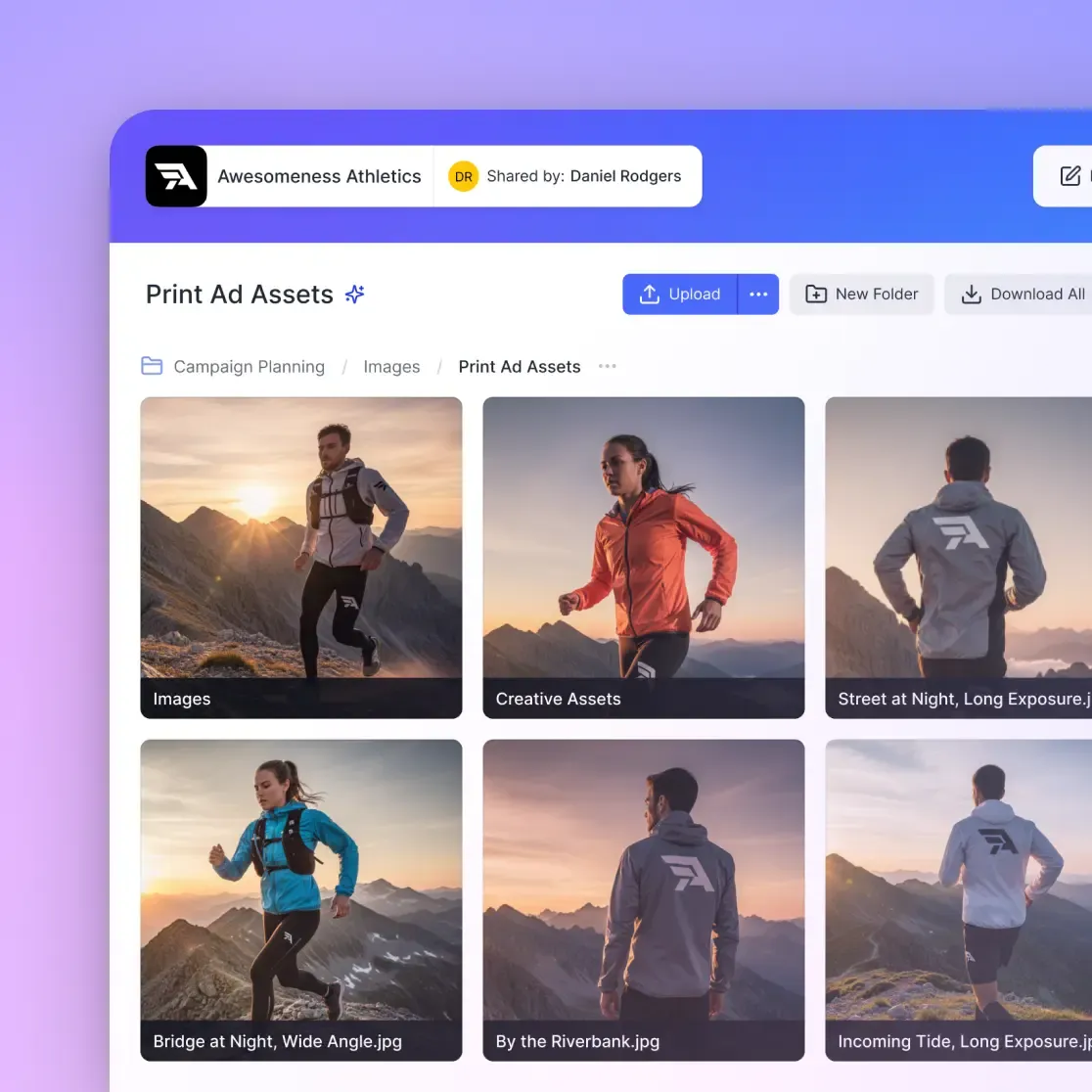
Fast.io takes a different approach than traditional no-signup services. Instead of eliminating accounts entirely, it gives the sender professional control while keeping the recipient experience completely frictionless.
Here's how that plays out in practice:
Unlimited Guest Access
External clients access your shared files without creating accounts, signing in, or being charged against your plan. They click the link, see your branded portal, and download. The "no signup" experience is preserved for the people who actually need it: your clients.
Branded Portals Replace Generic Links
Instead of sending clients to a third-party site with someone else's logo, you create portals with your own branding. Custom logo, custom colors, and optionally your own domain. Clients experience your brand, not a file sharing vendor's.
Persistent Workspaces vs. Expiring Links
Files don't disappear after 14 days. You organize deliverables in workspaces that persist indefinitely. When a client needs to re-download something six months later, the link still works. This eliminates the constant re-uploading cycle that plagues free tools.
Usage-Based Pricing, Not Per-Seat
Most enterprise file sharing tools charge per user, which becomes expensive when you invite clients to access files. Fast.io uses usage-based pricing, so external guests don't count against your bill. Invite unlimited clients without worrying about seat costs.
Activity Tracking and Audit Logs
See exactly when files are viewed, by whom, and whether they were downloaded. This information is valuable for both business operations (knowing when a client reviewed the proposal) and security (having documentation if access questions arise).
For teams that need both the convenience of no-signup access and the control of professional software, this hybrid approach delivers both. Recipients get the effortless experience of a free tool. Senders get the features needed to run a real business.
Choosing the Right Tool for Your Situation
The best file sharing tool depends on your specific situation. Here's a practical framework for choosing:
Use Smash or WeTransfer when:
- You're sending a one-off file to a friend or family member
- File size is under 2GB (WeTransfer) or you have patience for slow uploads (Smash)
- You don't care about tracking whether the file was accessed
- The recipient is tech-savvy and won't be confused by the generic interface
- Professional appearance doesn't matter for this transfer
Use Wormhole or ToffeeShare when:
- Privacy is the top priority and you trust no one with your files
- Both you and the recipient are online at the same time
- You have a fast, stable internet connection
- File size is under 10GB (Wormhole) or you have hours to wait (ToffeeShare)
- You understand the trade-offs of P2P transfer (must stay online)
Use Fast.io or similar professional tools when:
- You send files to clients regularly as part of your business
- File sizes exceed 2GB or you work with video, CAD, or high-resolution images
- Professional branding matters for your client relationships
- You need to track whether files were downloaded and by whom
- Multiple team members need access to the same organized file structure
- Clients may need to re-access files weeks or months after initial delivery
The mistake most professionals make is using free personal tools for business purposes because they're familiar. That works until file sizes grow, client expectations increase, or you need documentation of what was delivered when. Planning ahead for professional needs saves the painful transition later.
No-signup file sharing has a place in everyone's toolkit. For quick personal transfers, free tools remain excellent. For business use, the "no signup" benefit should flow to clients, not force compromises on the sender's control and professionalism.
Frequently Asked Questions
How can I share files without signing up?
Services like Smash, Wormhole, and WeTransfer let you upload files through your browser and generate a shareable link without creating an account. You visit the site, drag in your files, copy the generated link, and send it to your recipient. The process takes under a minute for most file sizes.
Is no signup file sharing safe?
It depends on the service. Reputable tools like Wormhole use end-to-end encryption where files are encrypted before leaving your browser. However, because there's no account, you typically lose control over the link once sent. For sensitive business data, use a platform with password protection, link expiration controls, and audit logs that track who accessed what.
What is the best anonymous file sharing site?
For pure anonymity and privacy, ToffeeShare is excellent because it uses direct peer-to-peer transfer without storing files on any server. For general ease of use with large files, Smash offers unlimited file sizes on its free tier. For business use where clients need anonymous access but you need control, Fast.io provides branded portals with no recipient signup required.
What are the file size limits for no signup sharing?
Limits vary significantly by service. WeTransfer caps free users at 2GB per transfer. Smash and ToffeeShare have no size limits but speed depends on your connection. Wormhole allows up to 10GB. Most free services impose some restriction, either on size, speed, or expiration time.
How long do shared files stay available?
Most free services delete files within 7-14 days. WeTransfer keeps files for 7 days. Smash allows 14 days. ToffeeShare and Wormhole delete files as soon as the transfer completes or within 24 hours. Professional services like Fast.io provide persistent storage where files remain available indefinitely until you choose to delete them.
Related Resources

Professional file sharing made simple
Give clients a no-signup download experience with your branded portal. Start your free trial today, no credit card required.