Best pCloud Alternatives for Business Teams
pCloud's lifetime storage plans and Swiss privacy appeal to personal users, but businesses hit walls quickly. No real team workspaces, limited collaboration features, and consumer-focused design leave professional teams looking elsewhere. This guide compares pCloud alternatives built for teams who share files with clients and colleagues.

Why Business Teams Look for pCloud Alternatives
pCloud built its reputation on two things: lifetime storage plans and Swiss data privacy. Pay once, store forever. For individuals backing up photos or personal documents, it works well.
But pCloud's architecture reveals its consumer DNA when teams try to use it:
Files belong to personal accounts. There's no organization-level ownership. When someone leaves your company, their pCloud files go with them. You're stuck asking departing employees to transfer files manually before they walk out the door.
Team features are an afterthought. pCloud Business exists, but it layers team functionality onto a personal storage product. There's no real-time presence, no shared workspaces you can browse and join, no multiplayer collaboration.
Client delivery is basic. You can share links, but there's no branded portals, no download tracking that shows engagement, no deal room functionality for sensitive projects.
Lifetime plans have sustainability questions. Business teams need vendors who will exist for the long term. Lifetime pricing models raise reasonable questions about long-term viability when ongoing revenue doesn't scale with customer growth.
If you're running a creative agency, managing projects with external clients, or need professional file sharing, pCloud's personal-first design becomes a constraint.
What Makes a Good pCloud Alternative for Business
Before comparing specific platforms, here's what distinguishes business file sharing from personal cloud storage:
Organization-Owned Files
Files should belong to your company, not individual employee accounts. When someone leaves, their work stays. This sounds obvious, but most consumer cloud storage fails here.
Shared Workspaces, Not Folders
Teams need spaces they can discover, join, and collaborate in. Folder hierarchies buried in personal accounts create silos. Shared workspaces create visibility.
Client-Facing Delivery
If you send files to clients, you need more than links. Branded portals show professionalism. Download tracking confirms receipt. Expiration controls protect sensitive content.
Predictable Pricing
Per-seat pricing punishes growth. Adding team members shouldn't require budget approvals. Usage-based models let costs scale with actual storage and transfer needs.
Media Handling
Video files shouldn't require downloads for preview. Professional teams working with creative assets need instant streaming, not progressive download buffering.
7 Best pCloud Alternatives for Business Teams
Here's how the main alternatives compare for professional use:
| Platform | Best For | Pricing Model | Team Features | Client Delivery |
|---|---|---|---|---|
| Fast.io | Teams & client sharing | Usage-based | Real-time collaboration | Branded portals, tracking |
| Dropbox Business | Familiar workflows | Per-seat ($18+/user) | Basic team folders | Link sharing |
| Google Drive | Google Workspace users | Per-seat | Shared drives | Basic links |
| Sync.com | Privacy-focused teams | Per-seat | Zero-knowledge encryption | Basic sharing |
| OneDrive | Microsoft 365 shops | Per-seat | SharePoint integration | Basic links |
| Box | Enterprise compliance | Per-seat ($20+/user) | Strong admin controls | Good analytics |
| Nextcloud | Self-hosted control | Self-hosted | Full customization | Configurable |
Fast.io
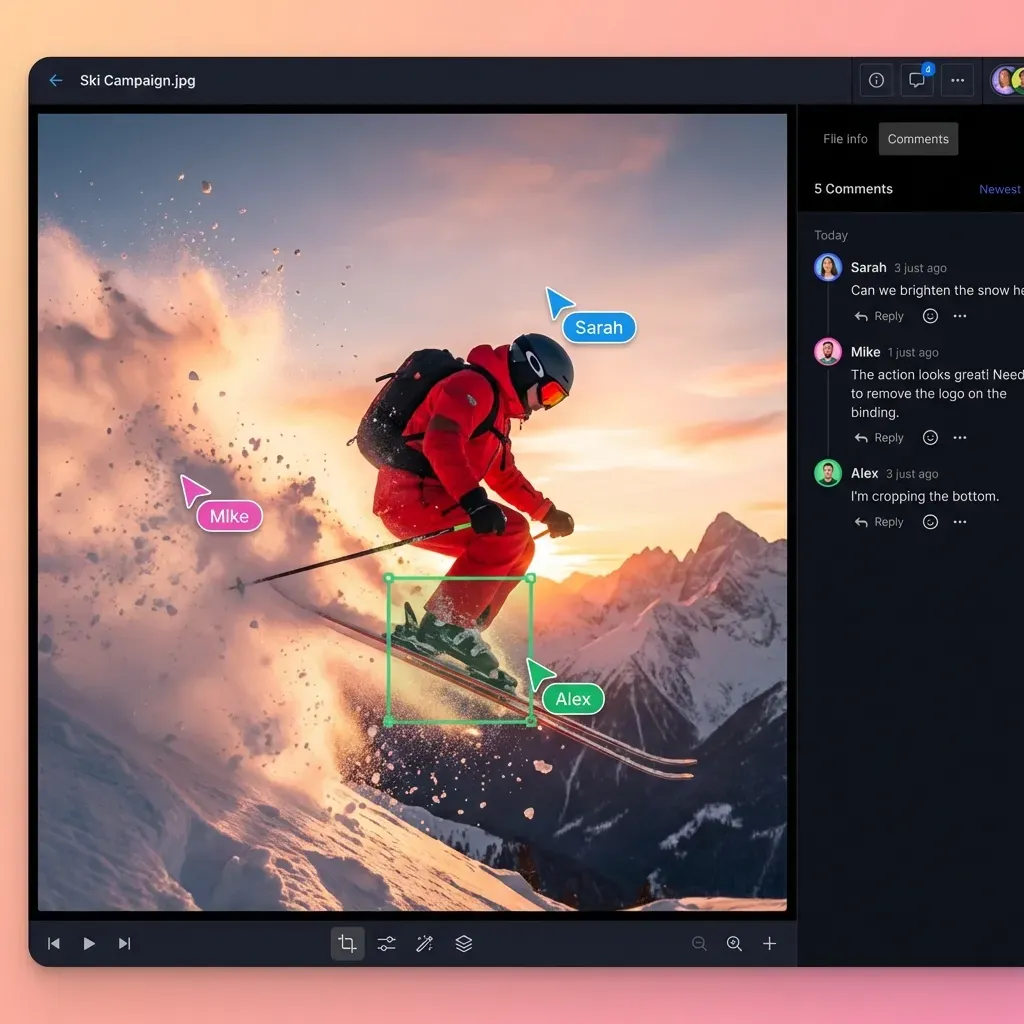
Fast.io takes a different approach than pCloud. Instead of retrofitting team features onto personal storage, it starts with organization-owned workspaces. Files belong to your company from day one.
Key advantages over pCloud:
- Real-time collaboration: See who's in a workspace, follow their view, comment on specific regions of files
- Branded client portals: White-label delivery with your logo, colors, and custom domain
- HLS video streaming: Clients watch video instantly without downloading multi-gigabyte files
- Usage-based pricing: No per-seat fees. A 25-person team can save 70% versus Dropbox or Box
Teams that share files with external clients regularly get a lot more here than from consumer cloud storage.
Dropbox Business
Everyone knows Dropbox. The sync model works reliably for keeping files updated across devices. But Dropbox was built for individuals first, and it shows. Per-user pricing at $18+ per seat adds up fast. Sync conflicts happen when multiple people edit simultaneously.
Best for: Teams already using Dropbox who don't want to retrain users.
Google Drive (Workspace)
If your company runs on Google Workspace, Drive makes sense. The 15GB personal tier is generous. Shared Drives add team ownership. But "My Drive" chaos remains a problem, and there's no client-facing delivery experience beyond basic links.
Best for: Companies already paying for Google Workspace who prioritize document collaboration over file delivery.
Sync.com
Sync.com markets zero-knowledge encryption where even Sync can't read your files. For privacy-focused teams, this matters. But the interface feels dated, there's no real-time collaboration, and client delivery features are minimal.
Best for: Teams where encryption and privacy trump collaboration features.
OneDrive (Microsoft 365)
Microsoft's cloud storage ties into the Office ecosystem. If your team lives in Word, Excel, and Outlook, OneDrive integrates well. But SharePoint complexity lurks underneath. Per-seat pricing applies, and there's no differentiated client delivery.
Best for: Companies embedded in Microsoft 365 who want tight Office integration.
Box
Box targets enterprises with strong admin controls, detailed activity logs, and compliance features. The $20+/user/month pricing reflects that positioning. For small-to-medium teams, it's often overkill and overpriced.
Best for: Large enterprises with specific compliance requirements and budget to match.
Nextcloud
Self-hosted and open source. You control everything, running it on your own servers. But you're responsible for hosting, security patches, scaling, and maintenance. Most teams don't have the technical resources to run infrastructure.
Best for: Organizations with strong technical teams who need complete data control.
pCloud vs Fast.io: Direct Comparison
Here's how pCloud and Fast.io compare for common business scenarios:
| Feature | pCloud | Fast.io |
|---|---|---|
| File ownership | Personal accounts | Organization-owned |
| Team workspaces | Basic folders | Shared, discoverable workspaces |
| Real-time presence | No | Yes, see who's viewing |
| Video playback | Progressive download | HLS adaptive streaming |
| Branded portals | No | Yes, custom logo/colors/domain |
| Download tracking | Basic counts | Engagement analytics |
| Pricing model | Lifetime or subscription | Usage-based credits |
| Data location | Switzerland | Cloud infrastructure |
| Encryption | At rest, optional E2E | At rest and in transit |
| SSO/SAML | Business plans | Yes |
When pCloud Makes Sense
pCloud works well for:
- Individual users backing up personal files
- Privacy-conscious users who want Swiss jurisdiction and optional client-side encryption
- Budget-conscious individuals who prefer one-time payment over subscriptions
- Personal file sync across devices without team collaboration needs
When Fast.io Fits Better
Fast.io targets teams that:
- Share large files with clients regularly
- Need branded, professional delivery experiences
- Want organization-owned files that don't leave with employees
- Work with video and need instant streaming playback
- Prefer usage-based pricing over per-seat fees
Is pCloud Good for Business?
pCloud offers a Business plan, but it's a consumer product with business features bolted on.
The good parts:
- Swiss data jurisdiction appeals to privacy-conscious organizations
- Lifetime plans exist for business, reducing long-term costs
- pCloud Crypto adds client-side encryption for sensitive files
- Basic team folder sharing works for simple use cases
The limitations:
- No organization-first architecture: Files still feel tied to individual accounts
- Limited collaboration: No real-time presence, no follow mode, basic commenting
- Consumer interface: The UI wasn't designed for professional workflows
- Basic client sharing: No branded portals, minimal delivery tracking
- pCloud Crypto costs extra: End-to-end encryption is a paid add-on, even on business plans
pCloud Business can work for small teams with simple needs. But teams that share files with external clients or need real-time collaboration typically outgrow it quickly.
Is pCloud Lifetime Worth It?
pCloud's lifetime plans are what set them apart. Pay once for 500GB, 2TB, or 10TB and use it forever. No recurring fees. For personal use, the math often works out.
The appeal:
A 2TB lifetime plan costs around $400. That's roughly 3-4 years of comparable subscription services. If pCloud stays in business and you use the storage for 5+ years, you come out ahead.
The concerns:
Lifetime pricing models have killed companies before. When revenue doesn't grow with the customer base, long-term sustainability gets shaky. pCloud has been around since 2013, which helps. But business teams should weigh vendor risk alongside pricing.
For business use specifically:
Lifetime plans are per-user, not per-organization. In a business context, you're still buying individual lifetime accounts and hoping employees stay forever. The organizational complexity doesn't match how businesses actually work.
If you're an individual user planning to use pCloud for years, lifetime plans can make financial sense. For business teams, the lack of proper team architecture matters more than pricing model.

How to Migrate from pCloud
Moving from pCloud to a new platform takes planning. Here's a practical approach:
1. Audit Your Current Setup
Document what you're actually using in pCloud. Check storage usage, identify shared folders, note any pCloud Crypto encrypted files that need special handling during export.
2. Export Your Files
pCloud's desktop app syncs files locally. Enable sync for everything you need to migrate, then copy files to your new platform. For large accounts, plan for this to take days, not hours.
3. Set Up Workspace Structure
Before uploading to your new platform, plan your organization. Fast.io uses shared workspaces rather than personal folders. Design the structure before importing files.
4. Update Shared Links
Any pCloud links you've shared will continue working, but you'll want to transition important shares to your new platform. Identify active shared folders and recreate them.
5. Handle pCloud Crypto Files
If you use pCloud Crypto, decrypt files before migration. The encryption is specific to pCloud and won't transfer to other platforms. Re-encrypt using your new platform's security features.
6. Run Parallel for a Month
Keep pCloud active while you verify everything migrated correctly. This catches missed files and gives collaborators time to update bookmarks.
Frequently Asked Questions
Is pCloud good for business?
pCloud Business exists but remains a consumer product with business features added. It works for small teams with simple needs, but lacks organization-first file ownership, real-time collaboration, and professional client delivery features. Teams sharing files with external clients typically need more.
What is better than pCloud?
For personal use, pCloud competes well on privacy and lifetime pricing. For business teams, alternatives like Fast.io, Dropbox Business, and Box offer team-centric architecture, organization-owned files, real-time collaboration, and professional client delivery features that pCloud lacks.
Is pCloud lifetime worth it?
For personal use, pCloud lifetime plans can save money over 4-5 years compared to subscriptions. For business use, the per-user lifetime model doesn't match how organizations work, and questions about long-term vendor sustainability are worth considering.
Is pCloud safe for sensitive files?
pCloud uses encryption at rest and offers optional client-side encryption through pCloud Crypto. Swiss data jurisdiction adds privacy protection. However, pCloud Crypto is a paid add-on even on business plans. For business use, evaluate whether you need additional features like SSO, audit logs, and granular permissions that come standard with enterprise alternatives.
Why is pCloud so cheap?
pCloud is based in Switzerland with lower operating costs than US-based competitors. Their lifetime pricing model front-loads revenue, which helps with cash flow. The trade-off is that features lean toward consumer use cases rather than business-grade collaboration and delivery.
Related Resources

Need cloud storage built for teams?
Fast.io gives you organization-owned workspaces, branded client portals, and usage-based pricing. Stop paying per seat.