How to Set Up Photo Proofing for Client Feedback
Photo proofing is the process of presenting images to clients for review, selection, and approval before final delivery or print production. This guide covers how to set up proofing galleries that reduce back-and-forth communication, speed up approvals, and keep all feedback organized in one place.
What Is Photo Proofing?
Photo proofing is the process of presenting images to clients for review, selection, and approval before final delivery or print production. The term originated in print photography, where photographers would send contact sheets or test prints for clients to mark up before committing to expensive final prints.
Today, photo proofing happens almost entirely online. Photographers, retouchers, and creative teams share digital galleries where clients can view images, leave comments, mark favorites, and approve final selections.
The goal is simple: get client decisions faster while keeping all feedback in one place. Without a proofing system, you end up with scattered email threads, vague descriptions like "the third photo from yesterday," and multiple rounds of unnecessary revisions.
The 4-Step Photo Proofing Process
Whether you're a wedding photographer, product retoucher, or in-house creative team, the proofing workflow follows the same pattern:
1. Upload and organize images Group photos by category, shoot date, or project phase. Clear organization helps clients navigate large galleries without getting overwhelmed. Most proofing tools let you create albums or folders within a single gallery.
2. Set viewing and selection permissions Decide what clients can do: view only, mark favorites, download, or leave comments. Some projects need tight control (select up to 50 images from 500), while others benefit from open collaboration (comment on anything, no limits).
3. Share the gallery link Send clients a direct link to the proofing gallery. The best tools require no client login, which removes friction and speeds up response times. Password protection adds security for sensitive shoots.
4. Collect feedback and finalize selections Clients mark their picks, leave comments on specific images, and submit their final selections. You receive notifications, review the feedback, and move to delivery or retouching.
Professional proofing galleries reduce revision rounds by around 50% compared to email-based workflows because feedback is specific, visual, and organized.
Why Email-Based Proofing Fails
Most photographers start with email. It seems simple: attach a few images, ask for feedback, wait for a response. But email breaks down quickly for anything beyond a handful of photos.
Vague references waste time. "I like the one where she's smiling" doesn't help when 40 photos match that description. Without visual markup, you're left guessing which image the client means.
Attachment limits create friction. Email services cap attachments at 25MB or less. Large image files mean multiple emails, confusing threads, and lost context.
Version chaos multiplies. When clients reply with edits, and you send revised images, the thread becomes a graveyard of outdated files. Neither side knows which version is current.
No selection tracking. You can't see which images a client has viewed, which they've considered, or how close they are to a decision. You're flying blind.
Photographers report spending 30% of their project time on client communication. Much of that time goes to clarifying feedback that should have been clear from the start.
What to Look for in Photo Proofing Software
Photo proofing tools range from basic gallery builders to full collaboration platforms. The right choice depends on your volume, client expectations, and workflow complexity.
No-login access for clients. Every login requirement adds friction. Clients abandon galleries they can't access immediately. The best tools let clients view and select without creating an account.
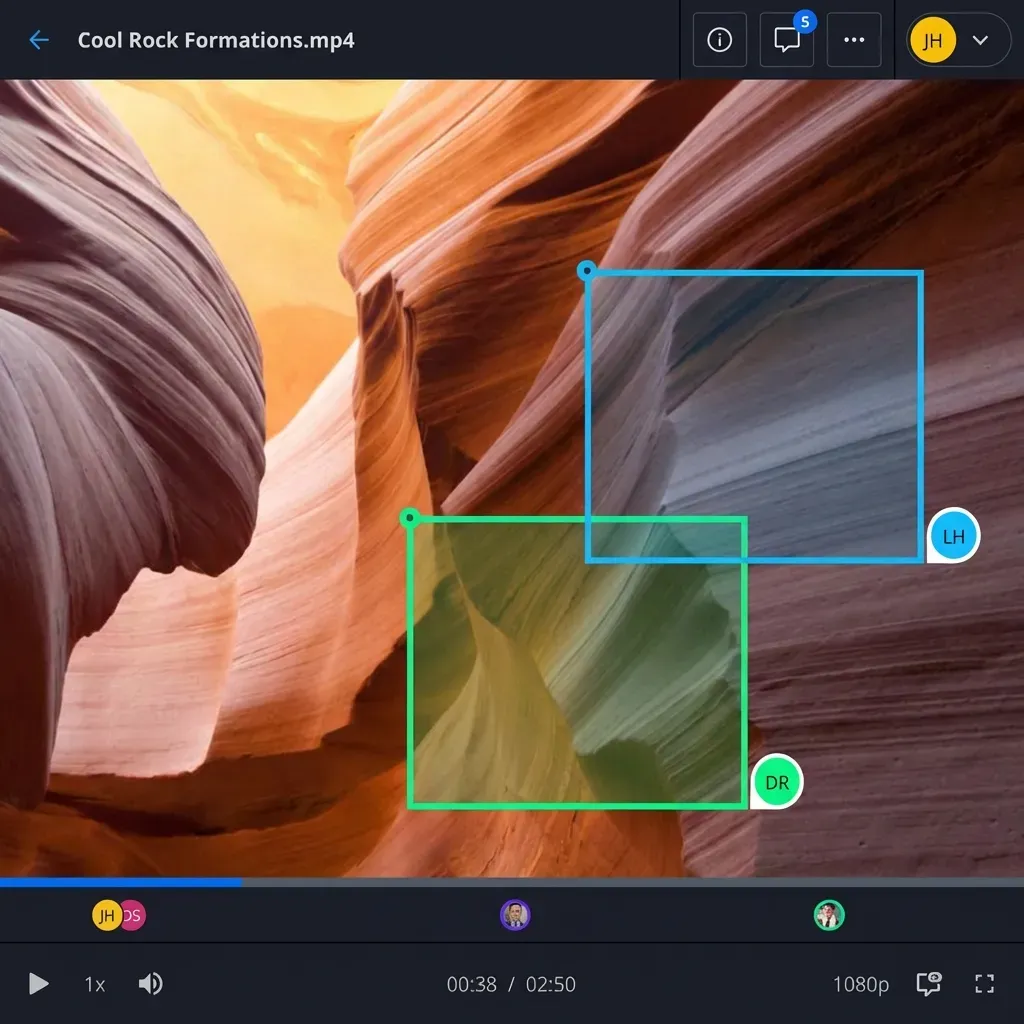
Visual feedback tools. Clients should mark favorites, add star ratings, and leave comments directly on images. Pin-pointed annotations ("fix this shadow") beat paragraph descriptions.
Selection limits and controls. For packages with limited deliverables, set selection caps so clients pick their true favorites instead of marking everything.
Real-time notifications. Know when clients view the gallery, make selections, or leave comments. This helps you follow up at the right time.
Download controls. Prevent unauthorized downloads of high-resolution files before final payment or approval.
Branding options. Client-facing galleries should reflect your brand, not the software's. Custom logos, colors, and domains create a professional impression.
Setting Up a Photo Proofing Gallery in Fast.io
Fast.io's workspace model works well for photo proofing because it treats image review as a collaboration workflow rather than a one-way delivery.
Create a client workspace Set up a workspace for each client or project. Upload your images in organized folders. The system generates previews automatically, so clients don't need any software to view professional formats.
Invite clients without seat costs Share the workspace link with clients. They get full viewing and commenting access without creating an account or consuming a paid seat. This matters when you're working with dozens of clients.
Enable contextual comments Clients click anywhere on an image to leave feedback. Comments thread by image, so you see all feedback in context without scrolling through emails.
Track viewing activity See who's viewed the gallery, which images they've spent time on, and when they last visited. This helps you know when to follow up or if a client is stuck on a decision.
Control downloads Set galleries to view-only until final approval. Once the client confirms selections, enable downloads for approved images only.
For repeat clients, workspaces persist between projects. You can archive old shoots and start new folders without recreating the sharing setup.

Photo Proofing for Different Industries
While wedding and portrait photographers pioneered online proofing, the workflow now extends across any industry that needs client approval on visual assets.
E-commerce and Product Photography
Product shoots generate hundreds of images per session. Proofing galleries help marketing teams select hero shots, identify retouching needs, and approve images for different channels (web, print, social). Selection limits keep teams focused on the best options.
Real Estate Photography
Agents and property managers need fast turnarounds. Proofing galleries let them quickly approve listing photos, request twilight re-edits, or mark images for virtual staging. The key is speed: most agents want to review and approve within hours, not days.
Advertising and Campaigns
Agency teams, brand managers, and legal reviewers all need to weigh in on campaign imagery. Proofing galleries centralize feedback from multiple stakeholders. Version history matters here because campaigns often go through several approval rounds.
School and Event Photography
High-volume shoots (sports teams, school portraits, conferences) require efficient selection workflows. Parents or attendees browse, select, and order without overwhelming the photographer's inbox.
Post-Production and Retouching
Retouching teams use proofing galleries for before/after comparisons. Clients approve edits or request changes directly on the image, eliminating confusion about which version needs adjustment.
Tips for Faster Client Approvals
A good proofing tool is only half the equation. How you structure the review matters just as much.
Pre-select your recommendations. Don't dump 500 raw images on a client. Cull first, then highlight your top picks. Clients appreciate guidance, and 85% prefer visual selection over text descriptions.
Set clear deadlines. Open-ended galleries get ignored. Give clients a specific review window: "Please make your selections by Friday." Deadlines create urgency.
Limit choices when appropriate. If a package includes 50 delivered images, set a selection cap. This forces clients to make real decisions instead of marking everything as a favorite.
Use folders strategically. Group images by scene, outfit, or location. Smaller, focused sets are easier to review than one massive gallery.
Follow up based on activity. If analytics show a client viewed the gallery but didn't select anything, a gentle check-in often unlocks the decision. Maybe they have questions or need more context.
Offer a call for complex projects. For high-value shoots, a 15-minute screen share while walking through the gallery can close decisions faster than days of async back-and-forth.
Frequently Asked Questions
What is photo proofing?
Photo proofing is the process of presenting images to clients for review, selection, and approval before final delivery or print production. Clients view images in an online gallery, mark their favorites, leave feedback, and submit their selections. The photographer or creative team then delivers only the approved images.
How do I proof photos for clients?
Upload images to an online proofing gallery and share the link with your client. Set permissions for viewing, selecting, and downloading. Clients review the gallery, mark their picks, and leave comments directly on images. You receive their selections and feedback in one organized place, then move to delivery or retouching.
What is the best photo proofing software?
The best photo proofing software depends on your needs. Photographers often use tools like Picdrop, Zenfolio, or Pic-Time. Creative teams and agencies benefit from platforms like Fast.io or ReviewStudio that offer real-time collaboration, contextual commenting, and branded client portals. Look for no-login client access, visual markup tools, and download controls.
How long should I give clients to review a proofing gallery?
For most projects, 5-7 days gives clients enough time to review without losing momentum. Shorter windows (2-3 days) work for time-sensitive projects like real estate or events. Set a clear deadline when sharing the gallery and follow up if clients haven't engaged by the midpoint.
Can clients download images from a proofing gallery?
Most proofing tools let you control downloads. You can set galleries to view-only during the selection phase, then enable downloads after approval and payment. Some tools add watermarks to proof images or restrict downloads to low-resolution versions until final delivery.
Related Resources

Ready to simplify your photo proofing?
Set up client galleries with comments, selections, and download controls. No client logins required.