7 Best SmugMug Alternatives for Photographers & Videographers (2026)
SmugMug works well for selling prints and displaying portfolios, but it struggles with large RAW files, video content, and client review workflows. Photographers and videographers who need to move serious amounts of data are looking for alternatives with faster transfers and better collaboration tools.

Why Photographers Are Leaving SmugMug
SmugMug built its reputation as a portfolio builder and print sales platform. It works great for displaying JPEG images to retail clients who want to buy a canvas print of their family portrait. But the industry has shifted. Today's creative professionals deliver massive amounts of data: RAW files, 4K video, and project files that SmugMug wasn't built to handle.
The main frustration for many users is weak video support and limited large file transfer options. SmugMug caps file sizes and video duration. If you're a hybrid shooter or video production team, that's a problem. Need to deliver a 200GB folder of dailies to an editor or send uncompressed RAWs to a retoucher? SmugMug gets in the way instead of helping.
Cost adds up too. SmugMug's pricing tiers get expensive, especially once you need features like client downloads or custom branding. Many photographers end up paying for a "Pro" plan just to get functionality that other services include by default. The interface can also feel cluttered and dated compared to newer platforms.

What to Look for in a SmugMug Alternative
Before you start comparing platforms, figure out what's actually slowing you down. Do you need a better website builder, or a better way to deliver work? Most alternatives focus on one or the other.
For delivery and workflow, prioritize transfer speed and file support. A good alternative should handle any file type you throw at it: ARW, CR3, ProRes, DNxHD. No choking, no forcing you to convert everything to JPEG first. It should also offer custom branding so your delivery portal looks like your business, not a generic file folder.
For sales and proofing, look for commission rates and lab integrations. If your business relies on selling 8x10 prints directly to consumers, you need a platform that automates fulfillment. But if your business is commercial (licensing images to brands) or service-based (shooting weddings for a flat fee), you probably don't need print lab integration at all. You need a secure, fast, professional way to hand over the assets.
1. Fast.io: The Best SmugMug Alternative for Delivery
Fast.io takes a different approach than traditional gallery sites. Instead of focusing on print sales, it focuses on moving and reviewing media assets. For commercial photographers, videographers, and agencies, this fills the gap SmugMug leaves open.
Why it's fast: Fast.io streams files on demand with no syncing engine slowing down your computer. Uploads use your full bandwidth, so you can share hundreds of gigabytes with a client right away.
Universal Media Engine: SmugMug is mostly limited to images and short clips. Fast.io previews almost anything: high-bitrate video, RAW photos, even PDFs. Clients can review the actual assets they're paying for, not just low-res proxies.
Brand Control: You can create fully branded portals with your logo, colors, and custom domain. When a client opens a link, they see your brand.
Video First: Video gets proper support here. Frame-accurate commenting and HLS streaming (the same tech Netflix uses) mean you can use Fast.io for video reviews and approvals. This solves a real problem for hybrid shooters who used to juggle SmugMug for photos and Vimeo or Frame.io for video.
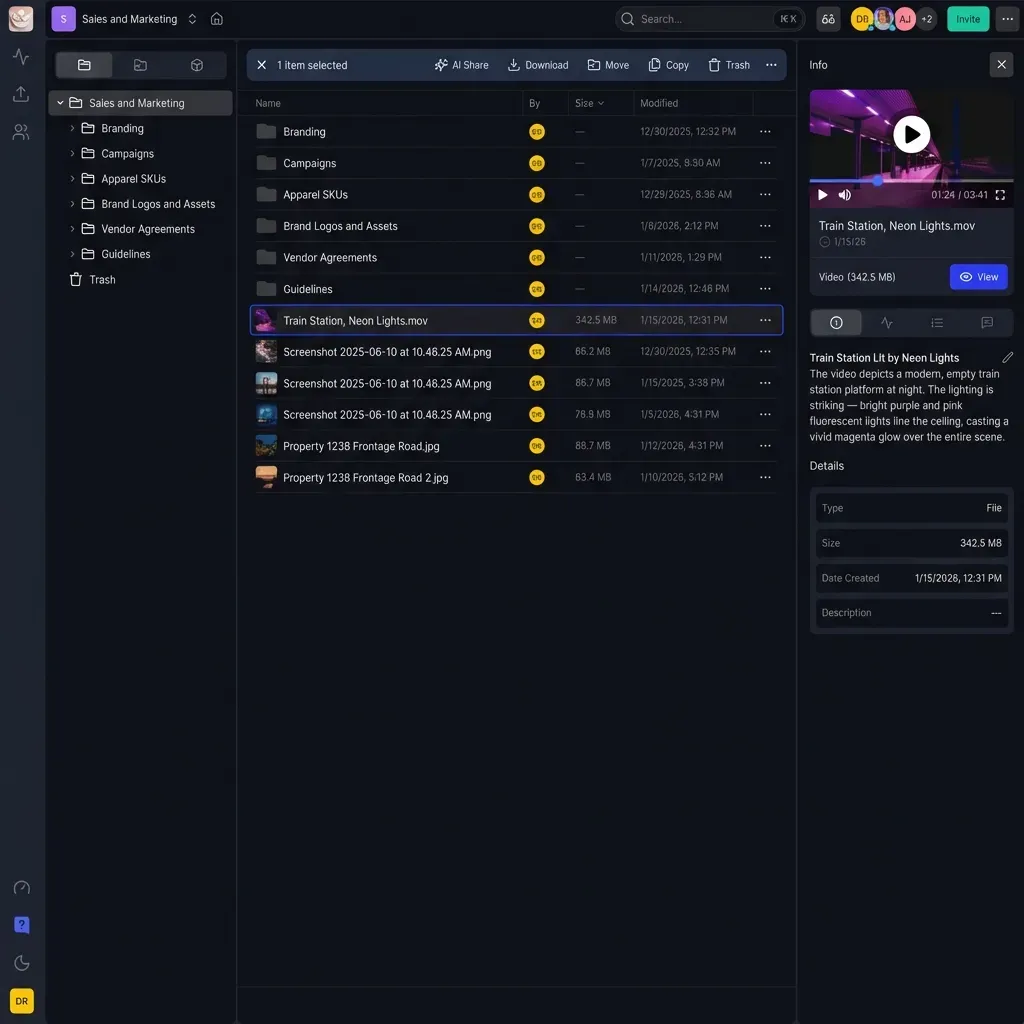
Key Features
- Massive File Support: No arbitrary limits on file size.
- RAW & Video Previews: View professional formats in the browser.
- Branded Portals: White-label delivery for clients.
- Unlimited Users: No per-seat pricing for your team or clients.
2. Pixieset: The Best for Aesthetic Client Galleries
Pixieset has become the go-to for wedding and portrait photographers who care about presentation. The gallery designs are clean, minimal, and work well on mobile. If your main goal is to deliver JPEGs to a bride and groom in a way that makes them cry (tears of joy), Pixieset does the job.
It has a built-in store that connects to major print labs, making it easy to sell prints, cards, and digital downloads. Setting up a new gallery takes minutes.
The Drawback: Pixieset is strictly for finished JPEGs. It's not designed for RAW file transfer, video production workflows, or archiving large projects. Storage limits get expensive if you keep high-resolution files online for long. It replaces the gallery part of SmugMug well but lacks the data management tools of dedicated delivery platforms.
3. Zenfolio: The Direct SmugMug Competitor
Zenfolio is the closest 1:1 competitor to SmugMug. It offers nearly the same feature set: website builder, client proofing, and print sales. Zenfolio recently added AI-driven features for sorting and tagging photos, which can save time for high-volume shooters like school or sports photographers.
Why choose it: If you want an all-in-one solution with your portfolio website, blog, and client area in one place, Zenfolio handles it well.
The Limitation: Like SmugMug, it struggles with video and large file transfers. The interface can be complex, and the all-in-one nature means it does many things adequately but few things well. If you already have a website on Squarespace or WordPress, you might find Zenfolio's site builder redundant.
4. ShootProof: The Best for In-Person Sales (IPS)
ShootProof is built for professional photographers who focus on sales. Its strength is invoicing, contract management, and sales automation. It's less of a website builder and more of a client interaction hub.
The galleries are functional and clean, but the real power is in the backend. You can set up automated email sequences to remind clients to order prints before their gallery expires. It integrates with studio management software, which makes it popular with business-focused portrait photographers.
The Trade-off: ShootProof is not a storage solution. It's a sales tool. Don't use it to back up RAW files or deliver video projects. It's purely for the proof-and-sell phase of your workflow.
5. Format: The Best for Portfolio Design
If SmugMug's templates feel too rigid or dated, Format is worth a look. It's primarily a portfolio website builder for visual artists, architects, and photographers. The designs are polished and highly customizable.
Format also offers "Workflow," a client proofing tool. It allows for branded client galleries and file transfers. It's not as powerful as Fast.io for heavy data or Pixieset for print sales, but it works well for creatives who want their website and proofing in one place.
Best For: Creatives who prioritize design and brand image over high-volume print sales or large data transfer.
6. WeTransfer / Dropbox: The Basic File Transfer Option
Many photographers leave SmugMug and end up piecing together a workflow with WeTransfer or Dropbox. These are general-purpose tools. WeTransfer is fine for sending a quick zip file, and Dropbox is everywhere for folder syncing.
Why they fall short: Neither tool is built for visual media. Send a client a Dropbox link and they see a list of filenames, not a gallery. WeTransfer links expire, which leads to the "can you resend that?" email.
Dropbox's per-user pricing punishes you for growing your team. WeTransfer's file size caps frustrate video work. Neither has branding, commenting, or media-specific preview engines that professional platforms provide.
7. Photoshelter: The Enterprise Stock Alternative
Photoshelter is built for photographers who manage large libraries of stock images or work with major editorial clients. Its Digital Asset Management (DAM) capabilities are far stronger than SmugMug's. You can search by IPTC metadata, license images directly, and manage permissions for different teams.
Who it's for: This is for the photographer with 100,000 images who needs to license them to newspapers, magazines, and brands. It's less about client galleries for weddings and more about maintaining an archival library for licensing.
The Cost: Priced for enterprise and high-end professionals. For the average portrait photographer, it's overkill and over budget.
How to Choose the Right Alternative
The right SmugMug alternative depends on your business model.
Choose Fast.io if: You deliver commercial work, video, or large projects. You need speed and security with no file size limits. You want a branded portal that handles RAWs and video as easily as JPEGs.
Choose Pixieset if: You're a wedding or family photographer. Your main deliverable is edited JPEGs, and you want to upsell prints to grandmothers and aunts.
Choose Zenfolio if: You want to replace your entire website and blog under one roof, and you're okay with average video and transfer tools.
Choose Photoshelter if: You're a photojournalist or stock photographer managing a large searchable archive for licensing.
Frequently Asked Questions
Is there a free alternative to SmugMug?
Yes, but with limits. Pixieset and Format offer free tiers with limited storage (usually 3GB to 10GB). For professional delivery of high-resolution files, a paid plan is almost always necessary to ensure speed and storage capacity. Fast.io allows you to start with a free trial to test the transfer speeds and branded portals.
Which alternative is best for video?
Fast.io handles video better than the others. Unlike SmugMug, Pixieset, or Zenfolio, Fast.io supports HLS streaming, frame-accurate comments, and large file sizes. It plays ProRes, DNxHD, and 4K footage natively in the browser, so it can replace tools like Frame.io while also handling your photo delivery.
Can I sell prints with Fast.io?
Fast.io focuses on asset delivery and workflow rather than retail print sales. It does not integrate directly with print labs for auto-fulfillment. It is designed for commercial delivery (B2B) where you provide digital assets to a client, rather than retail sales (B2C) where a client buys a single 8x10 print.
Is SmugMug good for large file transfer?
Not particularly. SmugMug is designed for display and archiving of finished JPEGs. It has limits on file sizes and upload speeds that can make transferring large RAW libraries or video projects frustrating. Dedicated transfer tools like Fast.io are built specifically to saturate your bandwidth and move terabytes of data reliably.
Can I use SmugMug for client delivery?
SmugMug can deliver photos to clients through password-protected galleries and download options. But it lacks contextual commenting, video streaming, and large file support. For straightforward photo delivery, SmugMug works fine. For workflows involving feedback, large batches, or video, a platform built for client collaboration gives you more options.
Related Resources

Ready to upgrade your client delivery?
Try Fast.io free and see why photographers are switching from SmugMug for faster transfers and better video support.