How to Secure File Sharing for AI Agents
AI agents need secure file access just like human teammates do, but their autonomous nature creates unique risks. This guide walks through encryption, granular permissions, version history, and audit trails for multi-agent file sharing, with practical setup steps you can follow today.


Why AI Agent File Sharing Needs Its Own Security Model
Traditional file sharing assumes a human clicks "share," picks recipients, and monitors what happens next. AI agents skip all of that. They create, read, modify, and transfer files autonomously, often across multiple systems, without anyone watching in real time.
That autonomy creates specific risks. An agent with overly broad permissions can access files it was never meant to touch. Two agents writing to the same file without coordination can corrupt outputs. And because agents operate at machine speed, a single compromised credential can exfiltrate data faster than any human attacker.
IBM's 2025 Cost of a Data Breach Report found that 97% of organizations reporting an AI-related security incident lacked proper AI access controls. Shadow AI breaches, where employees or agents use unauthorized tools, cost an average of $670,000 more than standard incidents.
These numbers explain why generic "share a link" security falls short for agent workflows. You need controls designed for how agents actually operate: programmatic access, concurrent file operations, and automated handoffs between stages of a pipeline.

Related guides
- Best Secure File Sharing for AI Teams in 2026AI teams face unique security challenges when sharing sensitive training data, proprietary model weights, and research...
- Multi-Agent File Sharing: Patterns, Storage & CodeHow multiple AI agents share, read, write, and collaborate on files in production systems. Covers storage...
- How to Secure Files Accessed by AI AgentsAI agent file security includes the access controls, encryption, and audit mechanisms that protect sensitive documents...
- How to Add File Watermarking to Your AI Agent PipelineAI agent file watermarking is the automated process of embedding visible or invisible identifiers into documents,...
- ChatGPT Attachment Limit: File Sizes, Counts, and Large Corpus WorkaroundsChatGPT caps message attachments at 20 files, enforces a 512 MB file ceiling, and silently truncates documents beyond 2...
- Modernizing File Server Resource Manager for Agentic WorkflowsModernizing File Server Resource Manager configurations for agentic workflows allows teams to transition from rigid...
More on this subject: Agent File and Document Workflows (325 guides)
Five Pillars of Secure Agent File Sharing
Secure file sharing for AI agents rests on five capabilities that work together. Skip one and you leave a gap.
1. Encryption in Transit and at Rest
Every file transfer between agents should use TLS 1.3. Files stored on the platform should be encrypted at rest. This protects against network interception and unauthorized disk access. For most cloud platforms, encryption is automatic, but verify it rather than assuming.
2. Granular Permissions
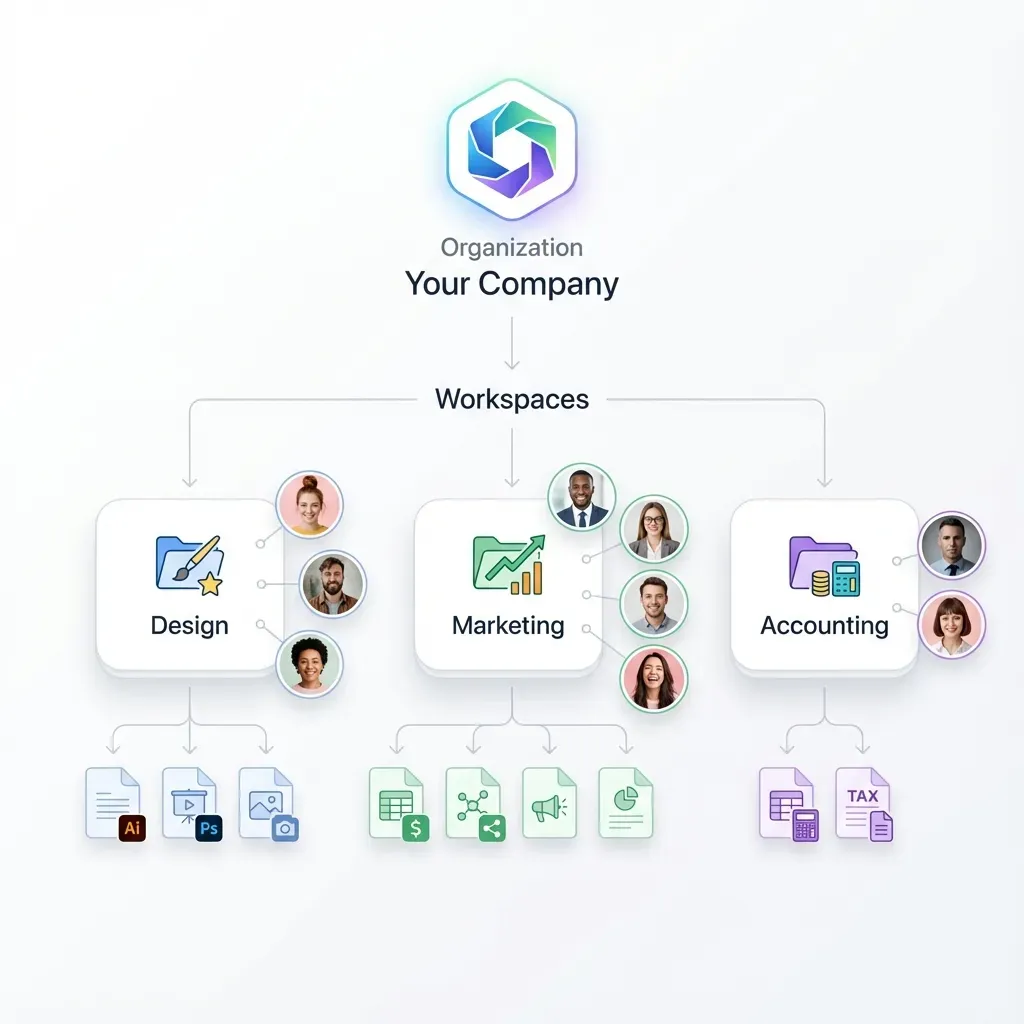
Agents should get the minimum access they need. A reporting agent that only reads analytics files should not have write access to the entire workspace. Set permissions at four levels: organization, workspace, folder, and individual file. Assign agents specific roles like viewer (read-only) or editor (read-write) based on their function.
Fastio implements this with granular permissions at each level. An agent authenticated via API key or OAuth gets scoped access, not blanket entry to everything.
3. Version History and Concurrency Control
When two agents modify files in the same workspace simultaneously, concurrency control is essential. Fastio provides advisory per-file locks so agents can coordinate writes, while automatic version history ensures no data is lost and a detailed activity log records who changed what.
Advisory locks allow an agent to signal its intent to write, while automatic version history ensures that every write produces a recoverable revision. If an agent commits an update while another is processing, neither agent's contribution is permanently lost, and conflicts can be audited and resolved cleanly.
4. Audit Trails
Every agent action on every file should produce a log entry: who accessed it, what they did, when, and from where. These logs serve three purposes. They help debug agent behavior when something goes wrong. They provide evidence for security reviews. And they enable automated alerts when an agent deviates from expected patterns, like a sudden spike in downloads.
5. Scoped Authentication
Each agent should have its own identity and credentials. Shared credentials make it impossible to trace actions back to a specific agent. Use API keys scoped to specific workspaces or OAuth tokens with limited permissions. Rotate credentials on a schedule and revoke them immediately after an incident.
Setting Up Secure Agent File Sharing Step by Step
Here is a practical walkthrough using Fastio, though the principles apply to any platform with agent-grade access controls.
Step 1: Create an agent account and workspace.
Sign up at Fastio for a 14-day Business Trial (credit card required; see pricing). Create your first workspace through the API or MCP server.
Fastio's MCP server is available at mcp.fast.io via Streamable HTTP at /mcp and legacy SSE at /sse. Agents using Claude, GPT-4, Gemini, or any LLM with MCP support can connect directly.
Step 2: Configure permissions per agent role.
Map each agent in your pipeline to a role. For example:
- Research agent: viewer access to source documents, editor access to its output folder
- Writer agent: viewer access to research outputs, editor access to draft folder
- Review agent: viewer access to everything, no write permissions anywhere
Set these permissions at the workspace or folder level so new files inherit the right access automatically.
Step 3: Enable Intelligence Mode.
Turn on Intelligence Mode for the workspace. This auto-indexes uploaded files for semantic search and RAG queries, with citations pointing back to specific pages and passages. Files are indexed once Intelligence is enabled for the workspace.
Step 4: Implement version checks in your agent code.
Before committing major file modifications, have the agent inspect recent versions or timestamps. After the write completes, verify the new version was recorded:
# Pseudocode for version-aware file updates
meta = get_file_metadata(file_id)
update_file(file_id, new_content)
# Fastio preserves complete version history for rollback if needed
Fastio lets agents acquire an advisory file lock before writing, while per-file version history ensures every update is preserved safely.
Step 5: Set up monitoring with activity feeds.
Configure event listeners using Fastio's realtime activity feed or WebSocket events feed to monitor security-relevant events: file downloads, permission changes, lock acquisitions, and access attempts. Route these to your monitoring system. Fastio provides realtime event streams and audit trails so your pipeline can react promptly without polling overhead.
Step 6: Test with concurrent agents.
Before going to production, run two or three agents against the same workspace simultaneously. Verify that version history captures all revisions, permissions block unauthorized access, and audit logs record every action. Fix any gaps before scaling up.



Secure Your Agent Workflows with the Right Foundation
Fastio gives AI agents generous storage, granular permissions, file locks, and audit trails. Connect via MCP or API.
Best Practices for Encrypted Agent File Transfers
Getting the basics right is one thing. Keeping them right as your agent fleet grows is another. These practices come from teams running multi-agent systems in production.
Principle of least privilege, enforced automatically. Do not give agents broad access and rely on good behavior. Scope every API key to the specific workspace and role the agent needs. If an agent only reads from one folder, its credentials should only grant read access to that folder.
Separate credentials per agent. When three agents share one API key, a breach compromises all three and your audit logs cannot distinguish between them. Give each agent its own credentials. Fastio supports scoped API keys and OAuth with PKCE for browser-based agent authentication.
Version verification to handle race conditions. Have agents verify the latest version timestamp or hash before committing major multi-file updates. If a newer revision was written while the agent was processing, the agent can re-read the latest data and re-evaluate.
Chunked uploads for large files. Break files larger than a few hundred megabytes into chunks. This avoids timeouts and lets you verify each chunk with checksums before committing. Fastio's chunked upload sessions handle this natively.
Rotate credentials on a schedule. Set calendar reminders to rotate API keys every 90 days, or automate it. Revoke keys immediately after any suspected compromise. Fastio's two-factor authentication adds a second layer for sensitive operations like key management.
Review audit logs weekly. Look for patterns: agents accessing files outside their normal scope, unusual download volumes, repeated unauthorized access attempts. Automated alerts catch obvious anomalies, but periodic human review catches subtle ones.
Use ownership transfer for handoffs. When an agent finishes building a workspace or deliverable, transfer ownership to a human rather than sharing credentials. Fastio's ownership transfer lets the agent hand off an entire organization while retaining admin access for maintenance. This creates a clean audit boundary between the agent's build phase and the human's review phase.
How MCP Servers Fit Into Agent File Security
The Model Context Protocol (MCP) standardizes how AI agents interact with external tools, including file systems. An MCP server exposes capabilities like file read, write, and search through a consistent interface that any compatible LLM can use.
Security in MCP deployments starts with the server configuration. Microsoft's guidance recommends zero permissions by default, requiring explicit opt-in for each capability. This maps directly to how you should configure file access: start with nothing, add only what each agent needs.
Fastio's remote MCP server exposes a consolidated toolset covering workspace management, storage operations, and AI queries. Each tool call respects the agent's permission level, so an agent with viewer access cannot use the storage tool to delete files even if it tries.
For teams running their own MCP infrastructure, secure the transport layer with TLS, validate every tool call against the agent's permissions, and log all MCP traffic for audit. The Fastio MCP documentation covers the specific tool surface and authentication requirements.
A practical pattern for multi-agent pipelines: each agent connects to the MCP server with its own scoped credentials. The orchestrator assigns tasks, agents execute through MCP tools, and the audit trail records every tool invocation. If an agent misbehaves, you can trace the exact sequence of actions and revoke its access without disrupting others.

Comparing Secure File Sharing Options for Agents
Not every platform handles agent file security equally. Here is how common approaches stack up.
Local filesystem. Agents read and write directly to disk. Simple to set up, but no built-in permissions, no audit trail, and no concurrency control. If two agents write to the same file, you lose data. Works for single-agent prototypes, not production multi-agent systems.
Object storage (S3, GCS, R2). Durable and scalable, with bucket-level permissions and access logs. But no file locks, no semantic search, and no concept of agent roles. You end up building permission management, concurrency control, and audit dashboards yourself.
Traditional cloud drives (Google Drive, Dropbox, OneDrive). Designed for human collaboration with UI-first sharing. API access exists but is not optimized for autonomous agents. Permission models assume human users, not programmatic identities. File locking is limited or absent.
Agent-native platforms (Fastio). Built for both human and agent access from the start. Granular permissions at four levels, advisory file locks for concurrency, automatic per-file version history, audit trails covering every operation, remote MCP integration, and Intelligence Mode for built-in RAG once enabled. Fastio offers a 14-day Business Trial (credit card required; see pricing).
The right choice depends on your constraints. For a quick prototype with one agent, local files work fine. For production multi-agent pipelines handling sensitive data, you need the full stack: encryption, permissions, versioning, audits, and an identity model that treats agents as first-class participants.
Sources
References used to verify factual claims in this guide.
-
97% of organizations that reported an AI-related security incident lacked proper AI access controls Shadow AI breaches cost an average of $670,000 more than standard incidents
-
Microsoft recommends zero permissions by default for MCP servers
Frequently Asked Questions
What is secure file sharing for AI agents?
Secure file sharing for AI agents uses encryption, granular permissions, and real-time audit logs to protect files that autonomous agents create, read, modify, and transfer. It adds agent-specific controls like version history with restore and scoped API credentials for each agent identity.
What are best practices for AI agent file security?
Give each agent its own credentials scoped to the minimum required access. Rely on granular folder permissions, advisory file locks, and per-file version history for writes. Enable audit logging on all workspaces. Encrypt data in transit and at rest. Rotate API keys regularly and monitor audit logs for unusual patterns.
How does Fastio prevent data corruption in multi-agent systems?
Fastio pairs advisory per-file locks with automatic version history and granular permissions. Agents acquire a lock before writing so other agents can wait; if concurrent writes occur, version history retains every revision.
How does MCP improve agent file security?
MCP standardizes how agents interact with file systems through authenticated tool calls. Each call respects the agent's permission level, creating a consistent enforcement point. Combined with TLS transport and audit logging of every tool invocation, MCP makes it easier to control and monitor agent file access at scale.
Can AI agents and humans share the same secure workspace?
Yes. Platforms like Fastio give agents and humans the same workspace with the same permission model. Humans use the web interface while agents use the API or MCP server. Both show up in audit logs, and ownership transfer lets agents hand off completed work to human reviewers cleanly.
Related Resources

Secure Your Agent Workflows with the Right Foundation
Fastio gives AI agents generous storage, granular permissions, file locks, and audit trails. Connect via MCP or API.