How to Implement AI Agent Cybersecurity Monitoring
AI agent cybersecurity monitoring spots threats as they happen using automatic analysis. Teams set up specialized agents to scan logs, spot anomalies, and respond in shared workspaces. Traditional tools fall short in agentic systems without multi-agent coordination. Fastio handles this with granular permissions, version history, audit logs, and a consolidated MCP toolset for secure collaboration. This guide covers patterns, steps to implement, Fastio workflows, and best practices to set up effective monitoring.

What Is AI Agent Cybersecurity Monitoring?
AI agent cybersecurity monitoring detects threats in real-time using autonomous analysis. Specialized agents scan logs, network traffic, and file activities continuously. They correlate events, identify anomalies, and trigger responses without human intervention.
In agentic environments, monitoring extends to inter-agent interactions. Agents access shared threat intelligence databases and apply behavioral models to baseline activities. Alerts go out via webhooks or notifications. Agents adapt by querying updated security documentation through built-in RAG systems.
For example, a log scanner agent parses audit logs for suspicious IP addresses. An anomaly detector flags deviations from normal behavior. A response orchestrator isolates affected files using granular permissions.
This approach handles high-velocity data that overwhelms static tools. Agents scale horizontally, processing terabytes of logs across distributed workspaces.
The key difference from traditional monitoring lies in autonomy. While conventional SIEM tools require analysts to write rules and interpret alerts, AI agents learn patterns independently. They can:
- Process unstructured data from multiple sources simultaneously
- Correlate indicators across geographically distributed workspaces
- Execute remediation playbooks without human approval for known threat patterns
- Continuously refine detection models based on new threat intelligence

Related guides
- How to Implement Audit Logging for AI AgentsAudit logging for AI agents is the practice of recording every action an agent takes, including tool calls, file...
- Agentic AI Security Risks: Threats, Vulnerabilities, and MitigationsAI agents that can plan actions, call tools, and access files introduce security risks that go well beyond prompt...
- How to Prevent Tool Poisoning Attacks on AI AgentsTool poisoning is an attack where a malicious MCP server or tool registry provides manipulated tool descriptions or...
- Azure OpenAI Rate Limits: TPM Quotas, PTU Scaling, and 429 Error ResolutionAzure OpenAI rate limits are regional and subscription-level constraints defined by Tokens Per Minute (TPM) and...
- Groq API Rate Limits: LPU Tier Quotas, TPM Ceilings, and Document HandlingGroq rate limit policies govern API throughput across GroqCloud LPUs through concurrent requests, requests per minute,...
- LlamaIndex Rate Limits: Ingestion Batching, Embedding Quotas, and Offloaded IndexingLlamaIndex rate limits are API request and token bottlenecks triggered while parsing, chunking, and embedding large...
More on this subject: Agent Security and Governance (65 guides)
The Growing Cybersecurity Threat Landscape
Cyber threats evolve rapidly. According to CrowdStrike's 2025 Global Threat Report, 79% of detections were malware-free, relying on behavior signals like vishing attacks, which surged 442% in the second half of 2024. Verizon's multiple DBIR reports ransomware in multiple% of breaches, often starting with initial access brokers. IBM's 2025 Cost of a Data Breach Report lists the average cost at $4.multiple million, with AI security tools saving $multiple.multiple million per breach through faster response. Cyber attacks have risen multiple% year-over-year, driven by AI-assisted adversaries. Traditional monitoring struggles with volume and speed. AI agents process data at scale, detecting multiple% more threats through pattern recognition. The threat landscape has shifted fundamentally over the past several years. Early cyber attacks relied heavily on malware, viruses, worms, trojans, that security tools could detect through signature matching. Modern attacks bypass these defenses entirely. Attackers use legitimate credentials, social engineering, and living-off-the-land techniques that blend with normal business activity. This shift creates detection challenges that rule-based systems cannot address. When multiple% of attacks show no malicious code, security teams cannot scan for signatures. Instead, they need behavioral analysis that identifies anomalous patterns: unusual access times, abnormal data volumes, or credential use from unexpected locations. AI agents excel at this by learning baselines and flagging deviations. The financial stakes continue rising. IBM's data shows the average breach now costs $multiple.multiple million, with detection and response time being the primary cost drivers. Organizations using AI-powered security tools identify breaches multiple% faster, saving an average of $multiple.multiple million per incident. These savings justify investment in agent-based monitoring systems.

Why Use AI Agents for Cybersecurity?
Agents excel in dynamic environments. They run asynchronously, scaling with threat volume. MCP tools enable file operations, event feeds signal updates, and RAG provides context once Intelligence is enabled on a workspace. Example workflow: Log indexer agent uploads parsed data. Query agent searches for IOCs. Notification agent alerts operators via email. In multi-agent setups, coordination prevents conflicts. Shared workspaces with granular permissions and version history ensure safe access. Traditional security tools struggle with three challenges that agents address directly. First, volume: modern environments generate terabytes of logs daily, making manual review impossible. Second, velocity: attacks unfold in seconds, but human analysis takes hours. Third, variety: threats constantly evolve, requiring models that adapt without manual rule updates. Agent architectures solve these by processing data in parallel, responding to alerts instantly, and learning from new threat intelligence. Each agent handles a specific function, log parsing, anomaly detection, threat correlation, while coordinating through shared workspaces. This modular design lets teams start simple and expand capabilities over time.
Agent Advantages Over Traditional Tools
Traditional SIEMs require manual rules. Agents learn baselines autonomously.
- Speed: Real-time analysis vs batch processing. Agents process events as they occur, identifying threats within seconds rather than waiting for daily log reviews.
- Adaptability: Update models via RAG without redeploy. When new threat intelligence emerges, agents query updated documentation immediately without infrastructure changes.
- Scale: Parallel processing across workspaces. Deploy multiple agents across different environments, each handling local data while contributing to organization-wide threat visibility.
- Cost: The 14-day Business Trial (credit card required; see /pricing/) covers monitoring workloads to evaluate workspace and credit capacity.
Agent Cybersecurity Patterns Table
Match threats to patterns for effective monitoring.
Multi-Agent Workflows in Shared Environments
Competitors lack multi-agent security in shared spaces. Fastio supports it natively.
Agents join workspaces with granular permissions. Version history and audit logs track all actions.
Workflow:
- Scanner accesses /logs/, scans IOCs.
- Releases, writes report.
- Analyzer uses RAG on threat intel.
- WebSocket event feed alerts if high risk.
Connect via remote MCP:
# Connect via remote MCP at https://mcp.fast.io/mcp/tools
Agent steps, as MCP tool calls:
# 1. storage action=list on the logs folder
# 2. read each log: download action=file-url, or storage action=content
#    when Intelligence is on
# 3. if a log mentions a suspicious IP, write a report into the reports
#    folder with upload_manage action=stream-upload
Audit logs record all actions for review. Encryption protects data at rest/transit.



Secure Your Agent Workflows Now
Cloud workspaces, usage credits, and a consolidated MCP toolset with audit logs for cybersecurity monitoring workflows.
Implementing Threat Detection with Fastio MCP
use a consolidated MCP toolset.
Detailed steps:
- Start the 14-day Business Trial (credit card required; see /pricing/).
- Create workspace, toggle Intelligence Mode for auto-RAG indexing of threat docs.
- Deploy scanner: list the security-logs folder with
storage action=list, read each log, extract IOCs, and upload any hits to an alerts folder withupload_manage action=stream-upload. - RAG query: ask the
ai_managetool "match IOCs to known malware". - Activity polling or WebSocket events on file changes trigger re-scan.
- Scale with multiple agents, using granular permissions for concurrency.
Supports chunked uploads, URL imports from SIEMs. Multi-LLM compatible.
Document access rules, audit trails, and retention policies before rollout so staging results are repeatable in production. This avoids late surprises and helps teams debug issues with confidence.
Handling Edge Cases
- Rate limits: Monitor credits (storage 100/GB, AI 1/100 tokens).
- Conflicts: Advisory file locks, permissions, and version history ensure safe coordination.
- Scale: Unlimited workspaces, parallel agents.
- Fallbacks: Human oversight via ownership transfer.
Fastio Security Features for Agents
Built for agentic security:
- Audit Logs: Track all actions - views, downloads, perms changes.
- Version History: Restore earlier states and track changes across multi-agent operations.
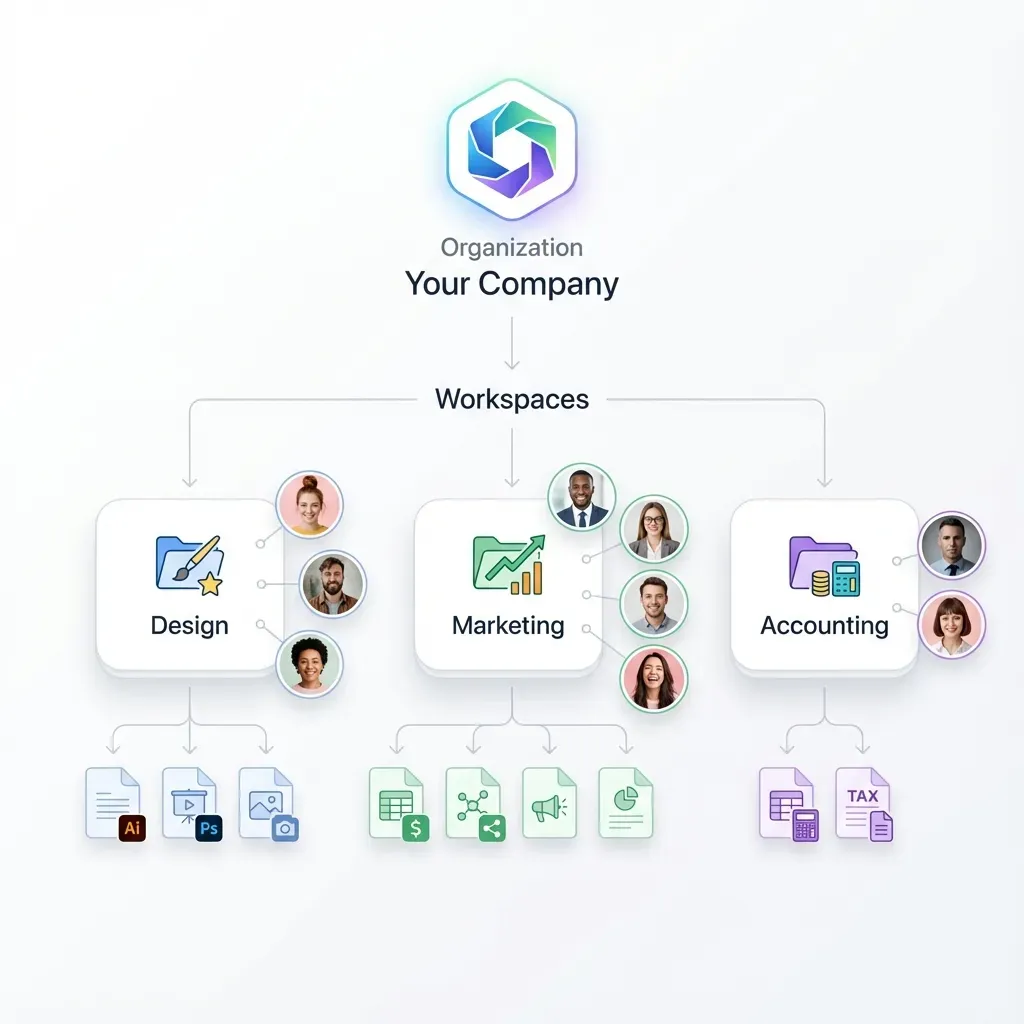
- Granular Permissions: Org/workspace/folder/file levels.
- Encryption: At rest and transit.
- Scoped API Keys: Secure authentication with granular permissions.
- Realtime Event Feeds: Reactive workflows via WebSockets and activity polling.
Agents use same tools as humans, ensuring consistent security.
Document access rules, audit trails, and retention policies before rollout so staging results are repeatable in production. This avoids late surprises and helps teams debug issues with confidence.
Remote MCP Integration for Monitoring
Connect monitoring agents directly to Fastio's remote MCP server at https://mcp.fast.io/mcp/tools using scoped API keys sent as a Bearer header. This provides instant tool access across Python, TypeScript, and standard MCP clients with full audit logging.
Best Practices and Troubleshooting
Best Practices:
- Start single-agent on critical logs.
- Scale to swarm by threat type (network, file, behavior).
- Baseline normal activity first.
- Rotate agent keys regularly.
- Test failover with ownership transfer.
Troubleshooting:
Links: MCP docs, /storage-for-agents/, /pricing/
Sources
References used to verify factual claims in this guide.
-
79% of detections were malware-free 442% vishing surge H2 2024
-
Ransomware present in 44% of breaches
-
Average breach cost $4.4 million; AI saves $1.9M
Frequently Asked Questions
What are AI agents for cybersecurity?
Autonomous agents scan, detect, and respond to threats using file operations, RAG analysis, and event feeds in shared workspaces. They operate continuously without human intervention, processing logs and network data to identify malicious patterns. Unlike static tools, AI agents learn from new threats and adapt detection models automatically, making them effective against evolving attack vectors.
How to monitor threats with AI agents?
Deploy monitoring agents to workspaces containing security logs and threat data. Use MCP tools to list and read files, query the RAG system to correlate IOCs with known threats once Intelligence is enabled, and subscribe to the WebSocket events feed to detect changes. Granular permissions and version history ensure safe access in multi-agent scenarios. Start with a single scanner agent on critical log directories, then expand to coordinated agent swarms as detection needs grow.
What makes Fastio suitable for agent security?
Fastio provides a consolidated MCP toolset, advisory file locks, granular permissions, and version history for safe concurrent operations, comprehensive audit logs for compliance tracking, and Intelligence Mode with built-in RAG for semantic threat intelligence queries once enabled. The 14-day Business Trial (card required; see /pricing/) lets teams evaluate monitoring workflows. Agents and humans share the same workspaces, ensuring consistent security policies across automated and manual operations.
Are there risks with multi-agent monitoring?
Multi-agent systems introduce specific risks including permission conflicts, race conditions on shared files, and over-privileged access chains. Mitigate these through advisory file locks to coordinate writes and granular permission scoping at the organization, workspace, folder, and file levels. Use automated version history to track revisions and recover prior states. Maintain audit trails to trace actions across agent interactions. Establish human oversight through ownership transfer workflows where agents can hand off alerts for human review.
How does AI improve threat detection?
AI agents handle volume and velocity that overwhelms manual analysis. According to IBM's multiple report, organizations using AI security tools save an average of $multiple.multiple million per breach through faster detection and response. AI detects approximately multiple% more threats than traditional rule-based systems by recognizing patterns across millions of events. Machine learning models adapt to new attack techniques without requiring analysts to write new detection rules for each variant.
Can MCP agents do cybersecurity monitoring?
Yes. Connect any MCP client to https://mcp.fast.io/mcp/tools to access a consolidated toolset for security operations. Agents can scan log directories, read suspicious files, query threat intelligence via RAG once Intelligence is enabled, and organize alerts. Fastio maintains version history and a detailed activity log of operations.
What Fastio features support compliance?
Fastio provides audit logs tracking all file views, downloads, and permission changes at the organization level. Granular permissions operate across four levels: organization, workspace, folder, and individual files. Data encryption protects information at rest and in transit. Scoped API keys and MFA options add strong authentication layers. For compliance reporting, export audit logs regularly and use workspace versioning to maintain historical records of security-related file access.
How to scale agent monitoring?
Fastio allows you to partition monitoring workspaces by environment, region, or threat type. Deploy parallel agents across workspaces using folder partitioning and version history. Start with the 14-day Business Trial (card required; see /pricing/) for evaluation, then choose a paid plan as detection coverage expands. Use ownership transfer to move monitoring configurations between agent and human administrators as operational needs evolve.
Related Resources

Secure Your Agent Workflows Now
Cloud workspaces, usage credits, and a consolidated MCP toolset with audit logs for cybersecurity monitoring workflows.