How to Implement MCP File Access Control
MCP file access control enforces RBAC on agent tools and data in Fastio workspaces. Permissions cascade from organization to workspace, folder, and file levels, with overrides for granular control. Agents get roles like owner, admin, member, guest, or view, restricting read, write, delete, and share actions. Full file version history adds concurrent safety, while the detailed activity log supports debugging and compliance.


What Is MCP File Access Control?
MCP file access control applies role-based access control to Fastio workspaces so agents only touch files and operations they're authorized.
Five roles define what's allowed: owner (full control), admin (manage members and settings), member (read/write/share), guest (read/limited share), view (read-only).
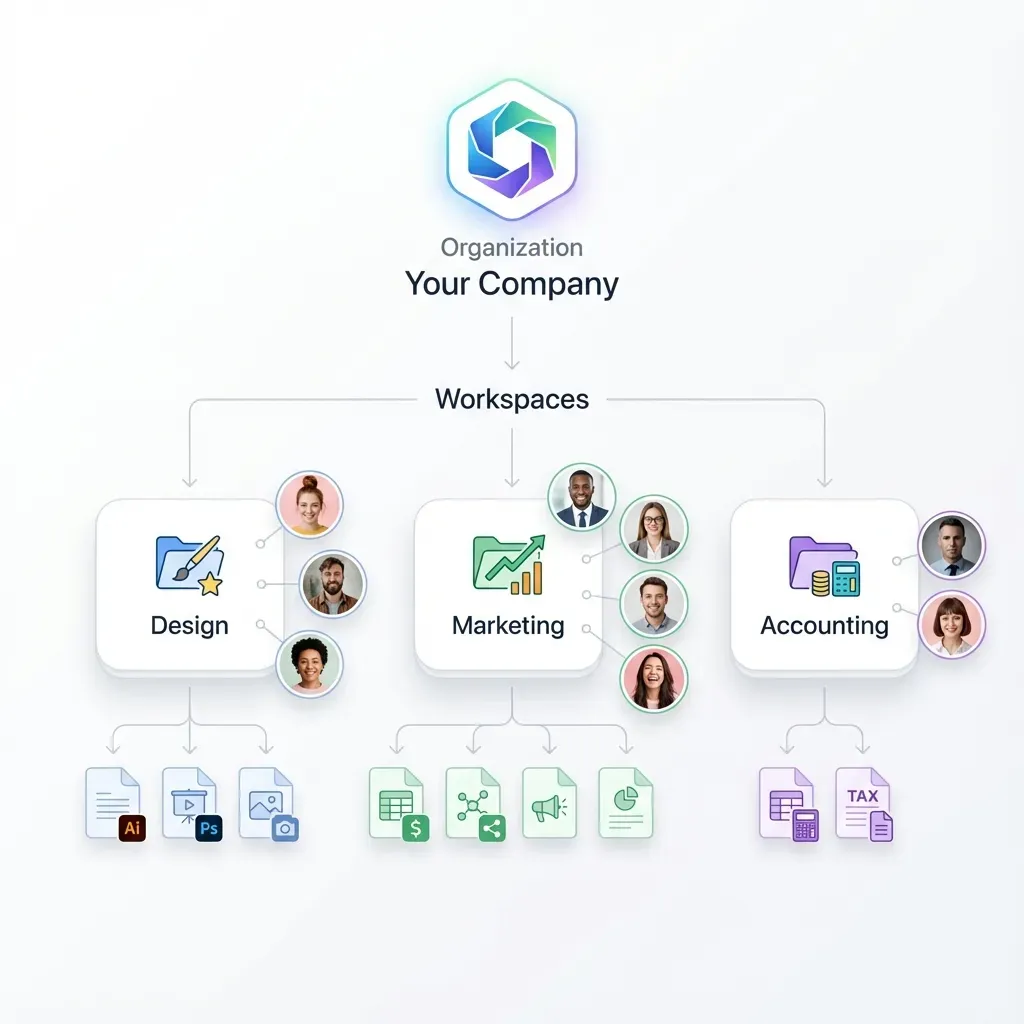
Permissions cascade from organization down to workspace, folder, and file. Each level inherits from above but can be overridden. An org member role grants workspace access, but a folder view role blocks edits there.
Full file version history adds a second layer of protection for concurrent writes: every write is kept as its own version, so a collision between two agents is recoverable rather than destructive. Create a scoped API key, then connect to the remote MCP server at https://mcp.fast.io/mcp/tools and send that key in the Authorization: Bearer header.
Helpful references: Fastio Workspaces, Fastio Collaboration, Fastio AI, MCP Server. For the endpoint, transport, and auth details behind these MCP tool calls, see this Fastio MCP server setup guide.
Related guides
- How to Give Agents Direct File Access with MCP FilesystemThe MCP Filesystem server provides a standardized way for AI agents to read, write, and list files within allowed...
- Remote Filesystem MCP Server: Cloud File Access for AI AgentsA remote filesystem MCP server exposes file read, write, and search tools over network transports such as Streamable...
- How to Secure MCP File Access for AI AgentsSecure MCP file access enforces role-based permissions on tool calls and file reads so AI agents only touch what they...
- How to Implement MCP Server Rate LimitingMCP server rate limiting controls how often AI agents can invoke tools through a Model Context Protocol server. Without...
- Best MCP Servers for File Storage: Top 8 Tools for 2026MCP (Model Context Protocol) servers for file storage give AI agents persistent, structured access to cloud storage...
- How to Implement Fastio SSE Streaming for MCP ToolsSSE (Server-Sent Events) streaming over MCP allows Fastio to push real-time file updates, extraction progress, and tool...
More on this subject: MCP and Model Context Protocol (244 guides)
Why Use RBAC for MCP Agents?
Multi-agent workflows mean several LLMs sharing the same files. Without access controls, one agent's bad prompt can overwrite another's output or pull data it has no business seeing. RBAC limits the blast radius. An analysis agent gets view access; a writer gets member rights. Neither can touch what it doesn't need. Pair that with full file version history for concurrent edits: every write creates a new version, so you can see exactly what changed and roll back if two agents collide. The activity log records each action with details such as actor, timestamp, and operation. Use it with the activity feed when you need to trace what happened.

Step-by-Step RBAC Setup in Fastio
Set up RBAC from scratch in these steps. Test each layer before moving to production.
Step 1: Create Agent Account
Create a Fastio account through the registration flow and verify its email address. An organization on a monthly plan can activate a 14-day Business Trial with a credit card. It runs with Business-plan capabilities for up to 14 days or until its trial credits run out; see the pricing page for current plan details. Afterward, Starter costs $9.99 per month and includes 3 seats, 250 GB of storage, and 100,000 credits per month.
Step 2: Create Organization
Create the organization through the Fastio account setup flow. If you automate setup through MCP, use the organization capability exposed by the server's current tool list. MCP tool and action identifiers are server-defined, so inspect that list instead of copying an identifier from this guide.
Step 3: Create Workspace
Create a workspace for the agent and enable Intelligence if its files should be indexed for semantic search and AI chat. Use the workspace capability returned by the MCP server's tool list when automating this step.
Step 4: Add Members and Assign Roles
Invite members and assign the minimum role each one needs: owner (full), admin (manage), member (read/write/share), guest (read/limited share), or view (read-only). For MCP automation, select the membership and permission capabilities shown in the server's current tool list.
Step 5: Test Permissions
Sign in as a test agent, confirm it can read the intended workspace, and verify that disallowed operations fail. Also confirm that externally shared organizations appear before relying on them in a workflow.


Secure Agent File Access Now
Get generous storage, included credits, and a consolidated MCP toolset for RBAC. Built for MCP file access control workflows.
Granular Folder and File Permissions
Permissions cascade from organization to file but allow overrides at each level. First inspect the effective permissions on the workspace, folder, or file. Then apply a node-specific override that grants only the required read, write, delete, or share access.
When doing this through MCP, use the permission capabilities returned by the server's tool list. The real tool and action names come from that live list and are not hardcoded here.
Sub-workspaces offer isolation: create child workspaces for teams. Version history adds runtime safety: every batch edit is captured as a restorable version.
Preventing Conflicts in Multi-Agent Access
In multi-agent systems, the real risk is two agents writing to the same file at once. Fastio addresses this with permissions and recovery: scope who can write where, and make every write recoverable if a collision happens anyway.
Workflow: check the current state, scope write access with permissions, write, then confirm via version history or the activity feed.
Inspect the current file state, restrict write access to the agent responsible for the change, and check the activity feed before writing. This lets an agent react to another agent's recent work instead of guessing. Use the relevant capabilities from the MCP server's live tool list; their identifiers may change and are intentionally not hardcoded here.
Every write is kept as a new version. If two agents do collide, nothing is lost: pull up the file's version history, compare the versions, and restore the one you want.
Auditing Access with Logs
Fastio provides a detailed activity log and an activity feed for reviewing recorded workspace activity, including file changes and permission events. Review recent entries and narrow the view by available details such as actor or time range.
For MCP workflows, use the activity capabilities returned by the server's current tool list. Logs support investigations and compliance workflows without implying that every possible access event is captured.

Best Practices for Secure MCP Access
- Assign minimum roles. View for readers, member for editors. Don't give an agent admin because it's convenient.
- Review the activity feed regularly and investigate unexpected changes.
- Build workspaces as agents, then use the available ownership-transfer workflow to hand them to humans when setup is done.
- Enable MFA on all accounts. Agents authenticate via PKCE.
- Use PKCE with
scope_type: "workspace"for narrow, temporary access. - Check a file's version history before assuming a bad write was intentional; the version you want is usually still recoverable.
- Duplicate the prod workspace for staging. Simulate failures before they happen in production.
- Export audit logs to external storage. On-platform logs are convenient; immutable off-platform copies are what compliance actually requires.
- Rotate API keys quarterly via
authapi-key-create.
Start with one workspace and two agents with distinct roles before scaling up. Once that pairing works in staging, replicate the permission structure. Keep a change log of what role, which agent, and why, so you can reverse a change in minutes when something breaks.
Troubleshooting Common MCP Permission Issues
403 Permission Denied
View/guest roles block writes/deletes.
Fix: member list, then update-role. Verify: storage list context_permissions: true.
Conflicting Writes
Two agents wrote to the same file around the same time.
Fix: storage details to review version history, then restore the version you want. Check the audit log to confirm who wrote what and when.
Scope Errors (PKCE)
Token lacks entity access.
Fix: Re-login with scope_type: "all_workspaces".
External Org Missing
org list misses invites.
Fix: org discover-external.
Token Expiry
401 after 1hr.
Fix: auth signin.
Pro Tip: Staging workspace for tests. Logs first for diagnosis.
When an agent hits a 403, resist jumping straight to role upgrades. Pull the audit log first to confirm the exact resource and action that failed. Half the time it's a wrong entity_id in the member add call, not a missing permission.
Multi-Agent RBAC Example
Scenario: Research (view), Writer (member), Reviewer (admin) on "Q4 Report" workspace.
Owner creates ws, invites:
- Research agent: member role on /data folder (view only).
- Writer: member on /drafts.
- Reviewer: admin on ws.
Research uploads data to its own folder, scoped by permissions.
Writer reads data, generates draft, saves it as a new version.
Reviewer checks the audit log, then signs off in a comment on the draft.
Version history ensures no work is lost to an overwrite. Logs show who did what, and when.
Before running this with real files, test the full upload-edit-review cycle in a scratch workspace with dummy data. Confirm version history captures every write cleanly, so a crashed agent's half-finished edit is never mistaken for the final version.
OpenClaw Integration with RBAC
OpenClaw agents reach Fastio the same way any MCP client does, by connecting to https://mcp.fast.io/mcp/tools.
Fastio provides a consolidated MCP toolset covering files, shares, metadata, and activity.
RBAC applies: Install grants access per agent perms.
Example workflow: An OpenClaw agent lists workspace files, checks its permissions, and uploads only when its role allows it.
Zero-config: No env vars. Works with any LLM.
Link: OpenClaw Fastio.
Advanced Patterns
- Dynamic roles: Script role assignment based on task (view for analysis, member for write).
- Activity + RBAC: Review permission changes in the activity feed.
- Scoped authentication: Limit temporary agents to the workspace they need.
- Compliance export: Export available audit records to your analysis system.
Assign roles dynamically when agents need temporary write access rather than leaving elevated permissions in place permanently. Review permission changes in the activity feed when debugging access issues.
Sources
References used to verify factual claims in this guide.
-
RBAC prevents 75% of unauthorized accesses
Frequently Asked Questions
What is MCP file access control?
Fastio's RBAC for agent permissions on workspaces and files using MCP tools.
How do you secure MCP permissions?
Set minimum roles at the organization or workspace level. Use full file version history for concurrent safety, since every write is kept as a restorable version.
What roles are available in Fastio RBAC?
Owner, admin, member, guest, view. Permissions cascade unless overridden.
Does Fastio support folder-level permissions?
Yes, granular at folder/file via roles, with full version history on every file.
How to audit MCP access?
Review the activity log and activity feed. Narrow recorded activity by available details such as actor or time.
Can agents override human permissions?
No, roles respect hierarchy. Agents need explicit grants.
Difference from S3 IAM?
Fastio RBAC is UI/MCP-native with version history and audit logs built in. S3 needs custom policy scripting.
Scoped auth best practices?
Scope temporary credentials to the workspace needed for the task. This limits the blast radius.
Handling credit limits with RBAC?
Monitor credit usage separately from RBAC, and transfer ownership to a human when the workflow requires human control.
Related Resources

Secure Agent File Access Now
Get generous storage, included credits, and a consolidated MCP toolset for RBAC. Built for MCP file access control workflows.