How to Set Up Storage for AI Coding Agents
AI coding agents like Cursor, Claude Code, and GitHub Copilot Workspace need persistent file access to read, modify, and manage codebases effectively. This guide explains the storage requirements for coding agents, compares filesystem vs API approaches, and shows how to set up infrastructure that gives agents reliable file access across sessions.


What Storage Do AI Coding Agents Need?
AI coding agent storage provides persistent file access and version control integration for coding assistants to read, modify, and manage codebases. Unlike chat-based AI tools that start fresh each conversation, coding agents work across multiple files and sessions. They need to:
- Read source files to understand existing code structure
- Write changes to multiple files in a single operation
- Track context from previous sessions for continuity
- Access project assets like configs, documentation, and dependencies
A typical coding agent session may touch hundreds of files when navigating a moderately sized codebase. Without persistent storage, agents lose context between sessions and waste time re-reading files they already analyzed.
Related guides
- Best AI Coding Assistants in 2026: 12 Tools ComparedAI coding assistants now do far more than autocomplete. The best tools in 2026 handle multi-file refactors, run tests,...
- How to Set Up MCP Servers in CursorCursor MCP server setup is the process of connecting Model Context Protocol servers to the Cursor AI code editor,...
- How to Set Up MCP Servers in VS CodeGuide to vscode mcp server setup: Model Context Protocol (MCP) servers in VS Code connect GitHub Copilot Chat to...
- Base44 File Storage Setup: Media Libraries and External Cloud PersistenceBase44 file storage setup involves configuring backend media libraries to store, manage, and deliver application...
- Best Open Source AI Coding Assistants in 2026: OpenClaw, OpenCode, and MoreDevelopers now spend more time reviewing AI-generated code than writing it. Choosing the right open source coding...
- Top OpenAI Codex Alternatives for Coding Agents and Shared WorkspacesModern software teams rarely rely on a single code completion model. As development shifts toward autonomous agents...
More on this subject: AI Coding Assistants (82 guides)
Filesystem vs API: How Agents Access Files
Coding agents interact with files through two primary patterns: direct filesystem access or API-based storage.
Direct filesystem access is how tools like Claude Code and Cursor work. The agent runs locally and reads files from your machine. This approach:
- Requires no configuration for local projects
- Works with existing version control (git)
- Has full access to the development environment
- Cannot easily share context between machines or team members
API-based storage decouples the agent from your local filesystem. The agent reads and writes through cloud storage APIs. This approach:
- Enables persistent context across sessions
- Supports team collaboration on shared projects
- Allows agents to work on remote codebases
- Requires initial setup and API integration
Recent benchmarks show a hybrid approach works best. Letta's research found that agents using filesystem-like interfaces scored 74% on memory tasks, outperforming specialized memory tools. Agents perform better with familiar file-based patterns, even when the underlying storage is cloud-based.
Core Requirements for Coding Agent Storage
Before choosing a storage solution, understand what coding agents need.
Persistent Context
Agents should remember previous work. When you return to a project, the agent shouldn't need to re-analyze the entire codebase. Storage that preserves session state and file indices leads to noticeably better code quality because agents retain project context and coding patterns.
Version Control Integration
Coding agents make changes. Good storage works alongside git so you can review, commit, or rollback agent modifications. Look for:
- Automatic checkpoints before major changes
- Clear diff visualization
- Branch management for experimental changes
Access Control
When agents can write to files, security matters. The storage layer should support:
- Read/write permissions per directory
- Audit logs of all agent operations
- Sandboxing for untrusted agent sessions
File Format Support
Beyond source code, agents need access to:
- Configuration files (JSON, YAML, TOML)
- Documentation (Markdown, RST)
- Assets referenced in code (images, data files)
- Dependency manifests (package.json, requirements.txt)
MCP Server Storage Solutions
The Model Context Protocol (MCP) provides standardized file access for AI agents. MCP servers expose file operations through a consistent API that works with Claude Desktop, Cursor, VS Code, and other compatible clients.
Fastio MCP Server
Fastio offers an official remote MCP server for file operations via Streamable HTTP. Key capabilities:
- A consolidated MCP toolset for file management
- Intelligence Mode for auto-indexing and RAG queries across workspace files
- Built-in RAG with citations (ask questions, get answers with source links)
- Ownership transfer from agents to human users
- URL Import from Google Drive, OneDrive, Box, Dropbox via OAuth
Why MCP Matters for Coding Agents
Traditional file APIs force agents to learn service-specific interfaces. MCP standardizes file operations so agents work the same way across different storage providers. Fastio's consolidated MCP toolset supports file access, version history, and permission management.
Setup with Claude Desktop
In Claude Desktop, open Customize, then Connectors, and add a custom connector with this URL:
https://mcp.fast.io/mcp/tools
Select Connect and sign in to Fastio in the window that opens. In a chat, turn Fastio on from the + menu under Connectors.
Full documentation is available at mcp.fast.io/skill.md.
Remote MCP Configuration for AI Coding Agents
Coding agents connect to Fastio through the remote MCP server URL at https://mcp.fast.io/mcp/code using Streamable HTTP and sign in to Fastio in the browser. In Cursor, add it to ~/.cursor/mcp.json:
{
  "mcpServers": {
    "fastio": {
      "url": "https://mcp.fast.io/mcp/code"
    }
  }
}
In Claude Code, run claude mcp add --transport http fastio https://mcp.fast.io/mcp/code, then run /mcp inside Claude Code to sign in.
This provides a consolidated toolset without requiring local server installation. Works with Claude, GPT-4, Gemini, LLaMA, and local models. Agents can manage files, inspect repository assets, and share workspaces directly.



Give Your AI Agents Persistent Storage
Fastio gives teams shared workspaces, MCP tools, and searchable file context to run ai coding agent storage workflows with reliable agent and human handoffs.
Setting Up Fastio for AI Coding Agents
Fastio provides cloud storage with a consolidated MCP toolset, built-in RAG, and ownership transfer capabilities. Here's how to configure it for coding workflows.
Step 1: Create an Organization
Start the 14-day Business Trial at Fastio. It requires a credit card. Create workspaces for the repositories and teams that need persistent context.
Step 2: Connect via MCP or REST API
Fastio offers two primary integration paths:
Model Context Protocol (MCP): Connect through the official remote MCP server with a consolidated toolset. Claude Desktop and other MCP-compatible clients use https://mcp.fast.io/mcp/tools, and coding agents such as Cursor and VS Code use https://mcp.fast.io/mcp/code. Each client signs in to Fastio in the browser. For Cursor (~/.cursor/mcp.json):
{
  "mcpServers": {
    "fast-io": {
      "url": "https://mcp.fast.io/mcp/code"
    }
  }
}
REST API: For custom integrations, use the REST API for file access, workspace management, and permissions. Documentation at Fastio's API documentation.
Step 3: Enable Intelligence Mode for RAG
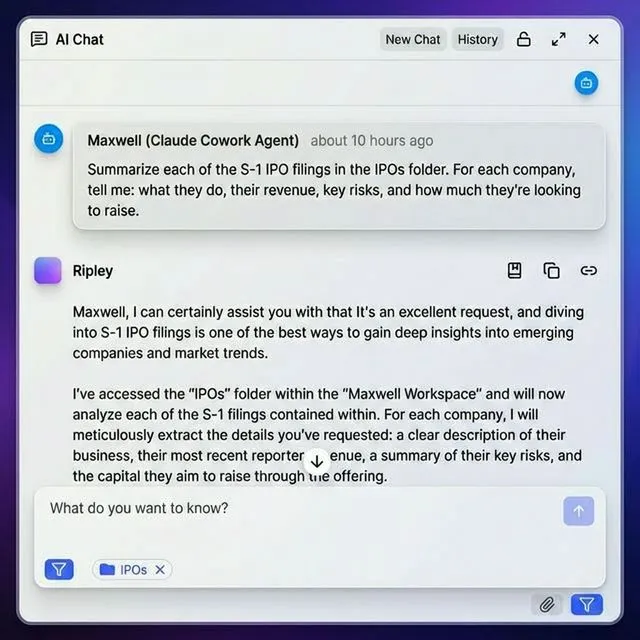
Toggle Intelligence Mode on workspaces where you want built-in RAG. When enabled, Fastio automatically indexes files so agents can ask questions like "What dependencies does this project use?" with citations to specific files. When Intelligence Mode is OFF, you get pure storage without AI processing.
Step 4: Set Up Ownership Transfer
For consulting workflows, agents can build complete projects and transfer ownership to clients:
- Agent creates org, workspaces, and shares
- Agent uploads code, documentation, configs
- Agent transfers ownership to human user
- Agent keeps admin access for future updates
This pattern lets agents deliver turnkey solutions while maintaining ongoing support access.
Human-Agent Collaboration Patterns
The best coding workflows combine human oversight with agent capabilities.
Review-Before-Commit Pattern
Let agents make changes, but require human review before committing to version control:
- Agent proposes changes in a staging workspace
- Human reviews diff and provides feedback
- Agent refines based on feedback
- Human commits approved changes
This pattern catches errors while still benefiting from agent speed.
Pair Programming with Agents
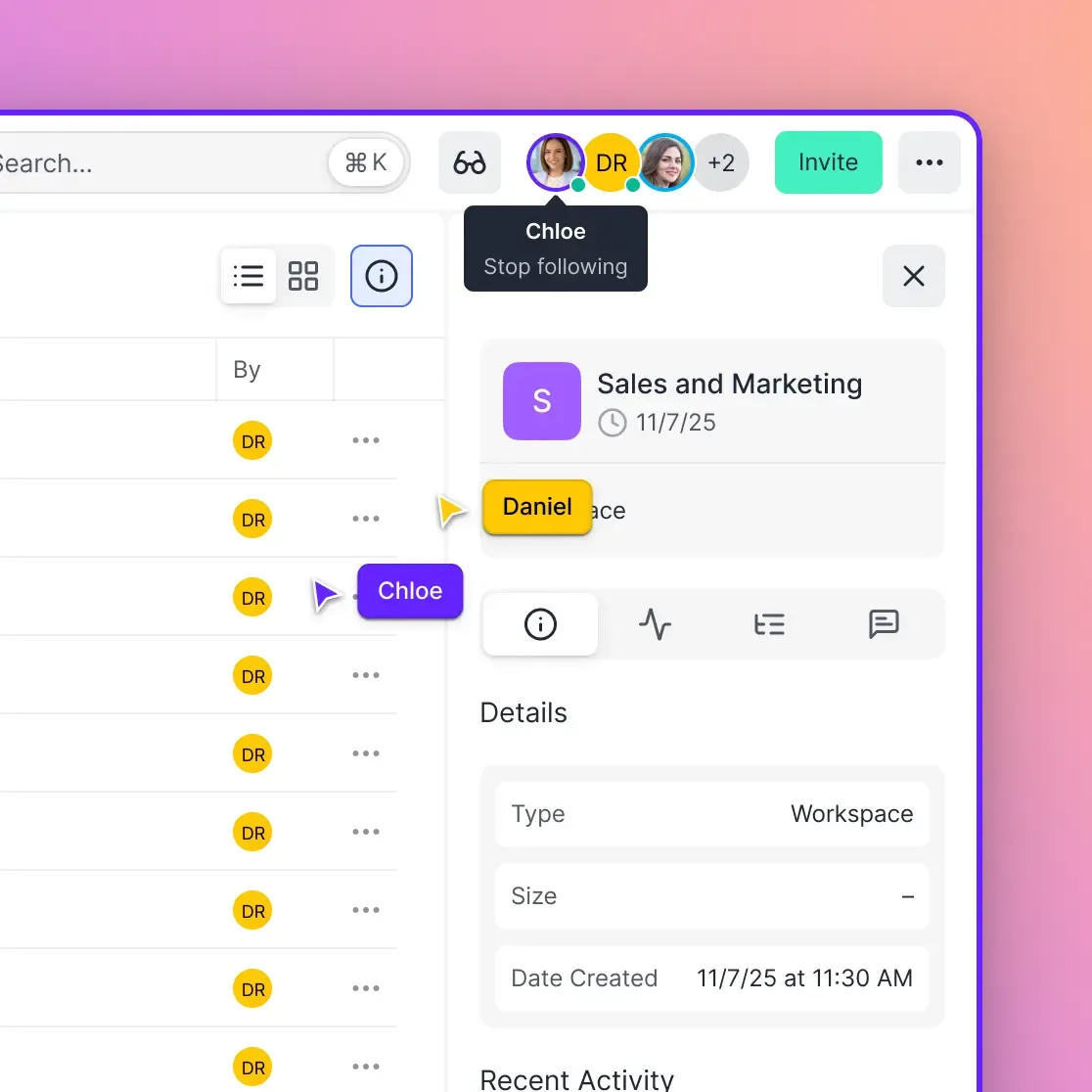
Some teams treat agents as junior developers. The agent handles boilerplate and test generation while humans focus on architecture and complex logic. Fastio shows real-time presence when agents are active in a workspace. You can see which files the agent is working on and pick up where it left off.
Audit Trail for Agent Actions
Every file operation in Fastio is logged. This matters when you need to understand what an agent changed or debug unexpected behavior.
Security Considerations
Running agents with file access introduces risks. Here's how to reduce them.
Sandboxing Agent Sessions
Don't give agents access to credentials, secrets, or production data. Create dedicated workspaces with only the files agents need. Fastio folder-level permissions let you:
- Restrict agents to specific folders
- Set read-only access for reference files
- Revoke access instantly if something goes wrong
Credential Management
Never store API keys or secrets in files agents can access. Use environment variables or secret managers outside the agent's reach. If an agent needs to call external APIs, provide a proxy that handles authentication without exposing credentials.
Code Review Before Deployment
Treat agent-generated code like any external contribution. Run it through:
- Automated linting and security scanning
- Unit tests
- Human review for logic and architecture decisions
The Business Trial on Fastio includes full audit logging, so you can trace every file the agent touched during a session.
Sources
References used to verify factual claims in this guide.
-
agents using filesystem-like interfaces scored 74% on memory tasks
-
Fastio MCP server offers a consolidated toolset for file operations via Streamable HTTP A consolidated MCP toolset covers operations coding agents need from CRUD to version control and permission management Fastio provides cloud storage built for AI agents with a consolidated MCP toolset, built-in RAG, and ownership transfer capabilities
-
The 14-day Business Trial allows teams to evaluate Fastio workspaces and persistent storage Fastio plans include seats and storage with monthly credits for AI work
Frequently Asked Questions
How do AI coding agents access files?
Coding agents access files through list, read, and write operations. Modern agents can use MCP servers that provide standardized file APIs for cloud storage. Fastio's remote MCP server uses Streamable HTTP.
What storage do coding assistants need for persistent context?
Coding assistants need persistent storage that maintains project structure, coding patterns, and previous decisions across sessions. This includes auto memory directories, external databases like SQLite, or cloud storage with built-in RAG for indexing. Persistent context produces noticeably better code compared to agents starting fresh each session because project-specific patterns and decisions carry forward.
Can AI agents edit code files directly?
Yes, AI agents can edit code files directly with proper write permissions. Agents need file system access to create, modify, and delete files while preserving permissions and version history. Teams can review and restore earlier file versions when agents edit the same workspace.
What is the difference between built-in memory and external storage?
Built-in memory like Claude Code's auto memory stores project patterns and preferences in local directories tied to specific repositories. External storage provides shared access across agents, human-agent collaboration, ownership transfer, and cross-project context. Built-in memory works for solo developers while external storage is necessary for teams and multi-agent systems.
How much storage does a typical coding agent need?
A typical coding agent accessing hundreds of files per session needs enough storage for the full codebase plus build artifacts and dependency caches. Agents working across multiple repositories or maintaining context for several projects may need tens of gigabytes. Fastio's 14-day Business Trial requires a credit card; see [/pricing/](/pricing/) for current plan details.
What are MCP servers for coding agents?
MCP (Model Context Protocol) servers provide standardized file access APIs that work with Claude Desktop, Cursor, VS Code, and other compatible clients. Fastio's remote MCP server uses Streamable HTTP and provides a consolidated toolset with workspace access, built-in RAG when Intelligence is enabled, ownership transfer, and advisory file locks for coordinating writes.
How do coding agents work with version control systems?
Coding agents works alongside git and other version control systems by accessing the repository's working directory with proper permissions. Agents commit changes, create branches, and push updates while preserving file permissions and git history. Storage should mount projects with correct ownership so agents can perform git operations without manual intervention.
What security controls do coding agent storage systems need?
Coding agent storage needs granular permissions at organization, workspace, folder, and file levels. Encryption at rest and in transit protects code. The activity log tracks file and permission activity, while sandboxed containers can isolate agents from host resources.
Can multiple AI agents share the same codebase?
Yes, multiple agents can share the same codebase using a workspace with granular permissions and version history. Teams can review changes and restore earlier versions when different agents handle frontend, backend, and testing work.
How does ownership transfer work for agent-built projects?
Ownership transfer lets agents create organizations, workspaces, and shares, then transfer ownership to human users while retaining admin access. The agent builds complete projects including code, documentation, and configs, then hands everything off to a client or team member. The human gains full control while the agent maintains access for future updates.
Related Resources

Give Your AI Agents Persistent Storage
Fastio gives teams shared workspaces, MCP tools, and searchable file context to run ai coding agent storage workflows with reliable agent and human handoffs.