How to Implement the Fastio API in Ruby on Rails
File sharing in modern applications has evolved past simple blob storage. Implementing the Fastio API in Ruby on Rails allows developers to natively integrate intelligent, multi-agent workspaces into their traditional web applications. This guide covers how to move beyond basic Active Storage and S3 configurations to build collaborative environments where humans and AI agents work together seamlessly using the Fastio REST API and remote MCP server.


What is the Fastio Ruby on Rails Integration?
File sharing is the practice of distributing digital files between users over a network, typically using cloud storage or direct transfer services. Modern file sharing platforms support files from a few kilobytes to hundreds of gigabytes, with features like access controls, versioning, and real-time collaboration. For development teams, choosing the right file sharing method directly affects application performance and feature velocity.
Implementing the Fastio API in Ruby on Rails allows developers to natively integrate intelligent, multi-agent workspaces into their traditional web applications. Instead of merely uploading files to a passive S3 bucket, a Rails application using Fastio creates dynamic workspaces where uploaded files are automatically indexed for RAG (Retrieval-Augmented Generation), immediately searchable by meaning, and accessible to AI agents via the Model Context Protocol (MCP).
This integration bridges the gap between legacy monoliths and modern AI workflows. By adopting Fastio, Rails developers can provide their users with enterprise-grade file management that is inherently understood by AI, without having to build complex vector databases or chunking pipelines from scratch.
Related guides
- How to Implement the Fastio Semantic Search APIThe Fastio Semantic Search API enables developers to execute vector-based searches against workspace files without...
- Fastio API Presigned URLs Implementation GuideFastio API presigned URLs allow your applications to grant secure, time-limited, direct access to files without...
- How to Build a Fastio API Golang ImplementationBuilding a Fastio API Golang implementation allows developers to manage workspaces, upload files concurrently, and...
- Implementing RBAC with the Fastio API: A Developer GuideImplementing RBAC with the Fastio API lets you map enterprise user roles to specific workspace and file permissions....
- How to Implement Semantic Search with Fastio APIHow to implement semantic search with Fastio API starts with enabling Intelligence Mode on a workspace. This...
- How to Implement URL Imports with Fastio APIGuide to how implement url imports with fast api: With Fastio's API, URL imports pull files straight from external...
More on this subject: Agent Integrations and APIs (192 guides)
Why Rails Teams Are Moving Beyond Active Storage
Active Storage makes it easy to attach files to Active Record objects, but it is fundamentally just a bridge to commodity storage like Amazon S3, Google Cloud Storage, or Microsoft Azure Storage. Most Rails file upload guides stop at basic S3 integrations, completely missing agentic workspace workflows.
When you only use S3, your application treats files as dead weight. You have to build your own vector databases, indexing pipelines, and agent communication layers if you want AI to interact with those files. Every time a user uploads a PDF or a video, your backend must process, transcribe, chunk, and embed the content before an LLM can even read it. This creates massive overhead and technical debt.
Fastio replaces this passive storage model. Fastio's 14-day Business Trial includes workspace storage, large file uploads, and AI credits. When you upload a file through the Fastio API, it is instantly available to Fastio's MCP tools via Streamable HTTP. Your Rails application no longer just stores data; it hosts an intelligent environment where agents and humans share the same tools and context.


Ready to upgrade your Rails storage?
Get scalable workspace storage, access to a consolidated MCP toolset, and built-in RAG for your AI agents. Visit /pricing/ to start your 14-day trial.
Setting Up the Fastio REST Client in Rails
Integrating Fastio into your Rails application requires configuring an HTTP client and establishing secure authentication. Follow these steps to set up standard REST calls to the Fastio API.
Step 1: Configure Faraday in your Gemfile
Add Faraday (or use standard Net::HTTP) to your Gemfile for robust REST communication.
gem faraday
Run bundle install to ensure the HTTP dependency is ready in your environment.
Step 2: Configure environment variables
Protect your API keys by storing them in credentials or your .env file. You will need your Fastio API key.
FASTIO_API_KEY=sk_test_your_api_key_here
FASTIO_ORG_ID=org_your_organization_id
Step 3: Create an initializer
Create config/initializers/fastio.rb to configure a Faraday connection with default headers pointing to the Fastio API.
require faraday

Rails.application.config.fastio_api = Faraday.new(url: https://api.fast.io/current/) do |f|
  f.request :authorization, :Bearer, ENV.fetch(FASTIO_API_KEY)
  f.request :url_encoded
  f.response :json
  f.adapter Faraday.default_adapter
end
Building Intelligent Workspaces via API
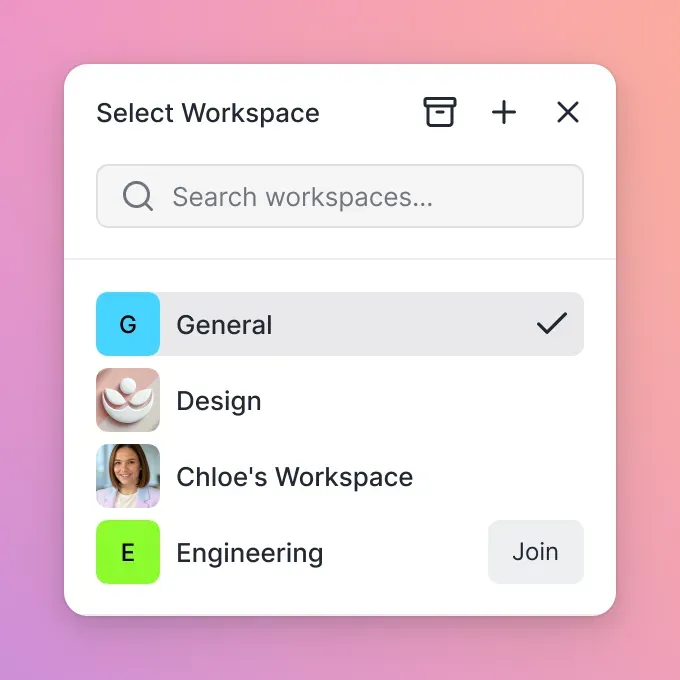
Once the client is configured, you can programmatically provision workspaces. Unlike traditional folders, Fastio workspaces are collaborative environments built for both humans and AI agents.
To create a workspace when a new project is initialized in your Rails app, you can wrap the API call in a service object:
class WorkspaceService
  def self.create_project_workspace(project)
    client = Rails.application.config.fastio_client

    workspace = client.workspaces.create(
      name: "Project Workspace: #{project.name}",
      description: "Auto-generated workspace for project #{project.id}",
      intelligence_mode: true
    )

    project.update(fastio_workspace_id: workspace.id)
    workspace
  end
end
By setting intelligence_mode: true, you ensure that any file uploaded to this workspace is automatically indexed. There is no need to configure a separate vector database or embedding pipeline. Toggle Intelligence Mode on a workspace, files are auto-indexed, ask questions with citations natively through the API.
Uploading Files and Managing Agents
Handling file uploads in Rails typically involves form data and multipart requests. With Fastio, you stream the file directly to the workspace, ensuring that memory consumption remains low on your web servers.
class DocumentsController < ApplicationController
  def create
    workspace_id = current_project.fastio_workspace_id
    file_io = params[:document][:file].tempfile
    filename = params[:document][:file].original_filename

    client = Rails.application.config.fastio_client

    # Upload the file directly to the Fastio workspace
    upload = client.files.upload(
      workspace_id: workspace_id.
      file: file_io.
      filename: filename
    )

    flash[:notice] = "File uploaded and indexed for AI agents."
    redirect_to project_path(current_project)
  end
end
Once uploaded, you can assign an AI agent to the workspace using the OpenClaw integration or by provisioning access via the MCP server. Connect agents to the remote MCP server URL at https://mcp.fast.io/mcp/tools to access a consolidated MCP toolset with natural language file management. This allows agents to read, summarize, and edit the files asynchronously while your human users interact with the UI.
Evidence and Market Data
According to G2, over 60% of all corporate data is stored in the cloud. As applications modernize, simply storing this data is no longer enough; it must be actionable and accessible to machine intelligence.
Also, according to BuiltWith, there are currently 565,045 live websites using Ruby on Rails. For these hundreds of thousands of applications, transitioning from passive storage to intelligent workspaces is a critical modernization step. Integrating AI workspaces directly into monolithic frameworks like Rails is a top priority for modernizing legacy applications. By utilizing the Fastio REST API and MCP server, teams can add next-generation capabilities without rewriting their entire application architecture.
Advanced Workflows: Activity Polling, File Locks, and Version History
For complex multi-agent systems, you need robust concurrency controls and event-driven tracking. Fastio provides advisory file locks alongside file version history, granular permissions, and a detailed activity log.
Coordinating Concurrent Access with Advisory File Locks
When multiple agents or workers collaborate on shared assets, an agent can acquire an advisory file lock before writing (POST /current/workspace/{workspace_id}/storage/{node_id}/lock/). Other agents attempting to lock the file receive HTTP 409 and can wait or read. Because locks are advisory, version history acts as the safety net: every write is preserved automatically under the stable node_id.
def fetch_file_versions(workspace_id, node_id)
  client = Rails.application.config.fastio_api
  response = client.get("workspace/#{workspace_id}/storage/#{node_id}/versions/")
  response.body
end
Long-Polling Activity for Reactive Workflows Keep your Rails application synchronized by long-polling the realtime activity feed instead of hammering endpoints.
class ActivityPollingJob < ApplicationJob
  queue_as :default

def perform(entity_id, last_activity)
    client = Rails.application.config.fastio_api
    response = client.get("activity/poll/#{entity_id}", { wait: 95, lastactivity: last_activity })
    ProcessActivityJob.perform_later(response.body) if response.success?
  end
end

Implementing URL Import for Zero Local I/O
One of the most powerful features of the Fastio API is the ability to bypass local server I/O entirely. Pull files from Google Drive, OneDrive, Box, Dropbox via OAuth without routing the bandwidth through your Rails application servers.
def import_from_drive(drive_url, workspace_id)
  client = Rails.application.config.fastio_api
  response = client.post("upload/", {
    action: web-import,
    url: drive_url,
    instance_id: workspace_id,
    folder_id: root
  })
  response.body[id]
end
This architectural pattern offloads the heavy lifting from your application directly to Fastio infrastructure. Your Rails app simply manages the state and displays the results to the user once the import completes. For B2B SaaS applications, you can use the API to let agents create organizations, build workspaces and shares, and transfer to human clients. The agent keeps admin access, ensuring smooth handoffs.
Sources
Frequently Asked Questions
How to integrate Fastio with Ruby on Rails?
Integrating Fastio with Ruby on Rails involves configuring an HTTP client like Faraday to connect to https://api.fast.io/current/, managing API keys securely in Rails credentials, and using Fastio REST endpoints to upload files and provision intelligent workspaces.
Can Rails apps use Fastio for agent storage?
Yes, Rails applications can fully utilize Fastio for agent storage. By creating workspaces via the API with Intelligence Mode enabled, files uploaded through your Rails app become immediately accessible to AI agents via multiple MCP tools and built-in RAG capabilities.
How does Fastio differ from Active Storage?
Active Storage provides a bridge to passive commodity storage like S3, requiring you to build your own indexing and AI integration layers. Fastio replaces this with intelligent workspaces where files are automatically vectorized, searchable by meaning, and accessible to multi-agent workflows.
What does Fastio cost for developers?
Fastio offers a 14-day Business Trial requiring a credit card, allowing developers to evaluate REST endpoints, workspace features, and MCP tools before choosing a paid plan, Starter at $9.99/mo, Business at $49.99/mo, or Enterprise at $199.99/mo. See /pricing/ for details.
Related Resources

Ready to upgrade your Rails storage?
Get scalable workspace storage, access to a consolidated MCP toolset, and built-in RAG for your AI agents. Visit /pricing/ to start your 14-day trial.