How to Create an Internal Knowledge Base: Step-by-Step Guide
Learning how to create an internal knowledge base helps teams replace fragmented wikis with an intelligent, searchable workspace. Traditional platforms demand manual curation and separate documentation from working files. By combining automated semantic indexing, cloud storage connectors, and Model Context Protocol access, organizations can build a centralized repository that delivers source-cited answers to people and AI agents alike.


What Is an Internal Knowledge Base?
When an engineer needs a deployment specification, an account executive needs a renewal clause, and a coding agent needs an API contract, traditional static wikis force all three to stop and dig through disconnected folders. A 2012 McKinsey Global Institute report estimated that interaction workers, such as managers and professionals, spend about 19 percent of their workweek searching for and gathering information. Information silos grow as a company adds people and tools, because manual document maintenance does not keep up. A modern internal knowledge base solves this not by demanding more manual tagging, but by creating an automated workspace where operational documents are indexed on arrival, restricted by clear workspace boundaries, and queryable by both employees and AI agents.
An internal knowledge base is a centralized, access-controlled workspace where operational documents, decisions, and specs are indexed to provide source-cited answers to people and AI agents. In companies running autonomous tools, this environment acts as a shared company brain where raw files become an interactive retrieval engine. Instead of forcing teams to convert their existing PDFs, spreadsheets, and markdown notes into a closed wiki format, an intelligent knowledge base accepts files in their native formats and indexes them for search on arrival.
Connecting people and AI agents to the same document substrate changes daily operations. When a customer success manager asks for the custom SLA agreed upon in an enterprise contract, the system retrieves the exact paragraph from the signed PDF. When a developer prompts Claude Code or Cursor to implement an endpoint according to an internal architectural decision record, the agent reads the spec directly through the Model Context Protocol without human intervention. The knowledge base stops being a static filing cabinet and becomes an active operational layer.
Why Static Documentation Platforms Fail
Traditional corporate wikis and intranets suffer from three chronic problems: high maintenance overhead, stale information, and separation from working files. Most documentation tools require an employee to manually draft an article, format it in a proprietary web editor, and tag it with category labels. Because people prioritize shipping code or closing deals over wiki gardening, these repositories fall behind actual operations within months. Outdated pages sit next to current ones, eroding trust in the search bar.
A second failure mode is file fragmentation. Critical operational knowledge rarely originates inside a wiki. It lives in Google Docs, architecture PDFs, slide decks, vendor contracts, and spreadsheet models. Teams attempt to solve this by pasting links into wiki pages, creating a maze of broken pointers and permission walls.
Finally, standard wikis separate pages from raw working files. In Fastio, the working files live in the workspace, so agents search them, take file locks, co-edit Notes, and save outputs beside the sources under one set of workspace and share permissions.
Operational Materials That Belong in the Repository
A company brain should house the foundational records that guide business execution across departments. Rather than archiving every transient draft, teams should curate high-value documents that answer recurring operational questions:
- Technical and Product Engineering: Architecture decision records (ADRs), API schemas, infrastructure runbooks, security review checklists, and post-incident briefs.
- Sales and Revenue Operations: Product launch kits, pricing calculators, competitor battlecards, win/loss analysis records, and contract renewal briefs.
- Corporate and People Operations: Employee onboarding packets, compensation bands, expense policies, standard operating procedures (SOPs), and investor updates.
- Autonomous Agent Outputs: Automated codebase audits, extracted contract tables, competitive intelligence scrapes, and research summaries.
Structuring these assets within dedicated workspaces gives teams a clear framework for daily collaboration and automated agent retrieval.
Related guides
- How to Build a Company Brain for Customer Success TeamsA company brain for customer success unifies client contracts, onboarding records, and product documentation into an...
- How to Build a Company Brain for Finance Teams: Security, Isolation, and AI RetrievalA company brain for finance teams centralizes accounting policies, vendor agreements, audit files, and financial models...
- Internal Knowledge Base Examples: Structures, Templates, and TaxonomiesAn internal knowledge base centralizes an organization's operational files, decisions, playbooks, and reference...
- How to Build a Collaborative AI Knowledge Base for TeamsAn AI knowledge base is an intelligent workspace where humans and AI agents collaborate on organizational knowledge....
- Knowledge Base Best Practices for Human Teams and AI AgentsKnowledge base best practices are operational standards for structuring, synchronizing, and securing central...
- Self-Hosted Knowledge Base: Open-Source Tools, Costs, and Modern AlternativesA self-hosted knowledge base gives organizations physical custody over their internal documentation and runbooks. While...
More on this subject: Agent Memory and Storage (365 guides)
Core Architecture: Humans and AI Agents in One Substrate
Many teams attempt to support AI adoption by creating separate systems: an internal wiki for human employees and an external vector database for machine retrieval. This dual-system approach adds engineering overhead. Every time an employee updates an onboarding document or edits an engineering spec, someone must run an extract, transform, and load (ETL) pipeline to chunk the file, generate embeddings, and update the vector store. Over time, the vector store can drift out of sync with the primary files.
Fast.io eliminates this split by unifying storage and retrieval into a single workspace layer. When an employee uploads an engineering spec or an agent writes an incident report, the platform's Intelligence Mode indexes the content on arrival. This indexing process supports hybrid search, combining keyword precision, semantic concept matching, and structured metadata queries. Both humans using the web application and software agents communicating over API connections query the exact same files.
Answers from the intelligence layer cite the source file, the page where one applies, and a text snippet. When an employee or an agent reviews an answer, they can click through to inspect the underlying source document. This transparent citation model makes answers checkable and gives team members confidence in automated retrieval.
Automated Ingestion and Source-Cited Answers
Traditional document retrieval systems rely on keyword indexing. If an employee searches for 'remote work equipment stipend' but the policy document uses the heading 'Home Office Hardware Reimbursement,' keyword search returns zero matches. Employees conclude the policy does not exist and ask HR directly.
Semantic indexing resolves this by analyzing the contextual meaning of sentences. Fast.io indexes incoming documents automatically when Intelligence is on, so search matches meaning as well as exact keywords. When a team member enters a question in natural language, the search engine matches the intent of the prompt against the indexed knowledge base.
Beyond semantic search, the system supports structured document processing through Metadata Views (see /product/document-data-extraction/). Metadata Views turn unstructured documents into a live, queryable database. Users describe the fields they want extracted in natural language, and AI creates a typed schema containing Text, Integer, Decimal, Boolean, URL, JSON, or Date fields. Incoming documents match the schema automatically, populating a filterable table of contract renewal dates, vendor totals, or policy numbers without manual data entry.
How Workspaces Differ from Enterprise Search Overlays
Enterprise search tools such as Glean, Guru, and Notion AI approach company knowledge from different technical angles. Understanding these distinctions helps teams choose the right architecture for their operations.
Glean operates as an enterprise search overlay. It connects to many workplace apps, indexing content stored across Slack, Google Drive, Jira, and Salesforce, and runs a remote MCP server for agents. It does not store the working files itself; they stay in the source apps. Guru pairs verified knowledge cards with AI answers over connected sources and offers an MCP server. Notion AI searches Notion pages and connected apps such as Slack and Google Drive, and Notion hosts an MCP server for its pages.
Fast.io approaches knowledge management from the storage substrate itself. Rather than indexing files that live in other apps, Fast.io keeps the files themselves in the workspace where team members and AI agents collaborate. When an agent creates an asset, it saves the file directly into the workspace. The file is indexed on arrival, versioned automatically, and immediately available for human review.
How to Create an Internal Knowledge Base in Five Steps
Building a living knowledge base requires moving from scattered local files to an indexed, access-controlled workspace. Following a structured implementation process prevents chaotic file dumps and keeps retrieval accurate across human and machine queries.
Here is the five-step process to create an internal knowledge base:
- Audit and Consolidate Operational Content: Inventory scattered documents across personal drives, chat threads, and legacy wikis. Group materials into core operational categories, discard obsolete drafts, and identify the single source of truth for critical procedures.
- Isolate Sensitive Materials with Workspace-Level Boundaries: Define separate workspaces based on access boundaries, such as Engineering, Sales Operations, and Executive Leadership. Establish strict membership boundaries so confidential documents remain isolated from general team access, and restrict each sensitive workspace's join setting to invited members, since by default any organization member can join.
- Ingest Documents via Scheduled Cloud Sync and Direct Import: Connect Google Drive, Dropbox, Box, and OneDrive folders to Fast.io workspaces using Cloud Sync. Configure one-way or two-way sync on a schedule or on demand to import existing documentation without disrupting daily operations.
- Enable Intelligence Mode and Configure Metadata Views: Turn on Intelligence Mode across all workspaces to initiate automatic semantic indexing upon file arrival. Set up Metadata Views for structured document types like vendor agreements and customer renewal briefs to extract key fields into queryable spreadsheets.
- Connect AI Agents via MCP and Verify Retrieval Accuracy: Add Fast.io's hosted Model Context Protocol endpoint to coding assistants like Cursor and Claude Code. Submit test queries across engineering runbooks and operational policies to confirm that retrieval returns exact, source-cited document snippets.
Completing this sequence establishes an operational company brain that serves both human team members and automated agent workflows.
Content Audit and Knowledge Domain Mapping
The most common mistake during knowledge base setup is dumping every historical folder into a shared drive without curation. Ingesting outdated product specifications, superseded employee handbooks, and deprecated code samples pollutes the semantic search index. When an employee or agent queries the system, the model may retrieve obsolete instructions.
Begin by appointing domain owners across engineering, product, sales, and operations. Each owner audits their team's assets and designates canonical documents. For instance, the engineering lead identifies active architecture decision records and runbooks, while archiving legacy migration guides.
Consolidate these files into standardized formats. While Fast.io indexes PDFs, Word documents, presentations, and spreadsheets directly, converting messy notes into clean Markdown or organized PDFs can make retrieval more reliable. Establish clear naming conventions that reflect document type and subject, such as adr-014-database-sharding.md or policy-travel-expenses-2026.pdf.
Ingestion and Synchronization Strategy
Migrating files does not require manually downloading and re-uploading gigabytes of data. Organizations can connect existing cloud drives using Cloud Sync, which links Google Drive, Dropbox, Box, and OneDrive folders directly to a Fast.io workspace.
Cloud Sync operates one-way or two-way, on a schedule or on demand. It is never continuous, live, or real-time. For a team maintaining existing Google Drive workflows, configuring a scheduled one-way sync pulls updated documents into the Fast.io workspace on the schedule the team sets. This keeps the company brain current without requiring staff to change their daily authoring habits.
Teams can also bring files in once with Cloud Import, which connects to Google Drive, Dropbox, Box, or OneDrive through OAuth, or with URL import from a public URL, so files do not pass through a local machine. Once files land in the workspace, Intelligence Mode processes them in the background, preparing them for semantic retrieval.


Centralize your company knowledge for teams and AI agents
Create an intelligent workspace where operational documents are indexed on arrival, queryable with source citations, and accessible to coding agents via MCP. Monthly plans start with a 14-day free trial, which requires a credit card.
Structuring Workspaces and Access Boundaries
Security and retrieval precision depend on how workspaces are structured. In an internal knowledge base, search queries must only return documents that the asking person or agent is authorized to read. If permissions are porous, an employee querying the knowledge base might surface executive compensation tables or acquisition memos.
Fast.io enforces security through a clear role-based permission architecture. Permissions are set per organization, workspace, and share by member role. Organization roles are owner, admin, and member. Workspace roles are owner, admin, member, guest, and view. There are no folder-level or file-level permissions within a workspace. Every workspace member has access to all files in that workspace according to their assigned role.
Because there are no folder-level permissions, isolating sensitive materials requires separate workspaces. Documents meant for the entire organization live in an open company workspace, while sensitive materials like legal contracts, executive board updates, or payroll records live in their own dedicated workspaces with restricted membership.
Managing Cloud Sync Across External Providers
When connecting external cloud storage accounts, understanding permission inheritance is essential. Files synced from Google Drive, Dropbox, Box, or OneDrive take the Fast.io workspace's permissions, not the source drive's sharing settings.
For example, if a folder in Google Drive is shared with external contractors, those sharing links do not carry over when the folder syncs into an internal engineering workspace, and the links on the Google Drive side stay as they were. Inside Fast.io, access is governed by workspace membership, so the source drive's sharing settings do not widen access to the synced copy.
Administrators must also pay attention to workspace join settings. By default, a workspace's join setting allows any member of the organization to join. When setting up workspaces for sensitive departments like legal, finance, or executive leadership, administrators must restrict the join setting to invited members only. This prevents unauthorized employees from adding themselves to confidential workspaces.
External Client and Contractor Distribution
An internal knowledge base frequently needs to share specific documents with external contractors, legal advisors, or clients without granting them access to the entire workspace. Fast.io handles this through branded shares, which operate outside workspace membership:
- Send Shares: Deliver specific files or folders to external parties through branded links. Links can be set as durable or expiring, with optional passwords and per-recipient access controls.
- Receive Shares: Provide external vendors or clients with a secure upload portal for project files.
- Exchange Shares: Establish a bi-directional collaboration folder where external partners can review existing files and upload new deliverables.
A share can also disable file downloads entirely. When downloads are disabled, recipients can preview files in their browser but cannot download them.
Connecting Coding Agents and Large Language Models via MCP
The defining feature of a modern internal knowledge base is machine accessibility. Human employees query documentation through a web interface, but software developers and operations teams increasingly work with autonomous AI agents. These agents require protocol-level access to browse files, read specifications, and write operational summaries.
Fastio provides native integration through the Model Context Protocol (MCP), an open standard for connecting AI models to external tools and filesystems. The Fastio MCP server is remote, over Streamable HTTP, with one address per kind of client. It requires no local npm installation, no terminal bridge commands, and no local process management.
Connecting an AI client to Fast.io depends on the client type:
- Coding Agents (Cursor, Claude Code, Cline, VS Code): Connect to
https://mcp.fast.io/mcp/code. This endpoint exposes coding-focused operations likesearch,execute, andupload. - Conversational Apps and Personal Agents (Claude Desktop, OpenClaw, Hermes Agent): Connect to
https://mcp.fast.io/mcp/tools. This endpoint provides structured toolsets likestorage,storage_manage,workspace, andworkspace_manage. - ChatGPT and Codex: Install the Fastio plugin directly from the official plugin directory, or connect a custom MCP server to
https://mcp.fast.io/mcp/operations.
Streamable HTTP Endpoints and Authentication
Coding assistants can read from your internal knowledge base through the same server. Because the MCP server uses Streamable HTTP, developers point their tools at a URL instead of installing anything.
For Cursor, add the server to ~/.cursor/mcp.json or .cursor/mcp.json:
{
  "mcpServers": {
    "fast-io": {
      "url": "https://mcp.fast.io/mcp/code"
    }
  }
}
For Claude Code, run the command in your terminal:
claude mcp add --transport http fast-io https://mcp.fast.io/mcp/code
When connecting interactively through a browser-supported client, Fast.io initiates an OAuth authentication flow. The browser displays a Review Permissions screen where the user selects whether the connection has Read Only or Read & Write access, and chooses which specific organizations and workspaces the agent can reach. For automated scripts, CI pipelines, or headless servers, developers authenticate by sending a scoped API key as an Authorization: Bearer <api key> header on the connection.
Collaborative Notes for Human-Agent Co-Authoring
Documentation should not remain an offline, static artifact. When agents research a technical issue or analyze competitive market moves, they need a workspace location to draft their findings alongside existing files.
Fast.io includes Collaborative Notes kept beside files in the workspace. They co-edit live: people and agents with the same note open see each other's labeled cursors and edits as they type. An agent can draft an incident retrospective or summarize an architecture proposal directly into a shared note.
Human engineers can open the note, review the agent's drafted analysis, and make edits. Because notes are stored in the workspace and automatically indexed by Intelligence Mode, the agent's output becomes part of the searchable knowledge base, ready for future human queries.
Maintaining Knowledge Freshness, Versioning, and Auditing
A knowledge base degrades quickly without administrative oversight. When multiple engineers, managers, and autonomous agents update documents concurrently, teams need visibility into what changed, who modified it, and whether previous versions can be restored.
Fast.io addresses operational hygiene through two core mechanisms: per-file version history and a detailed activity log of changes. Every file uploaded or edited within a workspace maintains a complete version history. If an agent script inadvertently reformats an engineering specification or overwrites a policy document, the team can inspect earlier versions and restore the original.
To manage concurrent modifications, the platform provides advisory file locks through MCP actions (lock-acquire and lock-release on storage_manage). An advisory lock signals to other people and agents that a document is currently undergoing revisions. Locks expire automatically unless refreshed by a heartbeat, and they do not prevent writes; if concurrent writes occur, version history preserves both versions safely.
Tracking Organizational Changes with the Activity Log
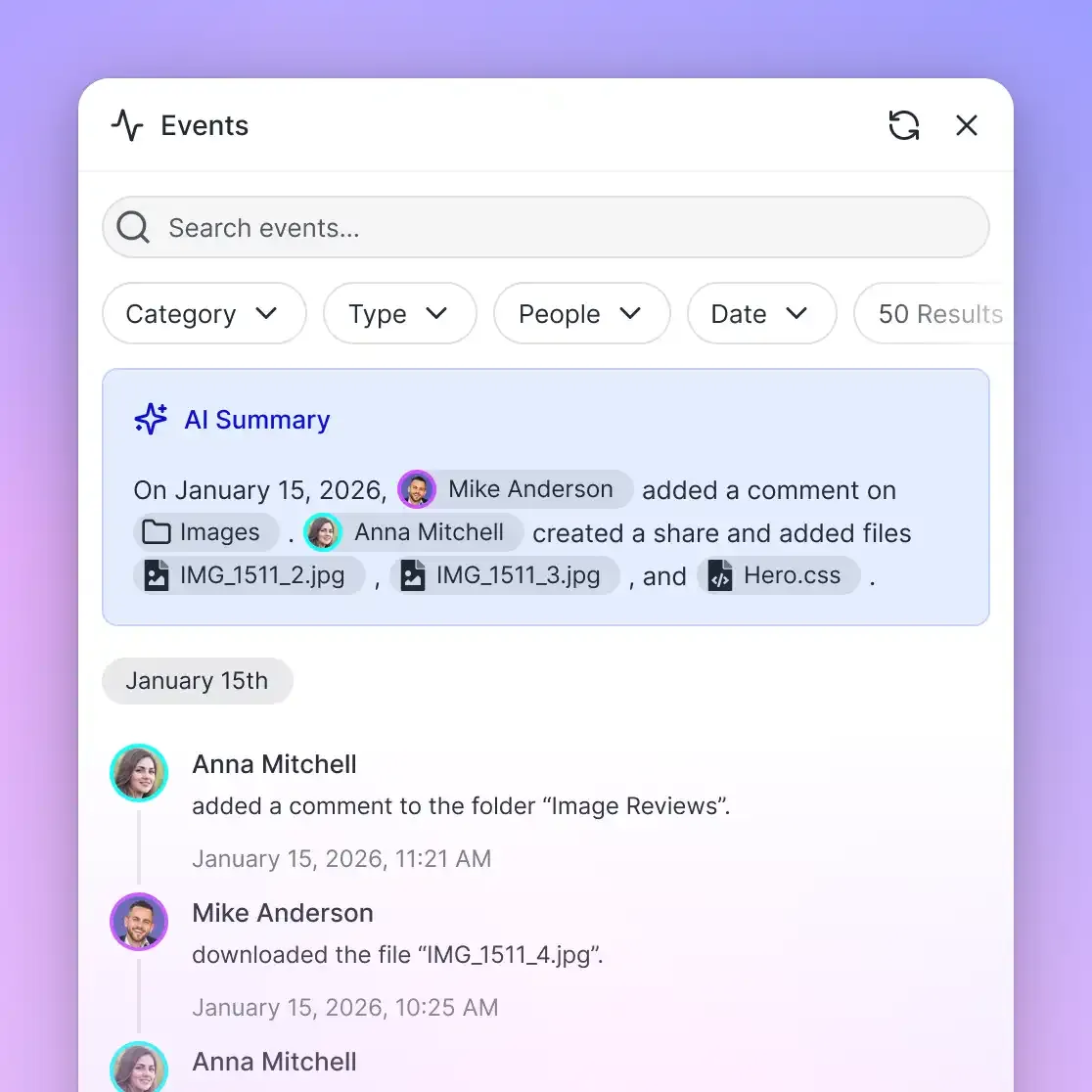
Operational transparency requires knowing how files move and who changes them. Fast.io maintains a detailed activity log that records modifications across organizations, workspaces, and shares.
The activity log records:
- Document uploads, edits, file renames, and deletions.
- Folder creation, moves, and storage reorganizations.
- Workspace membership additions, removals, and role updates.
- Share creation.
The activity log is designed specifically to track changes, not read-only events. It does not record file views, previews, opens, or downloads. There is no user tracking for document reads. This focus gives administrators a clean, actionable record of system modifications without logging noise.
Ownership Handoffs and Subscription Structure
In modern consulting and internal tooling workflows, external agencies or internal AI agents often set up the knowledge base before handing it off to department leaders. Fast.io supports clean ownership transfer from agent to human.
An agent or contractor can register an account, create the organization, establish workspaces, and upload documentation. Once setup is complete, the agent can hand the organization to a human stakeholder with a claim link, and the person who claims it becomes its owner. An owner can also transfer an organization or a workspace directly to another member, and the previous owner becomes an admin.
Every organization runs on a paid subscription. Monthly plans start with a 14-day free trial, which requires a credit card and ends early if trial credits are exhausted. Annual plans start paid with no trial. Seats count organization members only, while external guests who access shared files do not consume seats.
The table below outlines the core subscription plans:
Credits meter AI work only. Overage is $10 per 100,000 credits. Storage beyond the plan is $0.015 per GB a month and extra bandwidth $0.04 per GB, billed separately and not in credits.
Sources
References used to verify factual claims in this guide.
-
Interaction workers spend about 19 percent of their workweek searching for and gathering information (McKinsey Global Institute, July 2012, Exhibit 20, from IDC and MGI analysis).
Frequently Asked Questions
What should be included in an internal knowledge base?
An internal knowledge base should contain high-value operational documents that guide day-to-day work. Key assets include architecture decision records (ADRs), API specifications, deployment runbooks, post-incident briefs, product launch kits, sales battlecards, customer renewal briefs, standard operating procedures (SOPs), employee onboarding packets, and company policies. Keeping transient drafts and chat logs out of the knowledge base preserves retrieval accuracy.
How do you organize an internal knowledge base?
Organize an internal knowledge base by audience and access boundaries rather than deep, nested folder hierarchies. Create dedicated workspaces for specific domains, such as Engineering, Sales Operations, Customer Support, and Executive Leadership. Within each workspace, group files by project, product line, or operational function, and use descriptive file naming conventions so that both human team members and semantic search algorithms can locate content efficiently.
What is the best way to structure permissions in an internal knowledge base?
Structure permissions using workspace-level boundaries and role-based access controls. Fast.io sets permissions at the organization, workspace, and share levels through member roles (owner, admin, member, guest, view). Because there are no folder-level or file-level permissions, material that requires restricted visibility must be placed in a dedicated workspace or shared via access-controlled branded shares.
How do AI agents access an internal knowledge base?
AI agents access an internal knowledge base programmatically via the Model Context Protocol (MCP) or REST APIs. Fast.io hosts a remote MCP server using Streamable HTTP at `https://mcp.fast.io/mcp/code` for coding tools like Cursor and Claude Code, and `https://mcp.fast.io/mcp/tools` for conversational agents. ChatGPT and Codex use the Fastio plugin or `https://mcp.fast.io/mcp/operations`. Complete setup instructions and client configurations are available in the setup docs at https://mcp.fast.io/docs.
Does Fast.io sync with Google Drive?
Yes. Fast.io connects to Google Drive, Dropbox, Box, and OneDrive via Cloud Sync. Sync operations run one-way or two-way, on a schedule or on demand. Cloud Sync is never continuous, live, or real-time. Files synced from Google Drive adopt the Fast.io workspace's permissions, ensuring consistent access controls across your organization.
How does semantic search work in Fast.io workspaces?
When Intelligence Mode is enabled on a workspace, Fast.io automatically indexes files on arrival for both meaning-based and exact-term search. When a user or agent submits a query, hybrid search evaluates conceptual meaning and exact terms, returning direct answers with citations to the source files and pages.
What happens when files are synced from another cloud drive?
Files synced from external drives like Google Drive or OneDrive take the permissions of the Fast.io workspace into which they are imported. The sharing settings, external links, and permissions configured on the source drive are not inherited, preventing accidental exposure of internal documents to unauthorized external parties.
Related Resources

Centralize your company knowledge for teams and AI agents
Create an intelligent workspace where operational documents are indexed on arrival, queryable with source citations, and accessible to coding agents via MCP. Monthly plans start with a 14-day free trial, which requires a credit card.