How to Integrate Fastio API with Semantic Kernel Workflows
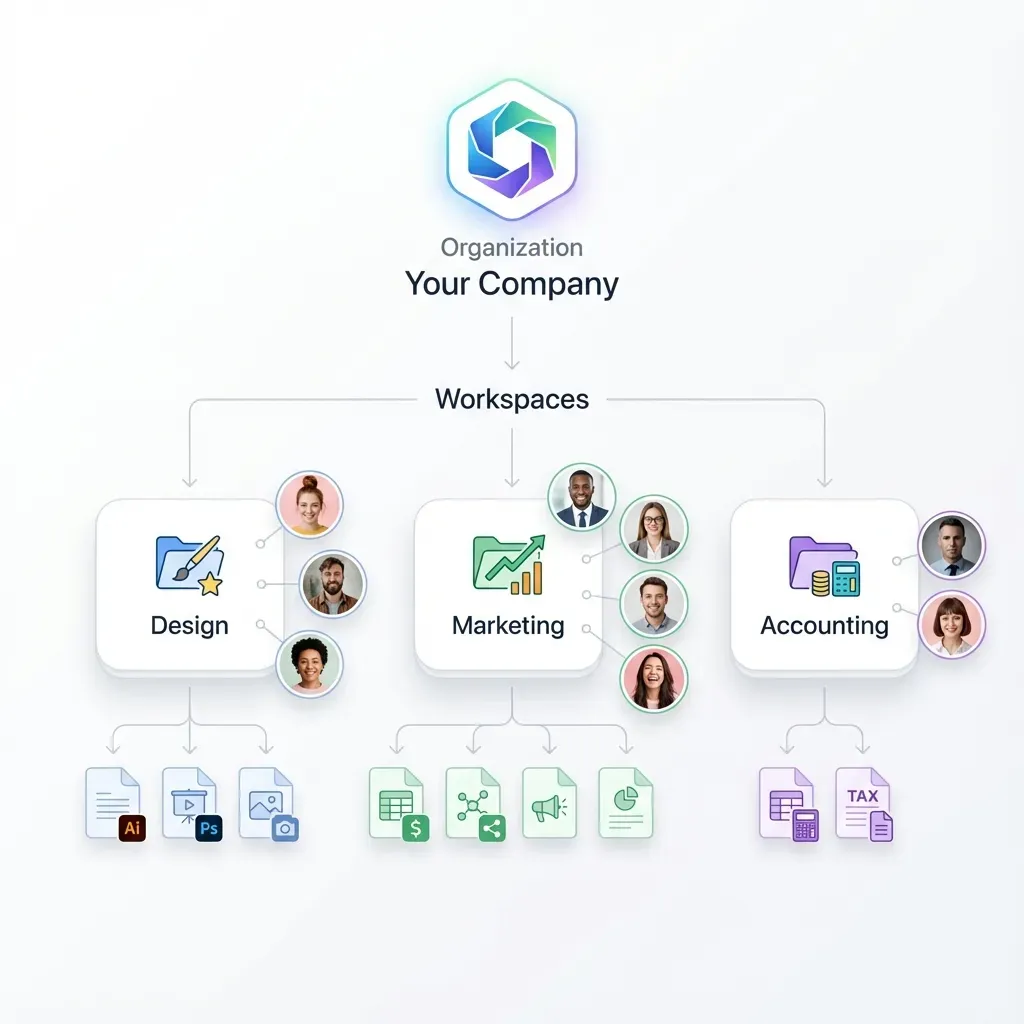
Integrating Fastio API with Semantic Kernel workflows gives .NET AI agents persistent file storage, secure RAG, and human handoff capabilities. Fastio workspaces let agents upload outputs, query documents with built-in AI, create branded shares, and transfer ownership to humans. This fills a gap in agent storage with C# examples. Follow these steps to build a native plugin that calls Fastio REST endpoints from Semantic Kernel kernels and agents.


Why Use Fastio with Semantic Kernel?
Semantic Kernel orchestrates AI agents, but agents need reliable storage beyond ephemeral memory. Fastio provides workspaces where agents store files alongside humans.
Key benefits include automatic RAG indexing when intelligence is enabled, multiple uploads, versioning, and multiple MCP tools for advanced integrations.
Unlike S3 or vector DBs, Fastio handles previews, comments, and shares out of the box. Agents build complete projects and hand them off via one-click transfer.
This integration uses Fastio's REST API (https://api.fast.io/current/) in SK native plugins. No extra services needed.
Helpful references: Fastio Workspaces, Fastio Collaboration, and Fastio AI.

Related guides
- How to Implement Semantic Search with Fastio APIHow to implement semantic search with Fastio API starts with enabling Intelligence Mode on a workspace. This...
- How to Integrate Fastio API with LlamaIndex WorkflowsGuide to integrate fast api with llamaindex workflows: Integrating Fastio with LlamaIndex enables AI agents to directly...
- How to Integrate Fastio API with Pydantic AIIntegrating Fastio API with Pydantic AI ensures that documents retrieved by agents are automatically parsed into...
- How to Implement the Fastio Semantic Search APIThe Fastio Semantic Search API enables developers to execute vector-based searches against workspace files without...
- How to Integrate Fastio API with LangChain ToolsConnect Fastio's API to LangChain tools. AI agents then get lasting file storage, RAG across multiple files, and...
- How to Integrate Fastio API with SvelteKit ApplicationsIntegrating Fastio API with SvelteKit applications lets developers add secure file storage to their apps. Use...
More on this subject: Agent Integrations and APIs (192 guides)
What to check before scaling Integrate Fastio API with Semantic Kernel workflows
Create a Fastio account. Start a 14-day Business Trial with persistent storage and usage-based credits.
Install Semantic Kernel NuGets:
dotnet add package Microsoft.SemanticKernel
dotnet add package Microsoft.SemanticKernel.Connectors.OpenAI --prerelease
dotnet add package System.Net.Http.Json
Get an API key from Settings > API Keys. Or use OAuth/JWT for production.
Base URL: https://api.fast.io/current/.


Build Agent Workflows with Persistent Storage
Start your 14-day Business Trial with persistent storage and usage-based credits. Connect Semantic Kernel agents and humans to Fastio workspaces.
Initialize Fastio Client in Semantic Kernel
Start with a HttpClient configured for Fastio. Here's the featured snippet code:
1. Create FastIoApiClient class:
public class FastIoApiClient
{
  private readonly HttpClient _httpClient;
  private readonly string _apiKey;

public FastIoApiClient(HttpClient httpClient, string apiKey)
  {
    _httpClient = httpClient;
    _apiKey = apiKey;
    _httpClient.DefaultRequestHeaders.Authorization = new("Bearer", apiKey);
    _httpClient.BaseAddress = new Uri("https://api.fast.io/current/");
  }

// Methods below
}
2. Register in Kernel:
var builder = Kernel.CreateBuilder();
builder.Services.AddSingleton<HttpClient>();
builder.Services.AddSingleton(new FastIoApiClient(httpClient, apiKey));
var kernel = builder.Build();
This sets up authenticated calls from any plugin function.

Handle JWT Refresh
For long sessions, implement token refresh. Call /current/user/auth/ with basic auth for new JWT (multiple hour expiry).
Build Core Plugin Functions
Define native functions for common operations.
Upload File:
[KernelFunction("UploadFile")]
public async Task<string> UploadFileAsync(string workspaceId, string filePath)
{
  var fileBytes = await File.ReadAllBytesAsync(filePath);
  var content = new MultipartFormDataContent();
  content.Add(new ByteArrayContent(fileBytes), "file", Path.GetFileName(filePath));

var response = await _httpClient.PostAsync($"/workspace/{workspaceId}/upload/single/", content);
  var result = await response.Content.ReadFromJsonAsync<JsonDocument>();
  return result.RootElement.GetProperty("node_id").GetString();
}
List Files:
[KernelFunction("ListFiles")]
public async Task<string> ListFilesAsync(string workspaceId)
{
  var response = await _httpClient.GetAsync($"/workspace/{workspaceId}/storage/root/?limit=50");
  // Parse and return JSON list
  return await response.Content.ReadAsStringAsync();
}
RAG Query (chat_with_files):
[KernelFunction("RagQuery")]
public async Task<string> RagQueryAsync(string workspaceId, string question)
{
  var form = new FormUrlEncodedContent(new[]
  {
    new KeyValuePair<string, string>("type", "chat_with_files"),
    new KeyValuePair<string, string>("query_text", question)
  });
  var response = await _httpClient.PostAsync($"/workspace/{workspaceId}/ai/chat/", form);
  // Poll for complete with message-read
  return await response.Content.ReadAsStringAsync();
}
Create Shares and Transfer Ownership
Create Send Share:
[KernelFunction("CreateSendShare")]
public async Task<string> CreateSendShareAsync(string workspaceId)
{
  var form = new FormUrlEncodedContent(new[]
  {
    new KeyValuePair<string, string>("mode", "send"),
    new KeyValuePair<string, string>("storage_mode", "room")
  });
  var response = await _httpClient.PostAsync($"/workspace/{workspaceId}/share/", form);
  var result = await response.Content.ReadFromJsonAsync<JsonDocument>();
  return $"https://go.fast.io/shared/{result.GetProperty("custom_name").GetString()}/{result.GetProperty("title_slug").GetString()}";
}
Transfer Org Ownership:
[KernelFunction("TransferOwnership")]
public async Task<string> TransferOwnershipAsync(string orgId)
{
  var response = await _httpClient.PostAsync($"/org/{orgId}/transfer/token/create/");
  var result = await response.Content.ReadFromJsonAsync<JsonDocument>();
  var token = result.GetProperty("token").GetString();
  return $"https://go.fast.io/claim?token={token}";
}
Share the claim URL with humans for smooth handoff.
Full Workflow Example
Orchestrate in a SK agent:
var uploadResult = await kernel.InvokeAsync<string>("UploadFile", new() { ["workspaceId"] = wsId, ["filePath"] = "report.pdf" });
var ragResult = await kernel.InvokeAsync<string>("RagQuery", new() { ["workspaceId"] = wsId, ["question"] = "Summarize key findings" });
var shareUrl = await kernel.InvokeAsync<string>("CreateSendShare", new() { ["workspaceId"] = wsId });
var claimUrl = await kernel.InvokeAsync<string>("TransferOwnership", new() { ["orgId"] = orgId });

return $"Report uploaded. Summary: {ragResult}. Share: {shareUrl}. Claim: {claimUrl}";
This builds, analyzes, shares, and hands off a complete project.
Sources
References used to verify factual claims in this guide.
-
Fastio provides a consolidated MCP toolset
-
Fastio offers a 14-day Business Trial
Frequently Asked Questions
How to use Fastio with Semantic Kernel?
Create native plugins with HttpClient calls to Fastio REST API. Register the client in the kernel builder for use across functions.
Can Semantic Kernel access external file storage?
Yes, integrate any REST API like Fastio. Agents upload to workspaces, query via RAG, and manage shares programmatically.
What plans does Fastio offer?
Fastio offers Starter, Business, and Enterprise plans, alongside a 14-day Business Trial requiring a credit card.
Does it support C# code examples?
This guide provides complete C# snippets for auth, upload, RAG, shares, and transfer.
How does RAG work?
Enable intelligence on workspace. Files auto-index. Use /ai/chat/ endpoint with chat_with_files for cited answers.
Related Resources

Build Agent Workflows with Persistent Storage
Start your 14-day Business Trial with persistent storage and usage-based credits. Connect Semantic Kernel agents and humans to Fastio workspaces.