Law Firm Collaboration Software: Managing Cross-Firm, Co-Counsel, and Client Workspaces
Law firm collaboration software provides structured, permission-controlled digital workspaces where attorneys, paralegals, outside co-counsel, and clients securely coordinate files, exhibits, and communications per matter. By replacing fragmented email attachments and consumer cloud drives with standardized matter folders and branded client portals, legal teams safeguard privileged records and maintain a clear chain of custody across every active case.

Why Traditional Tools Fail Cross-Firm, Co-Counsel, and Client Collaboration
When co-counsel from two different law firms team up on a complex litigation matter, collaboration almost always collapses into unencrypted email chains and ad-hoc consumer file sharing links. One firm uses a legacy document management system behind a firewall, the other uses a corporate cloud drive, and neither firm's IT department will grant the other full access to their internal network. The result is version confusion, unvetted access links, and privileged discovery files scattered across personal download folders.
Law firm collaboration software provides structured, permission-controlled digital workspaces where attorneys, paralegals, outside co-counsel, and clients securely coordinate files, exhibits, and communications per matter. According to the American Bar Association’s 2023 Cybersecurity TechReport, 29% of respondents reported that their firms had experienced a security breach at some point. For managing partners and legal operations leaders, this operational disconnect is a direct liability. Active caseloads across commercial litigation, intellectual property, corporate transactions, and joint defense agreements require real-time file sharing and collective document review. Yet traditional legal technology treats collaboration as an afterthought, forcing legal professionals to choose between rigid internal archives and insecure consumer cloud storage.
The Multi-Party Boundary Problem: When Case Teams Extend Beyond Firm Walls
Modern legal practice is rarely confined to a single physical office or a single corporate domain. High-stakes litigation routinely involves joint defense groups, specialized local counsel, independent expert witnesses, e-discovery vendors, and corporate in-house counsel. Each organization operates under its own security policies, software ecosystems, and IT restrictions.
When firms attempt to collaborate across these organizational boundaries using conventional tools, they encounter the multi-party boundary problem. An enterprise legal document management system (DMS) is engineered to protect internal firm assets behind corporate credentials. Provisioning temporary user accounts for outside co-counsel or expert witnesses requires IT intervention, expensive external seat licenses, and complex network permissions. To avoid this administrative bottleneck, lead attorneys often export sensitive files and circulate them through unmanaged external channels.
This workaround fragments the matter record. Essential correspondence, annotated court filings, and revised contract drafts end up distributed across separate, disconnected storage environments. When trial preparation accelerates or deal closing deadlines approach, nobody knows which document represents the true current version, and assembling a complete case file requires days of manual cross-referencing.
The Hidden Security and Liability Risks of Email Attachments and Consumer Cloud Drives
In the absence of a purpose-built legal collaboration platform, email inboxes become the default file repository. Attorneys and paralegals routinely circulate draft pleadings, expert disclosures, and confidential financial statements as attachments.
This practice introduces three severe operational vulnerabilities:
- Privilege Waiver and Misdirected Messages: Autofill address bars and reply-all mishaps represent a persistent vulnerability in legal practice. Sending an unencrypted attachment containing privileged work product or confidential settlement terms to an unintended recipient can trigger ethics investigations and jeopardize evidentiary protections.
- Version Proliferation: When three attorneys and two expert witnesses mark up separate copies of a PDF brief circulating via email, the team ends up with multiple conflicting versions. Reconciling competing edits manually wastes non-billable hours and increases the likelihood of submitting obsolete declarations or outdated contract terms.
- Storage Insecurity and Rogue IT: When email servers reject large discovery files due to attachment size caps, attorneys frequently turn to consumer file transfer tools. These consumer tools lack matter-centric access controls, enforce no ethical walls, and leave confidential client records accessible on personal devices long after the matter concludes.
A Five-Point Evaluation Checklist for Legal Collaboration Platforms
Legal practice managers and IT directors evaluating collaboration tools must look beyond internal chat features and basic file synchronization. A comprehensive legal collaboration platform must satisfy five core criteria:
- Granular Permission Scoping: The platform must support multi-level access controls across organizations, workspaces, folders, and individual files. Administrators must be able to invite co-counsel, expert witnesses, and corporate clients into specific matter folders without exposing broader firm archives.
- Client Portal Branding: Client-facing surfaces should feature the firm's branding, custom colors, and vanity URLs. A professional exterior reinforces client confidence and eliminates the confusion of generic consumer links.
- Defensible Audit Trails: Every document interaction, including uploads, downloads, file views, and link creations, must be recorded in an immutable, append-only log to maintain a verifiable chain of custody for court proceedings.
- Large Exhibit and Media Handling: The system must accommodate massive files, such as multi-gigabyte deposition videos, high-resolution surveillance exhibits, and voluminous discovery archives, using resilient upload protocols and in-browser media playback.
- Zero Client Login Friction: External clients and third-party witnesses should be able to securely access or submit documents without undergoing forced account registrations or complex multi-step onboarding.
Related guides
- Law Firm Workspace: Centralizing Matter Files, Client Portals, and Team CollaborationManaging active legal matters requires a unified digital environment where attorneys, paralegals, and clients...
- Law Firm Document Sharing: Secure External Delivery for Counsel and ClientsLaw firm document sharing requires controlled, encrypted pathways to distribute privileged files, discovery materials,...
- Documate Review: Legal Document Automation and Client PortalsDocumate, now rebranded as Gavel, is a no-code legal automation platform for building customized workflows, client...
- Choosing a Document Management System for Law Firms: A Complete GuideChoosing a document management system for law firms requires balancing secure internal case storage with the practical...
- How to Build a Secure SharePoint Client PortalSetting up a secure client portal for SharePoint often introduces heavy login friction for legal clients through...
- How to Build a Searchable Client Database for Your Law FirmBuilding a secure client database software structure does not require complex relational databases or custom...
More on this subject: Legal Teams (247 guides)
How Law Firm Collaboration Software Structures Multi-Firm and Co-Counsel Workspaces
An effective law firm team workspace organizes all case assets around the active legal matter rather than individual user accounts or personal computer folders. By creating a dedicated, self-contained digital environment for each case, legal teams establish clear confidentiality perimeters that accommodate internal staff, outside co-counsel, and specialized external contributors without exposing unrelated files.
This matter-centric structure guarantees that all work product, court filings, hearing transcripts, and evidentiary disclosures remain filed within their proper legal context from initial case intake through post-trial appeals or closing binder distribution. Managing multi-firm litigation requires transparent access boundaries, predictable directory conventions, and automated version controls so that all participating attorneys stay synchronized without continuous administrative intervention or confusing email threads.
Standardizing the Matter Hierarchy Across Participating Firms
When multiple firms collaborate, establishing a predictable directory taxonomy is essential for operational harmony. Operations managers should enforce a uniform folder hierarchy across all matter workspaces:
01_Pleadings_and_Court_Filings: Filed complaints, motions, judicial orders, hearing notices, and formal summons, arranged chronologically.02_Discovery_and_Productions: Inbound document productions, interrogatory answers, subpoena responses, deposition transcripts, and Bates-stamped exhibits.03_Co-Counsel_Work_Product: Shared legal research, joint strategy memoranda, draft briefs, and witness interview outlines accessible by all participating counsel.04_Internal_Firm_Work_Product: Dedicated internal folders restricted strictly to the primary firm's attorneys for billing records, internal staffing notes, and preliminary assessments.05_Client_Transmittals_and_Disclosures: Client-provided intake forms, sensitive corporate records, tax filings, and verified financial disclosures.06_Correspondence: Formal transmittal letters, meet-and-confer documentation, and communications with opposing counsel.
Establishing this standardized structure ensures that any attorney, paralegal, or covering partner across participating firms can immediately pinpoint relevant documents without searching through disparate email chains.
Enforcing Granular Permissions and Ethical Screens
Legal ethics rules require firms to safeguard client confidentiality and enforce strict conflict-of-interest separations. When collaborating with outside co-counsel, the primary firm must control access so external attorneys only see documents relevant to their specific assignment.
A modern collaboration workspace enforces granular permissions at four distinct tiers:
- Organization Level: Primary firm administrators manage billing, global security settings, and overarching workspace policies.
- Workspace Level: Core matter teams (lead partners, senior associates, primary paralegals) hold workspace-wide access to direct case administration.
- Folder Level: Outside co-counsel and local attorneys receive scoped access strictly to shared work product, pleadings, and discovery subfolders, completely isolating internal firm notes and client financial records.
- File Level: Sensitive settlement proposals or expert work product can be restricted to specific named counsel, preventing unauthorized viewing across the broader team.
When a lateral attorney joins a participating firm with a prior conflict against an adverse party, administrators can implement an immediate ethical screen. By excluding the conflicted attorney from the matter workspace, the firm prevents file visibility, notifications, and search indexing for that user, establishing defensible ethical compliance.
Version History and Defensible Chain of Custody
Joint brief writing and multi-party contract negotiation require rigorous version discipline. When multiple lawyers draft sections of an appellate brief or complex commercial agreement, manual file renaming conventions like brief_v3_revised_FINAL inevitably break down.
With per-file version history, every saved change automatically creates an immutable revision record. Attorneys can inspect previous iterations, compare redlines, identify which collaborator authored specific modifications, and revert to earlier language if negotiation strategies pivot. When documents are shared with outside parties, recipients always view the current approved draft, eliminating the risk of circulating obsolete provisions.
Litigation teams must also maintain a defensible chain of custody. A detailed activity log records every user action across the matter workspace, capturing timestamps for file uploads, downloads, views, permission adjustments, and share creations. If an opposing party disputes whether an evidentiary disclosure was made or received by a specific deadline, the activity log shows who did what and when.
How Client Delivery Workspaces and Branded Portals Replace Email Attachments
Client interaction defines the reputation and perceived value of a modern law practice. How a firm delivers interim work product, shares case updates, and collects sensitive personal records directly impacts client satisfaction, confidence, and ongoing retention. When clients encounter technical barriers or confusing account setup requirements just to review a draft agreement, their trust in the firm's operational competence erodes.
According to the American Bar Association, 53% of survey respondents reported that their firm does not offer clients access to a secure client portal. Relying on unencrypted email attachments or requiring clients to register for complex enterprise portals creates administrative friction that delays case progression and introduces avoidable security liabilities. A modern legal collaboration platform replaces these outdated mechanisms with branded client workspaces that combine enterprise data protections with consumer-level ease of use.
Branded Portals: Protecting Client Trust and Firm Identity
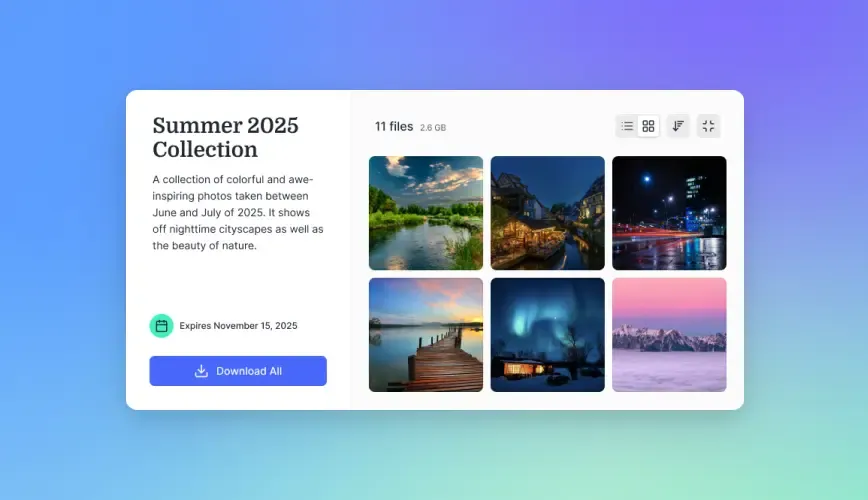
Forward-thinking law practices use branded Content Portals to establish an authoritative, trustworthy digital front door. Clients access case records, filed pleadings, and executed agreements through a polished interface that displays the firm's custom logo, corporate color palette, and personalized domain.
Presenting a cohesive, branded environment reassures corporate clients and individuals that their confidential legal records are managed with rigorous professional care. Instead of receiving disconnected links from generic consumer cloud storage providers, clients interact with a unified legal delivery portal that reflects the firm's dedication to privacy and operational excellence.
Scoped Shares: Send, Receive, and Exchange Workflows
Fastio replaces unstructured email attachments with purpose-built share links tailored to specific legal interactions:
- Send Shares: Tailored for unilateral deliverable distribution, such as transmitting executed estate plans, commercial real estate closing binders, settlement agreements, or filed appellate briefs. Administrators can apply custom expiration windows, restrict downloads, and configure password protection to ensure records remain under strict control.
- Receive Shares: Engineered for client intake and discovery collection. Firms provide clients with a secure upload link where they can drag and drop bank statements, tax records, medical documentation, or digital evidence directly into the designated matter intake folder. Clients do not need to register for an account, create passwords, or download software, eliminating delays in file collection.
- Exchange Shares: Create reciprocal collaboration spaces where corporate legal departments, co-counsel, and specialized financial auditors can review, annotate, and upload documents within a governed workspace boundary.
Because these shares are backed directly by live workspace folders, client interactions stay synchronized with internal records. When an attorney updates an exhibit or adds an entered court order, the client portal reflects the new file immediately without requiring a follow-up email.
Transferring Heavy Evidence, Deposition Video, and Discovery Archives
Active litigation and corporate investigations routinely generate files that far exceed email attachment limits and choke legacy practice management software. High-definition video depositions, digital surveillance recordings, smartphone forensic extractions, and multi-gigabyte Bates-stamped production volumes cannot be transferred through standard channels.
When firms lack modern file infrastructure, staff frequently resort to burning physical optical discs, mailing encrypted USB flash drives, or relying on consumer file transfer services. These manual workarounds delay deadlines and create tracking gaps.
A modern law firm workspace handles heavy evidentiary assets through chunked upload technology. Massive discovery sets and multi-hour deposition videos upload over standard web connections in resilient blocks. If a network interruption occurs midway through a transfer, the session resumes from the last confirmed block rather than restarting from the beginning.
Once uploaded, legal teams and outside co-counsel can review materials directly in their web browsers without downloading massive files to local workstations. The platform provides in-browser previews for hundreds of document formats alongside adaptive bitrate streaming for video depositions and audio recordings. Attorneys can scrub through hours of witness testimony smoothly, verify key video evidence, and coordinate case strategy instantly.


Unify matter collaboration across your firm, co-counsel, and clients
Coordinate active matters in secure workspaces with granular guest access, branded client portals, and automated document extraction. Monthly plans start with a trial of up to 14 days (credit card required); annual plans have no trial. Plans are Starter at $9.99/mo, Business at $49.99/mo, and Enterprise at $199.99/mo.
Accelerating Case Preparation with Document Intelligence and Structured Extraction
The volume of digital documentation generated during modern litigation, regulatory inquiries, and corporate due diligence can quickly overwhelm traditional manual review workflows. Legal teams often spend hundreds of non-billable or write-down-prone hours searching across disorganized document sets, extracting contract terms, or cross-referencing witness disclosures. When critical records are scattered across email chains and local hard drives, attorneys risk overlooking material clauses or inconsistent testimony.
Modern law firm collaboration software integrates document intelligence directly into the file storage layer. This allows attorneys, paralegals, and co-counsel to extract structured data, conduct semantic investigations, and surface relevant facts across thousands of pages without deploying expensive third-party review tools or maintaining complex secondary databases. Uniting document storage with native intelligence accelerates case analysis while keeping client information strictly confined within the matter workspace.
Structured Contract and Exhibit Extraction with Metadata Views
The vast majority of legal records arrive as unstructured text, such as scanned PDFs, Word documents, email archives, and image files. Extracting critical dates, monetary sums, or counterparty names from these records historically required tedious manual entry into spreadsheets or rigid OCR template tools that break when formatting changes.
Metadata Views convert unstructured case files into structured, queryable data grids. Rather than configuring complex regular expressions, legal staff describe the information they need in natural language. In a complex commercial dispute, breach-of-contract matter, or transactional audit, staff can define columns such as:
Execution Date(Date & Time field)Contracting Parties(Text field)Governing Law and Forum Selection(Text field)Indemnity Obligation Cap(Decimal or Text field)Termination Notice Period(Integer field representing calendar days)Arbitration Requirement(Boolean field)
The underlying artificial intelligence scans the matter workspace, classifies matching documents, and extracts the target data into a sortable, filterable spreadsheet. The system processes scanned documents, typed briefs, and handwritten meeting notes. If co-counsel later determines that non-solicitation clauses or liquidated damages provisions must also be evaluated, they can add new columns incrementally without reprocessing previously analyzed files.
Hybrid Full-Text and Semantic Search Across Matter Records
Pinpointing an admission, obscure email exchange, or prior court argument across vast discovery productions is often impossible with basic keyword search. If an attorney searches for "environmental liability" when a witness used the phrasing "spill remediation expenses," traditional keyword search returns nothing.
When Intelligence Mode is activated on a matter workspace, case files are automatically indexed for Hybrid Search. This combines exact full-text keyword matching with semantic retrieval. Attorneys can locate exact Bates numbers, statutory citations, or docket entries, while simultaneously performing conceptual queries like "discussions regarding project cost overruns prior to contract signing."
Furthermore, legal teams can filter searches by extracted metadata values, such as identifying all agreements governed by New York law with liability limits exceeding a specific dollar amount. When attorneys query their workspace, the platform provides answers backed by direct citations pointing to exact document pages, paragraphs, and source snippets. This enables attorneys to verify every factual proposition against the source record before citing it in a motion or brief.
Equipping Governed AI Agents via the Model Context Protocol (MCP)
Innovative legal operations teams are deploying autonomous AI agents to accelerate research, conduct preliminary document triage, and prepare initial draft summaries. However, connecting AI models to confidential legal repositories introduces significant risk if data access cannot be strictly partitioned.
Fastio supports the Model Context Protocol (MCP), exposing a consolidated MCP toolset accessible over Streamable HTTP at https://mcp.fast.io/mcp/code for coding agents such as Claude Code and Cursor, and at https://mcp.fast.io/mcp/tools for Claude and most other MCP clients. Technical legal teams can connect AI coding and research assistants, such as Claude Code, Cursor, or proprietary firm bots, using matter-specific credentials.
Because permissions are enforced at the workspace and folder boundary, an AI agent granted access to Matter A cannot see, index, or leak information from Matter B. The agent can read matter exhibits, trigger Metadata Views extractions, and synthesize complex deposition transcripts directly into Collaborative Notes.
Collaborative Notes provide real-time co-editing where human attorneys and AI agents work together within a live document. Legal staff can watch an AI agent summarize key testimony, review its citations in real time, and refine the legal analysis directly. Once initial matter indexing or research is complete, an automated agent account can transfer workspace ownership to the responsible partner, maintaining human control over the legal workspace.
Comparing Legal Collaboration Architecture and Implementation Steps
Selecting the appropriate collaboration architecture requires understanding the operational trade-offs between traditional legal document management systems, consumer cloud storage drives, and modern matter workspaces. Legal technology decision-makers must weigh deployment complexity, external collaboration barriers, and document intelligence across daily practice workflows. The primary divergence lies in how systems treat external collaboration and document intelligence. While legacy suites focus primarily on internal document checkout and archival compliance, modern practices require dynamic workspaces that bridge internal drafting with immediate, branded client transmittal. Choosing the right platform directly impacts attorney efficiency, client satisfaction, risk posture, and overall firm profitability across every active practice group.
Architectural Comparison: Legacy DMS vs. Consumer Cloud Storage vs. Modern Collaboration Workspaces
The following comparison highlights how different software architectures support multi-party legal collaboration:
Firms that transition from disjointed tools to modern collaboration workspaces eliminate file dispersion, enhance data governance, and present a modern digital presence to clients and co-counsel alike.
A Phased Roadmap for Firm-Wide Collaboration Rollout
Migrating a law firm's active matters from on-premises servers or consumer cloud storage to a modern collaboration workspace requires a systematic, phased rollout:
- Audit Caseloads and Establish Standardized Templates: Review active litigation, transactional, and regulatory matters. Define uniform directory templates tailored to each practice group, establishing clear conventions for court pleadings, discovery, and client communications.
- Import Active Matter Repositories: Use Cloud Import to pull existing matter files directly from Google Drive, Dropbox, Box, or OneDrive via secure OAuth connections. For Google Drive, Dropbox, Box, and OneDrive, legal teams can configure Cloud Sync to maintain ongoing synchronization during the transition period.
- Configure Access Boundaries and Ethical Walls: Establish organization-wide permission groups, scope folder-level access for outside co-counsel, and configure ethical screens for conflicted personnel.
- Launch Branded Client Portals: Create branded Content Portals for primary corporate clients, configuring custom logos, domain names, and zero-login Receive shares for incoming client intake files.
- Activate Document Intelligence for Open Files: Enable Intelligence Mode across active matter workspaces and deploy Metadata Views to automatically extract critical dates, contract terms, and exhibit indexes from existing case documents.
Establishing Sustainable Cross-Firm Collaboration Habits
Long-term success depends on team adoption and consistent operational habits across all participating legal professionals:
- Eliminate Email Attachments: Make it firm policy that all external file delivery and client intake occur through branded Send and Receive shares. Incorporate direct links to matter intake portals into paralegal and attorney email signatures.
- Enforce Version Discipline: Require attorneys and co-counsel to review and edit documents directly within the collaborative workspace rather than saving local copies to desktop folders, leveraging version history to track updates.
- Adopt Natural Language Investigation: Encourage litigation teams to query complex discovery productions using Hybrid Search and citation-backed document chat, accelerating document review during trial preparation.
By following this structured implementation plan, law firms can eliminate file dispersion, protect client confidentiality, and deliver a collaborative experience that strengthens partnerships with co-counsel and clients.
Sources
References used to verify factual claims in this guide.
-
According to the American Bar Association’s 2023 Cybersecurity TechReport, 29% of respondents reported that their firms had experienced a security breach at some point.
-
According to the American Bar Association, 53% of survey respondents reported that their firm does not offer clients access to a secure client portal.
Frequently Asked Questions
What is the best collaboration software for law firms?
The best collaboration software for law firms combines matter-centric organization, granular permission controls, branded client portals, and built-in document intelligence. While legacy document management systems like iManage and NetDocuments focus on internal archival compliance, modern workspaces like Fastio provide structured external collaboration for co-counsel, resilient chunked uploads for large discovery files, and zero-login client portals.
How do law firms collaborate securely with outside co-counsel?
Law firms collaborate securely with outside co-counsel by creating dedicated matter workspaces with folder-level permissions. External attorneys receive access strictly to relevant pleadings, discovery sets, and joint work product folders, while internal billing records and other client matters remain completely inaccessible behind strict administrative perimeters.
Can law firms use Microsoft Teams or Slack for legal collaboration?
Law firms can use Microsoft Teams or Slack for real-time internal team messaging, but these platforms fall short as comprehensive legal collaboration software. They lack structured legal matter taxonomies, cannot handle multi-gigabyte evidentiary video files effectively, do not provide immutable audit trails for chain of custody, and introduce significant confidentiality risks when sharing files across external firm boundaries.
How do lawyers securely share large case files with outside parties?
Lawyers securely share large case files using cloud collaboration platforms that support chunked uploads and purpose-built Send and Receive shares. These systems transfer multi-gigabyte deposition recordings and voluminous discovery sets reliably over standard web connections, providing password protection, custom expiration windows, and in-browser media streaming without requiring recipients to register for an account.
What is the difference between a legal client portal and standard cloud file sharing?
A legal client portal provides a branded, professional environment displaying the law firm's custom logo and color scheme, integrated directly into the firm's matter taxonomy. Unlike generic consumer cloud sharing links, legal client portals offer zero-login document intake, automated document data extraction, and immutable audit logs that record all file access for defensible chain of custody.
How does structured document extraction work in a legal workspace?
Structured document extraction in a legal workspace uses Metadata Views to convert unstructured files like contracts, discovery responses, and court filings into a sortable, filterable spreadsheet. Legal staff describe desired fields in plain English, such as effective dates, counterparties, or indemnification caps, and the underlying AI extracts and populates those data points across the entire matter file without requiring OCR templates or manual data entry.
Related Resources

Unify matter collaboration across your firm, co-counsel, and clients
Coordinate active matters in secure workspaces with granular guest access, branded client portals, and automated document extraction. Monthly plans start with a trial of up to 14 days (credit card required); annual plans have no trial. Plans are Starter at $9.99/mo, Business at $49.99/mo, and Enterprise at $199.99/mo.