How to Optimize Your RAG Context Window: Token Budgets and Sizing
A RAG context window requires strict token budgeting across system instructions, conversation history, and retrieved knowledge chunks. Expanding an LLM context window does not eliminate retrieval, because long prompts introduce latency spikes, linear inference costs, and attention degradation. This guide provides a four-step framework for calculating token allocations, sizing chunk retrieval, and using external workspaces for large document collections.

The Context Window Ceiling for RAG Systems
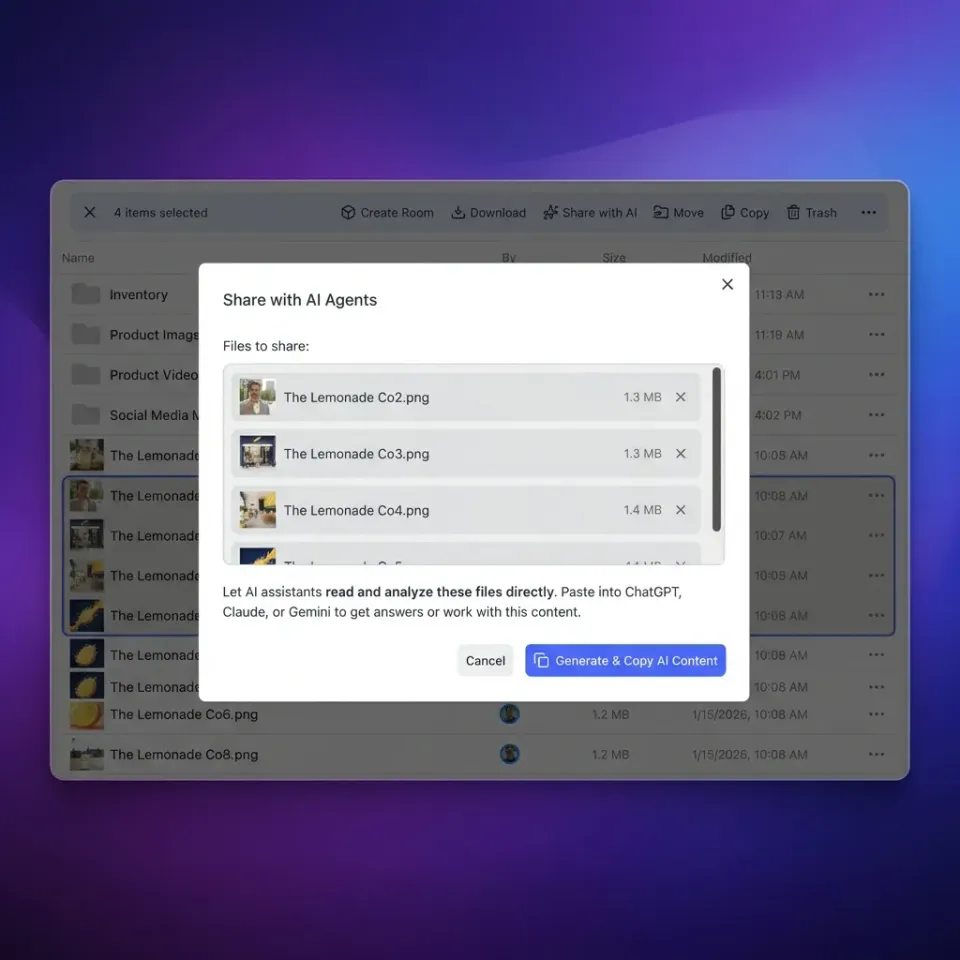
Anthropic documents that Claude chat uploads allow up to 20 files per chat at 500MB per file, while Claude project files accept 30MB per file with unlimited file count fitting within Claude's context window. Claude Projects has no fixed file-count cap, which means the practical ceiling on any project is the context window itself, as detailed in Anthropic's file upload documentation. When engineering teams build production assistants or agent workflows around a large technical corpus, they quickly encounter this boundary. Trying to attach fifty architecture diagrams, customer case studies, and compliance policies directly to a prompt or project fills the context buffer before the model can even generate its first response.
A RAG context window is the portion of an LLM's total context window explicitly budgeted for retrieved knowledge chunks, balancing document relevance against prompt bloat, latency, and attention degradation.
In a retrieval augmented generation context window, every token assigned to external knowledge directly reduces the space available for reasoning, multi-turn dialogue, tool definitions, and structured output formatting. Treating the context window as an infinite bucket leads to prompt bloat, rising API bills, and sluggish response times. Sizing retrieval correctly requires treating tokens as an operating budget with distinct allocations for static instructions, dynamic conversation state, retrieved excerpts, and completion headroom.
When an agent attempts to answer queries from a massive document repository, brute-force attachment breaks down. Retrieval Augmented Generation exists to decouple the size of your underlying document corpus from the physical constraints of the model. Instead of loading an entire knowledge base into working memory, the system queries an external index, extracts a focused subset of text chunks, and places only those relevant passages into the prompt. Optimizing this boundary requires understanding where long context windows fail and how to balance chunk sizing against model attention heads.
Related guides
- ChatGPT Projects Context Window: Token Limits, Hidden Context and MCPThe ChatGPT Projects context window provides a 128,000-token working memory buffer shared across custom instructions,...
- Cohere Context Window: Command R Token Limits and Enterprise SearchThe Cohere context window provides 128,000 tokens of sequence capacity on Command R and Command R+, and 256,000 on the...
- DeepSeek Context Window: Token Limits, Truncation, and Workspace RetrievalThe DeepSeek context window spans 64,000 to 128,000 tokens on DeepSeek-V3 and R1 before requests hit truncation errors....
- Gemini 1.5 Flash Context Window: Token Limits, Multimodal Capacity, and WorkaroundsGemini 1.5 Flash provides a native 1,048,576-token context window that accommodates 700,000 words, an hour of video, or...
- Gemini 1.5 Pro Context Window: 2M Limits, Latency, and Workspace RAGThe Gemini 1.5 Pro context window offers 2,097,152 tokens of input capacity, processing audio, video, and text in a...
- Gemini 2.5 Flash Context Window: Token Limits, Latency, and Memory ManagementThe Gemini 2.5 Flash context window provides 1,048,576 tokens of input capacity alongside a 65,536 token output...
More on this subject: Agent Memory and Storage (277 guides)
Why Million-Token Context Windows Do Not Replace Retrieval
Recent advancements in foundation models have introduced context windows spanning hundreds of thousands, or even millions, of tokens. This expansion has led some practitioners to assume that retrieval augmented generation context window engineering is obsolete. The argument suggests that developers can simply dump entire documentation sites, codebases, and legal filings directly into the prompt without building chunking pipelines or maintaining vector indexes. In production architectures, this assumption fails on three distinct technical dimensions: inference cost, time-to-first-token latency, and cognitive attention degradation.
First, LLM inference pricing operates on input token volume. While modern models offer competitive rates per token, processing half a million input tokens across an agent's multi-step decision loop multiplies operational costs rapidly. In an agentic system where a model makes ten sequential tool calls to complete a workflow, re-sending a massive context block on every turn incurs compounding charges. A targeted retrieval step that passes a few thousand tokens of relevant context costs a fraction of sending raw document archives.
Second, inference latency scales with prompt length. Processing large prompt payloads introduces noticeable delays in time-to-first-token generation. In conversational interfaces or autonomous agent execution loops where quick tool selection is required, waiting several seconds for prompt ingestion degrades the user experience and stalls background workflows. Focused retrieval limits prompt evaluation to the precise paragraphs needed for the task, keeping generation responsive.
Third, model recall degrades as context windows fill. Large language models often experience a decline in reasoning performance when processing inputs that approach or exceed approximately 50% of their maximum context length. Even models with million-token benchmarks struggle with the needle-in-a-haystack problem when relevant facts are buried amid hundreds of pages of distracting prose. Transformers distribute attention weights across all active tokens; diluting the prompt with marginally relevant text introduces semantic noise that increases hallucinations and causes models to overlook critical edge cases. Precision retrieval filters out noise before tokens enter the attention heads, ensuring the model focuses on high-signal excerpts.
A Four-Step Framework for Calculating Your Token Budget
Navigating a strict rag token limit requires understanding where each token is allocated across an execution turn. A production rag token budget requires an explicit mathematical ceiling. Rather than letting retrieved passages expand until an API error occurs, teams must partition the available context space across four core components:
Total Context Window = System Overhead + History Buffer + Retrieval Budget + Output Generation Reserve.
1. Account for System Instructions and Tool Schema Overhead
Every production agent starts with static overhead: behavioral instructions, role definitions, formatting rules, and JSON function schemas for tool calling. In a framework where an agent has access to multiple tools, the schemas alone can consume 1,500 to 3,000 tokens before evaluating any user prompt. Measure this overhead precisely by running your static prompt through a tokenizer. Lock this figure as a fixed baseline in your budgeting calculations.
2. Establish a Dynamic Conversation History Buffer
Multi-turn dialogues accumulate context quickly. Without active management, user messages and assistant responses consume the entire window. Establish a sliding window buffer that retains the most recent conversation turns while compacting older dialogue into concise summaries. For conversational assistants, allocating 2,000 to 6,000 tokens for chat history allows sufficient context for follow-up questions without crowding out retrieved reference materials.
3. Determine the Retrieved Knowledge Allowance
The retrieval allowance represents the maximum token space dedicated to external documents. For most enterprise queries, an allocation between 2,000 and 8,000 tokens provides sufficient depth to answer technical, financial, or operational questions. This allocation directly informs your chunking strategy: if your retrieval budget is 4,000 tokens, you can comfortably ingest eight 500-token chunks or four 1,000-token chunks.
4. Reserve Output Completion and Safety Headroom
Large language models require reserved space for generation. If an agent must generate detailed reports or structured JSON payloads, allocate 2,048 to 4,096 tokens specifically for completion. In addition, maintain a safety headroom buffer of 1,000 to 2,000 tokens. This safety margin accounts for tokenization discrepancies between different languages, code syntax, and runtime system injections, preventing unexpected context overflow exceptions.
The following table illustrates how context allocations scale across standard model context tiers:


Scale Your Agent Knowledge Base Without Context Limits
Connect your AI agents to shared workspaces with auto-indexing and remote MCP retrieval. Start your 14-day free trial on Starter, Business, or Enterprise.
How to Size Chunks and Configure Top-k Retrieval
The success of your rag chunk size context window strategy depends on how raw documents are fragmented and how many fragments are returned per search. Chunk size and retrieval count are tightly coupled variables; altering one necessitates adjusting the other to maintain a balanced token budget.
Chunk Size Trade-offs
Selecting a chunk size requires balancing semantic resolution against contextual integrity:
- Small Chunks (128 to 256 tokens): Excellent for semantic search precision. Small chunks map to tightly focused embedding vectors, making it easy to identify specific sentences, definitions, or parameters. However, small chunks risk severing important surrounding context, such as preceding qualifying clauses or subsequent exceptions.
- Medium Chunks (512 to 1,024 tokens): The workhorse of enterprise RAG systems. A 512-token chunk typically captures an entire subsection, complete thought, or procedural step. It provides enough context for the LLM to comprehend nuances without wasting token budget on irrelevant text.
- Large Chunks (1,500 to 2,048 tokens): Suitable for narrative documents, legal agreements, or academic papers where themes span multiple paragraphs. The disadvantage is rapid consumption of your token budget and embedding dilution, where multiple distinct topics in a single chunk weaken vector similarity scores.
Top-k Selection Mechanics
Top-k specifies the number of document chunks retrieved from the vector database and injected into the prompt. Setting top-k too low leads to context starvation, where the model lacks the information needed to construct a complete answer. Setting top-k too high introduces prompt bloat, increases cost, and degrades attention focus.
In production architectures, top-k retrieval between 3 to 10 chunks optimizes recall without overwhelming attention heads. For example, retrieving five chunks of 512 tokens yields approximately 2,560 tokens of context, leaving ample room in a 32,768-token or 131,072-token context window for conversation history and output generation. If you increase top-k to twenty chunks, context consumption reaches 10,240 tokens, which may introduce conflicting passages or redundant details that confuse the generator.
Advanced Sizing Strategies
To maximize retrieval efficiency within a fixed token budget, mature architectures employ two-stage retrieval techniques:
- Parent-Document Retrieval: The indexing pipeline creates small child chunks (e.g. 200 tokens) for vector embedding and search, but links each child to a larger parent chunk (e.g. 1,000 tokens). When a child chunk matches the query, the retriever injects the broader parent chunk into the context window, combining high search precision with complete reading context.
- Re-ranking with Cross-Encoders: A vector search retrieves an initial candidate pool of twenty chunks based on bi-encoder cosine similarity. A cross-encoder model then scores each candidate against the query, discarding low-scoring passages and passing only the top five highest-relevance chunks to the LLM. This step ensures that every token admitted to the context window contributes directly to answer quality.
Intelligent Workspaces and MCP-Native Retrieval Architecture
Managing large document collections through local folder structures or client-side prompt attachments creates operational friction for development teams. When multiple autonomous agents and team members need access to the same corporate knowledge, storing documents in Fast.io workspaces provides a cleaner, scalable architecture for storage for agents.
Rather than forcing hundreds of technical guides or policy documents into an assistant's upload window, the entire corpus resides in a shared workspace. Cloud Sync connects Google Drive, Dropbox, Box and OneDrive folders to a workspace, one-way or two-way, on a schedule or on demand. Teams can also upload files directly or import assets via URL.
When Intelligence Mode is enabled on a workspace, files are indexed for hybrid search, combining full-text search, semantic search, and metadata matching. Autonomous agents and desktop assistants connect to the workspace through the remote Model Context Protocol server over Streamable HTTP at https://mcp.fast.io/mcp/tools (for Claude applications and general clients) or https://mcp.fast.io/mcp/code (for coding agents). Setup instructions and client connection guides are documented in the Fast.io MCP setup guide, while tool definitions and parameter schemas are detailed in the MCP tooling documentation.
Instead of attaching twenty separate PDFs to every session, the assistant uses Fast.io MCP search tools to execute targeted queries against the workspace index. The tool returns only the top matching text snippets directly to the agent's rag context window on demand. This approach preserves the model's token budget for reasoning and dialogue while leaving the underlying vendor upload limits untouched.
For documents containing structured information, Metadata Views turn files into live, queryable tables with typed schemas such as Text, Integer, Decimal, Boolean, URL, JSON, and Date & Time. Agents query extracted metadata values through MCP, retrieving exact contract renewal dates, policy numbers, or financial line items without burning tokens on narrative document prose.
When multiple agents interact with shared files, advisory file locks acquired via lock-acquire and released via lock-release on the storage_manage tool coordinate work, while per-file version history preserves every iteration. A detailed activity log records changes to files and permissions across the organization, keeping handoffs auditable across human and synthetic team members. Monthly plans start with a 14-day free trial on the pricing page, which requires a credit card.
How to Diagnose Context Allocation Failures in Production
Maintaining an optimized RAG context window requires continuous evaluation and diagnostic monitoring. In production systems, token allocation failures generally manifest in two opposite extremes: context starvation and context bloat.
Diagnosing Context Allocation Failures
Context starvation occurs when the retrieval pipeline delivers an insufficient volume of relevant information. Symptoms include:
- The model hallucinating plausible but incorrect details to fill logical gaps.
- Responses stating that the requested information is unavailable, even though the data exists in the source repository.
- Partial answers that omit essential caveats or multi-step procedures.
To resolve context starvation, increase top-k retrieval by two to three chunks, implement cross-encoder re-ranking to prioritize authoritative passages, or increase the chunk overlap setting during ingestion to prevent sentence severance.
Context bloat occurs when the retrieval pipeline injects excessive text or low-relevance passages into the prompt. Symptoms include:
- Extended response latency and high token consumption metrics per conversation.
- The model ignoring specific instructions located at the beginning or end of the system prompt.
- Contradictory answers generated when the model attempts to synthesize conflicting information from loosely related chunks.
To resolve context bloat, implement strict similarity score cutoffs, filter candidate documents using metadata tags before vector search, and reduce top-k retrieval count.
Token Drift in Autonomous Agent Loops
In agentic architectures where models execute sequential tool calls, context windows experience token drift. Each tool invocation appends the tool call signature, arguments, and serialized output to the conversation history. In a complex debugging or research workflow, four or five iterative tool executions can consume ten thousand tokens of history alone.
To mitigate token drift, implement aggressive output truncation on tool results. Rather than returning raw API responses or full file bodies, configure tools to return structured summaries or targeted excerpts. In addition, compact conversation history at regular intervals by summarizing previous tool actions into concise state representations, freeing valuable token capacity for subsequent retrieval queries.
Sources
References used to verify factual claims in this guide.
-
Anthropic documents that Claude chat uploads allow up to 20 files per chat at 500MB per file, while Claude project files accept 30MB per file with unlimited file count fitting within Claude's context window.
-
Large language models often experience a decline in reasoning performance when processing inputs that approach or exceed approximately 50% of their maximum context length.
Frequently Asked Questions
Do long context windows make RAG obsolete?
Long context windows do not make RAG obsolete. While extended windows can hold vast volumes of text, processing hundreds of thousands of input tokens on every query increases inference costs and introduces latency delays. Language models also experience attention degradation and reduced reasoning accuracy when inputs approach capacity. RAG provides cost-effective, precise, and dynamic knowledge access by retrieving only the specific passages required for each query.
How many tokens should you allocate to RAG context?
For most factual, technical, and operational queries, allocating 2,000 to 8,000 tokens for retrieved knowledge provides optimal balance. This budget accommodates three to ten high-relevance chunks of 512 tokens while leaving sufficient context space for system prompts, conversation history, and model output generation.
How does Fast.io handle RAG context via MCP?
Fast.io provides an external workspace storage and indexing layer accessible through a remote Model Context Protocol server at `https://mcp.fast.io/mcp/tools`. Files stored in Fast.io workspaces are automatically indexed when Intelligence Mode is enabled. Instead of attaching massive files to an LLM context window, agents execute search queries through MCP tools to retrieve only the top relevant excerpts on demand.
What is the difference between chunk size and retrieval context size?
Chunk size refers to the token length of an individual document fragment created during ingestion, typically between 256 and 1,024 tokens. Retrieval context size refers to the aggregate token volume of all retrieved chunks injected into the model prompt during inference, calculated as chunk size multiplied by the top-k retrieval count.
How do you prevent context window overflow in multi-turn agent conversations?
Prevent context window overflow by establishing an explicit token budget with strict ceilings for each component. Implement a rolling conversation buffer that compacts older dialogue turns into concise summaries, enforce output truncation on tool responses, and reserve a dedicated headroom buffer of 1,000 to 2,000 tokens to absorb tokenization variance.
Related Resources

Scale Your Agent Knowledge Base Without Context Limits
Connect your AI agents to shared workspaces with auto-indexing and remote MCP retrieval. Start your 14-day free trial on Starter, Business, or Enterprise.