How to Test Fastio Event Bridges Locally with ngrok
Testing webhooks locally saves time when building file event integrations. This guide shows how to use ngrok to expose your local development environment and bridge Fastio event notifications. You will learn how to configure tunnels, validate webhook signatures, and troubleshoot common issues.

The Challenge of Local Webhook Development
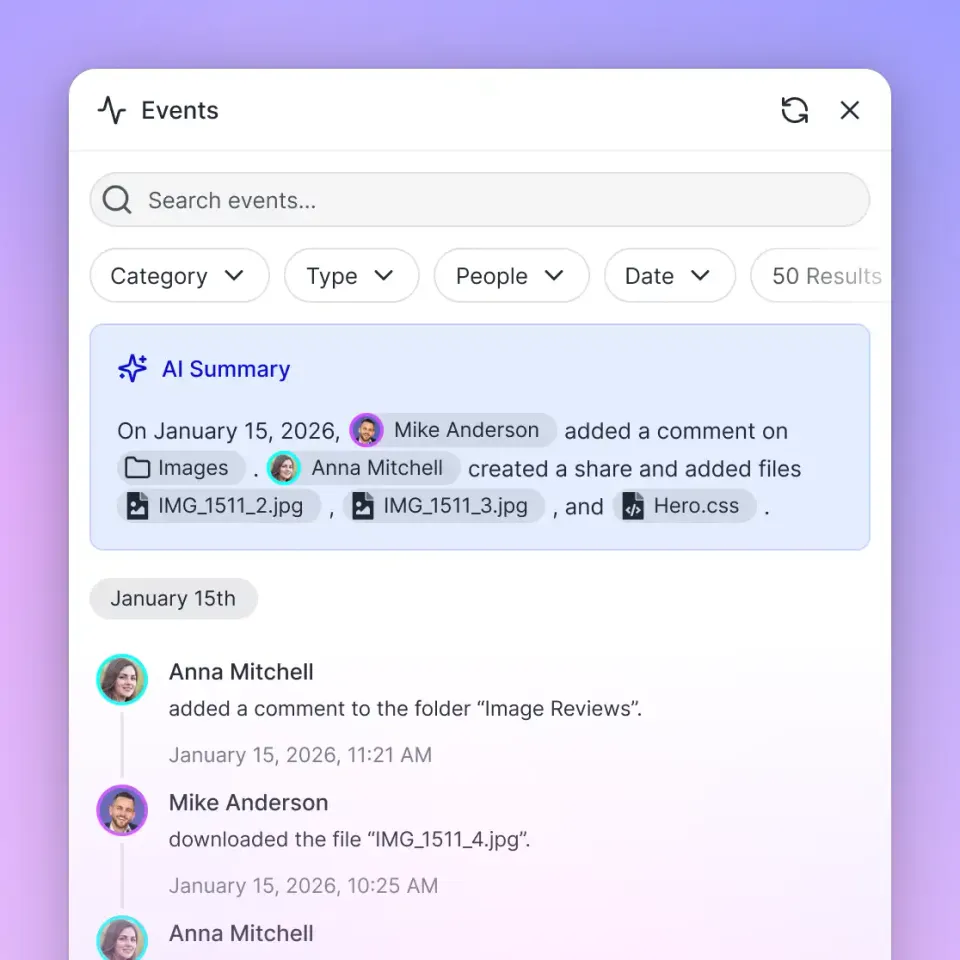
Building event-driven apps means you need to receive notifications quickly. When integrating with Fastio, real-time event streaming via the WebSocket events feed and the workspace activity long-polling endpoint (GET /current/activity/poll/{entity_id}) over the REST API at https://api.fast.io/current/ lets your application react to file events. While Fastio does not offer native outbound HTTP webhooks, developers frequently bridge these event streams into local webhooks or expose local webhook listeners with ngrok to trigger Fastio API actions.
Testing local webhook handlers or bridges is challenging when your development machine sits behind a router or corporate firewall with a private IP address that the public internet cannot reach. Since cloud services cannot connect directly to localhost, a tunneling mechanism is necessary.
To get around this, developers often write code locally, push it, and wait for a staging server to deploy just to test one webhook payload. This breaks your feedback loop. It forces you to wait for pipelines, makes local debugging impossible, and turns a quick check into a frustrating chore.
Context switching slows you down. Pushing code to a remote server means leaving your editor, checking git, and watching logs. You need a way to receive live webhooks directly on your local machine so you can inspect payloads, get immediate feedback, and iterate faster.
Related guides
- How to Mock Fastio API Endpoints for Unit TestingBuilding reliable AI agent workflows means testing without active network connections. Mocking Fastio API endpoints...
- Best Tools for AI Agent Testing and EvaluationAgent testing tools automate the evaluation of agent performance, checking for accuracy, loop detection, and goal...
- How to Build a Prompt Regression Testing Pipeline for AI AgentsA single token change in a system prompt can shift agent behavior as dramatically as a logic rewrite. Catching those...
- Best AI QA and End-to-End Testing Tools for Web and Mobile AppsAI QA tools write, run and repair end-to-end tests of your web and mobile apps, so a test suite can keep up as the...
- Best AI Dashboard Builders for Agents: Top 9 Tools (2026)AI dashboard builders provide visual interfaces and no-code tools to design, deploy, and customize user-facing...
- How to Handle AI Agent Errors: Best Practices for 2026Production AI agents frequently encounter errors during task executions. This guide covers essential error handling...
More on this subject: Agent Observability and Evaluation (24 guides)
What is ngrok and Why Use It?
ngrok exposes your local server to the internet so you can test real-time event handlers and event bridges with Fastio. It works as a tunneling application that creates a persistent connection between your machine and the ngrok cloud. When you start a tunnel, ngrok gives you a public HTTPS URL.
Any HTTP traffic sent to that URL gets intercepted by ngrok, tunneled through your outbound connection, and forwarded to your local port. This bypasses local firewalls and routers without making you open any ports manually.
This setup makes Fastio event bridge integration much easier. Testing locally saves time. Instead of guessing payload structures, you can upload a file in Fastio and verify that your event listener forwards live JSON to your local handler. ngrok also includes a web inspection interface that captures all incoming requests. This lets you replay a failed request with one click, saving you from having to upload test files over and over.
Essential Steps to Test Webhooks Locally
Setting up your local environment takes three pieces: your local application, the ngrok tunnel, and your Fastio event integration bridge.
Here is how to set up the workflow:
First: Install ngrok Download the ngrok agent using a package manager or direct download. The easiest way to authenticate is with the authtoken command. This saves to a configuration file, so you only do it once per machine. Run the command from your ngrok dashboard to link the agent to your account.
Second: Start Your Local Server Run your app on a local port and set up an endpoint for POST requests. Make sure your webhook route does not enforce strict Host header validation, since the request will come from the ngrok domain instead of localhost. Your route should accept the request and immediately return an HTTP success status.
Third: Configure the Event Bridge or Forwarder Start an ngrok tunnel pointing to your local port. Use the HTTPS URL in your event bridge or forwarder that listens to Fastio's WebSocket events feed or activity polling endpoint, routing incoming payloads to your local tunnel.
Fourth: Trigger a File Event Upload a file in Fastio via the dashboard or REST API, and verify the bridged event payload arrives at your local handler. The ngrok inspection dashboard will show the new request and lets you inspect and replay the request with one click.
Event Bridge Signature Validation
You need to verify incoming requests to keep your webhook integrations secure. Since your endpoint is public, anyone can send data to it. Many developers skip signature validation during local testing and wait until production. Building it in from the start saves headaches later.
When bridging Fastio file events to external services, you must verify incoming requests to keep your integrations secure. Since your endpoint is public, anyone can send data to it. In your bridge service, configure a secret key to compute an HMAC SHA-256 hash for every payload and pass it in a signature header (such as X-Signature).
To validate the signature in your local application, calculate the expected hash and compare it to the header. First, grab the raw, unparsed HTTP request body. If your web framework parses the JSON before you compute the signature, the resulting string might differ and validation will fail.
Take the raw request body and compute an HMAC SHA-256 hash using your secret as the key. Then compare your hash against the signature header. Use a constant-time string comparison function to prevent timing attacks. Testing these validation steps locally with ngrok ensures your authentication logic works before deploying to production.
Scaling Event Infrastructure with Fastio
As your application grows, your event handling moves from local testing to production. Fastio provides real-time event streaming via its WebSocket events feed and workspace activity polling, eliminating the overhead of maintaining fragile webhook delivery queues.
Fastio is an intelligent workspace platform. Files are indexed and searchable once Intelligence is enabled for the workspace. When a file event occurs for a new upload, your application knows the file is ready in the built-in RAG system for Ripley AI chat or document search.
Fastio provides a consolidated MCP toolset via Streamable HTTP at https://mcp.fast.io/mcp/tools. Fastio offers Starter ($9.99/mo), Business ($49.99/mo), and Enterprise ($199.99/mo) plans alongside a 14-day Business Trial. You can link your event bridges with agent tools to trigger processing, summarize files, or notify team members as soon as an event occurs.


Ready to build reactive file workflows?
Set up a Fastio workspace today and start integrating intelligent, event-driven file workflows with your agent tools.
Troubleshooting Common Local Integration Issues
Testing webhooks with ngrok is straightforward, but you might run into a few issues. Knowing how to fix them saves time.
A common problem is a mismatch between the payload structure and your local parser. If you get a Bad Request error or validation fails, double-check that you are capturing the raw body for signature verification. Also, if your app takes too long to process an event, your bridge might assume it failed and close the connection.
Webhook handlers should acknowledge receipt immediately. Your endpoint should accept the payload, pass it to a background queue, and return a success code right away. This acknowledges receipt while your app processes the file in the background.
Network retries can sometimes cause an event bridge to deliver the same payload twice. If your handler creates a database record every time an event arrives, you will end up with duplicate data. Design your handler to check unique event identifiers and implement idempotency. If that ID is already in your database, ignore the request and return a success code.
Local firewalls or antivirus software can also block the ngrok tunnel. Corporate policies sometimes stop tunneling apps from passing traffic. If your event bridge forwards events but your local server sees nothing, check your local security logs and firewall rules. Finally, remember that on the free tier of ngrok, your public URL changes when you restart the app. If your machine goes to sleep, the URL expires, requiring you to update the tunnel URL in your bridge service.

Frequently Asked Questions
How do I test Fastio event bridges locally?
While Fastio provides a WebSocket events feed and activity polling rather than native outbound webhooks, developers bridge these feeds to local webhook receivers using ngrok to test event handling on localhost.
Can I use ngrok with the Fastio API?
Yes, ngrok works well when developing local webhook services that bridge Fastio file events or receive external webhooks to trigger Fastio REST API actions.
How do I verify a webhook payload is authentic?
When bridging events, generate an HMAC SHA-256 signature using a shared secret and verify the signature header on your receiver using constant-time string comparison.
What happens if my local server is down when an event occurs?
If your local receiver is offline, the Fastio activity feed and audit log retain event history, allowing your service to poll and catch up once reconnected.
What HTTP status code should my local webhook handler return?
Your handler should return an HTTP 200 OK immediately after receiving the payload, processing heavy file operations or downstream tasks asynchronously.
Related Resources

Ready to build reactive file workflows?
Set up a Fastio workspace today and start integrating intelligent, event-driven file workflows with your agent tools.