Company Brain Governance Framework: Access Control, Permissions, and Data Hygiene
A company brain governance framework regulates how institutional documents are ingested, indexed, accessed, and queried across human teams and AI agents. By setting permissions per workspace, restricting default join settings, and reviewing changes in the activity log, organizations keep files out of answers for people who are not members while keeping knowledge current.


How a Company Brain Governance Framework Unifies Five Core Pillars
A Gartner survey of 4,861 digital workers found that 47% struggle to find the information or data they need to perform their jobs effectively. When organizations attempt to resolve this friction by deploying generative search over unstructured documents without administrative boundaries, that information retrieval gap can become an internal data leakage channel. Autonomous AI agents and internal search assistants do not evaluate social context or implicit boundaries. If an agent receives a prompt asking for executive compensation adjustments, pending litigation strategies, or unannounced corporate restructurings, it searches whatever index it can reach and summarizes the most relevant text chunks it finds.
A company brain governance framework is the set of administrative rules, permission structures, and maintenance protocols that regulate how corporate documents are ingested, accessed, updated, and queried by employees and AI agents.
In an intelligent enterprise workspace, the company brain stores the files the business runs on, including vendor agreements, engineering specifications, architectural decisions, standard operating procedures, and generated agent deliverables. Operating a shared intelligence layer requires shifting from abstract compliance policies to concrete workspace access controls, explicit member roles, and disciplined data hygiene.
Why Unpartitioned Vector Search Creates Context Leaks
Early implementations of enterprise retrieval-augmented generation attempted to build knowledge bases by ingesting every corporate document into a single, centralized vector database. Under this design, an ingestion script reads files across internal drives and generates vector embeddings stored in a flat index. When any user queries the system, the model evaluates semantic similarity across the entire corpus.
This flat retrieval pattern introduces severe operational risks. OWASP lists cross-context information leaks between users of a shared vector store under LLM08:2025 Vector and Embedding Weaknesses. Without native permission enforcement at the storage container tier, the retrieval layer relies on system prompts, post-filtering heuristics, or model alignment to hide sensitive information. These defenses can fail when subjected to novel phrasing or prompt injections.
A governed company brain addresses this by tying retrieval to workspace membership. What any person or autonomous agent can query is bounded by the workspaces and shares they belong to. If an identity does not belong to a workspace, search and AI answers do not draw on that workspace's files for it.
The Five Pillars of Company Brain Governance
A complete governance framework for an AI knowledge base rests on five operational pillars:
- Access Boundaries: Enforcing hard administrative isolation at the workspace and share tier rather than relying on nested folder trees.
- Join Restriction Policies: Restricting default organization-wide join settings to ensure private project workspaces remain confined to named members.
- Role Hygiene and Scoped Credentials: Enforcing role distinctions across organization and workspace tiers, while scoping API keys to user permissions.
- Ingestion Hygiene and Sync Freshness: Scheduling cloud sync connections to decouple institutional storage from external permission chaos and automating structured extraction.
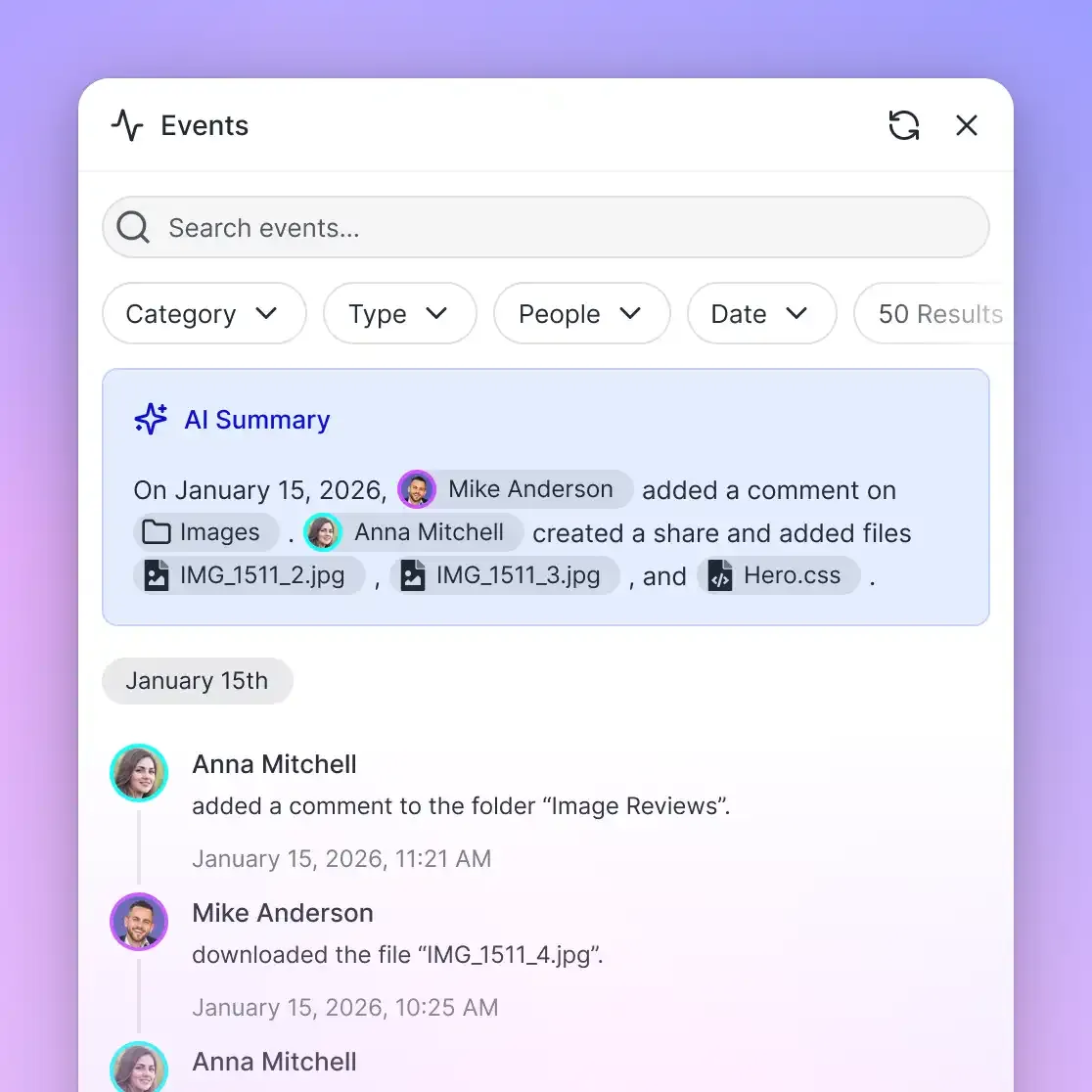
- Detailed Activity Log Auditing: Reviewing operational changes across memberships, permissions, document revisions, and share creation events.
Related guides
- Enterprise RAG: System Architecture, Data Ingestion, and Access ControlEnterprise RAG is an architectural pattern that grounds large language model responses in verified internal company...
- How to Design a Company Brain Architecture for People and AI AgentsA company brain architecture unites operational storage, hybrid search, and autonomous agents inside an authoritative...
- Company Brain for Executive Teams: Private Workspaces and Strategic IntelligenceAn executive company brain is a secure, isolated workspace where leadership teams centralize strategic documentation,...
- Company Brain for Product Management: Setup, Specs & WorkflowsA company brain for product management centralizes PRDs, technical specs, customer research, and roadmap decisions into...
- Company Brain vs. Wiki: Why File-Centric Workspaces Replace Static Internal PagesA company brain replaces static wiki pages by turning operational files into an indexed context layer queryable by...
- How to Build a Company Brain Workflow for Security QuestionnairesA company brain workflow for security questionnaires centralizes compliance certifications, security policies, and...
More on this subject: Agent Memory and Storage (365 guides)
Why Workspace-Level Access Boundaries Outperform Folder Permission Trees
Traditional file management systems rely on hierarchical folder trees with complex inheritance rules. In platforms like Windows Server, SharePoint, or Google Drive, a parent folder establishes default permissions that subfolders inherit, override, or break. Over years of organizational changes, staff departures, and cross-functional initiatives, these nested inheritance chains become chaotic.
When applied to AI agents and semantic retrieval engines, nested folder permissions break down quickly. An AI retrieval engine indexes document contents as mathematical vectors and lexical terms, matching queries based on semantic relevance rather than navigating directory trees sequentially. When permissions depend on inherited folder flags or subfolder exceptions, retrieval systems can miscalculate access scope, leaking restricted snippets into generated summaries.
Why Fastio Sets Access per Workspace
To eliminate the vulnerabilities of nested folder trees, Fastio operates without folder-level access controls, establishing clean workspace boundaries instead. Permissions are set per organization, workspace, and share by member role. A workspace has no folder-level or file-level permissions, so every workspace member reaches the entire workspace according to their designated role.
This architectural rule simplifies access governance:
- No Hidden Overrides: Administrators never need to inspect nested directories to verify access rights.
- Deterministic Access: If a collaborator has Member access to a workspace, they can view and edit all documents in that workspace. If they should not see certain files, those files must live in a separate workspace or a share.
- No Inheritance Drift: Moving a file between folders inside a workspace does not change which workspace members can read or query it. The exception is a folder shared as a share, whose recipients see whatever is moved into it.
When an organization handles sensitive subject matter, such as executive performance evaluations, quarterly financial preparations, or acquisition target diligence, administrators provision a dedicated workspace and restrict its join setting. Its files then stay out of search results and AI answers for employees who are not members.
Bounding Search and Intelligence Mode
Inside an enabled workspace, Fastio Intelligence Mode automatically indexes files upon arrival for keyword search, semantic search, summarization, and interactive chat. The retrieval boundary is absolute: search and Intelligence answer only from the workspaces and shares the asking person or agent belongs to.
When a user asks a question in the web application or an agent queries the system via the Fastio API, answers come strictly from the workspaces and shares the caller belongs to, so one department's files do not appear in another department's answers unless people belong to both.
Scoping External Collaborators with Branded Shares
External collaboration presents another common data governance vulnerability. Organizations regularly need to share project files with outside contractors, legal counsel, marketing agencies, or clients without granting them broad access to internal operations.
Fastio addresses this requirement through branded shares, configured for Send, Receive, or Exchange workflows:
- Send Shares: Deliver specific files or folders to external parties through a branded portal with optional link expiration.
- Receive Shares: Provide a secure drop point where external partners upload documents directly into a designated workspace directory without viewing other files.
- Exchange Shares: Establish bidirectional collaboration spaces for sharing deliverables and collecting partner files.
A share can disable file downloads, allowing external recipients to inspect documents in the browser without retaining local offline copies. External guests who open a share link do not consume an organization member seat.
How to Restrict Workspace Join Settings and Enforce Role Hygiene
Establishing workspace boundaries is effective only if membership enrollment is strictly controlled. In many SaaS platforms, default convenience settings undermine security boundaries by allowing internal employees to browse and join active workspaces at will.
In Fastio, a workspace join setting defaults to letting any member of its organization join. This open default accelerates organic adoption in small, collaborative teams, but it creates significant governance risks in mid-sized and enterprise environments. If an IT team provisions a workspace named "Q4 Reorganization Strategy" without adjusting this default, any organization member can join the workspace and immediately query its contents through Intelligence Mode.
Restricting Default Join Settings for Named Personnel
A core requirement of any enterprise company brain governance framework is enforcing join restriction policies during workspace provisioning. Keeping a workspace confined to named personnel requires administrators to restrict this join setting explicitly.
Setting the join value to "No one can join automatically" removes self-joining, so only members added directly get in. The "Admin or above" and "Only Org Owners" values still let those roles join on their own. A restricted workspace works like this:
- Invitation-Only Membership: Collaborators must be invited directly by email, and the member-management setting can be restricted so only admins and owners invite members.
- Directory Invisibility: Workspaces with restricted join settings do not appear in open directory lists for general organization members.
- Agent Membership Containment: An agent signed in through OAuth, or using a person's API key, acts with that person's permissions, so it can join only what that person can join. A workspace service account, the non-human identity for pipelines and automated agents, belongs only to the workspace that created it and never joins another.
Organization Roles vs. Workspace Roles
Fastio separates administrative authority across two distinct tiers: organization roles and workspace roles. This separation prevents day-to-day project management actions from interfering with global billing, compliance, and subscription controls.
The View Role and Read-Only Connection Safety
The View role is particularly valuable for autonomous AI agent governance. When an AI assistant needs access to internal documentation to answer employee questions or verify technical policies, granting it write permissions creates unnecessary operational risk. An agent with write access could inadvertently overwrite or delete source files.
Assigning the View role gives the agent read-only access in that workspace, so its write attempts are refused. A Read Only connection goes further: tools that change data are not offered at all, so the agent never sees them and cannot call them.
Managing Ownership Transitions
When autonomous agents provision workspaces or set up project repositories on behalf of humans, organizations need clear ownership transfer protocols. In Fastio, transferring ownership demotes the previous owner to admin.
If an agent creates a workspace, populates the initial document hierarchy, and transfers ownership to a human project lead, the agent keeps admin access for day-to-day updates, while ultimate governance authority rests with the human owner.


Govern Your Company Brain with Explicit Workspace Boundaries
Reduce internal context leaks and stale agent permissions with per-workspace permissions, hybrid search, and a detailed activity log. Monthly plans start with a 14-day free trial, credit card required.
How to Govern Agent Credentials with Scoped MCP Endpoints and File Leases
As organizations deploy autonomous AI tools, agents become primary consumers and producers of company brain assets. Instead of humans copying text snippets into web prompts, tools like Claude Code, Cursor, Codex, and custom background bots connect directly to shared workspaces. Governing these machine interactions requires strict credential scoping and concurrency controls.
Fastio provides a remote Model Context Protocol (MCP) server running over Streamable HTTP, eliminating local process wrappers and custom bridges. Connecting an agent to storage for agents allows it to read authoritative corporate documents and persist deliverables into the shared environment.
Standardized MCP Endpoints by Client Category
To support diverse AI runtimes while maintaining clean access controls, Fastio provides dedicated MCP endpoints tailored to specific client categories:
- Claude Applications and General Agents: Claude Desktop, Claude web, Claude Cowork, Manus, OpenClaw, and Hermes Agent connect via Streamable HTTP at
https://mcp.fast.io/mcp/tools. - Coding Agents in Development Environments: Claude Code, Cursor, Gemini CLI, Cline, Roo Code, and Devin connect to
https://mcp.fast.io/mcp/code. - ChatGPT and OpenAI Codex: Install the Fastio plugin directly from the ChatGPT plugin directory, or configure a custom connector pointing to
https://mcp.fast.io/mcp/operations.
Integration procedures and configuration guides are documented at Fastio MCP documentation.
Tool Separation: Read Tools vs. Management Tools
To enforce least-privilege operations across agent integrations, Fastio organizes MCP capabilities into distinct operational pairs. On https://mcp.fast.io/mcp/tools, read operations and management operations live on separate tools:
storagehandles file listings, search, version history, and lock status checks, whilestorage_managehandles moves, renames, deletions, lock-acquire, and lock-release. Uploads have their own pair,uploadandupload_manage.workspacereads workspace settings and details, whileworkspace_manageupdates workspace settings and writes notes. Workspace creation is handled byorg_manage.shareretrieves existing share configurations, whileshare_managecreates and configures Send, Receive, and Exchange shares.
A write sent to a read tool is refused, and the refusal names the matching _manage tool. Clients can run read tools without asking, while Claude and ChatGPT ask before running a tool that changes data.
API Key Token Hygiene and Scope Enforcement
When agents run headless in CI/CD pipelines, background daemons, or automated server containers, they authenticate using API keys. In Fastio, API keys carry explicit scopes and act with the permissions of the user who created them; they have no role of their own.
This design binds agent authority to human oversight:
- User Permission Boundary: An API key acts with the permissions of the user who created it; its containment boundary is the workspaces and shares that user belongs to.
- Credential Revocation: Because a key acts with its creator's permissions, removing a departing employee from the organization and its workspaces also takes those workspaces out of reach of the keys they created. Delete those keys as well, which revokes them.
- Stale Token Pruning: Regular permission hygiene audits prevent stale agent access tokens from persisting across quarters. Security teams should audit active API keys quarterly, revoking unused credentials.
For headless agent configurations, credentials are passed via standard authorization headers:
POST /mcp/code HTTP/1.1
Host: mcp.fast.io
Authorization: Bearer your-fastio-api-key
Content-Type: application/json
Accept: application/json, text/event-stream
For desktop coding environments like Cursor, add the server to ~/.cursor/mcp.json or project-level .cursor/mcp.json:
{
  "mcpServers": {
    "fast-io": {
      "url": "https://mcp.fast.io/mcp/code"
    }
  }
}
For Claude Code, add the connection via the CLI:
claude mcp add --transport http fast-io https://mcp.fast.io/mcp/code
Concurrency Control with Advisory File Leases
When multiple autonomous agents and human team members collaborate in the same workspace, concurrent file writes can cause accidental data loss or race conditions. Fastio coordinates writers with advisory file locks.
An agent acquires an advisory per-file lease in workspace or share storage using the lock-acquire action on the storage_manage MCP tool, inspects lock states via lock-status on storage, and releases the lease with lock-release on storage_manage. A lock expires unless periodically heartbeated by the holding agent, preventing abandoned locks if an agent process crashes.
Advisory locks never grant exclusive write rights or block other users destructively. Instead, they signal active editing states across the workspace. If concurrent writes occur, both revisions land, and per-file version history keeps the earlier versions for auditing and restoration.
What Data Ingestion Hygiene Requires for Scheduled Cloud Sync
A company brain is only as dependable as the information it contains. If an AI knowledge base ingests obsolete drafts, conflicting policy variants, or unvetted conversational fragments, its answers can mislead. Establishing data hygiene protocols ensures that institutional context remains fresh, structured, and authoritative.
In most enterprises, documentation originates in distributed cloud storage environments. Rather than forcing departments to migrate entirely off legacy tools, a governed company brain connects existing file repositories using scheduled synchronization.
Decoupling Ingestion from Source Drive Sharing Chaos
Fastio Cloud Sync connects Google Drive, Dropbox, Box, and OneDrive folders to a workspace, one-way or two-way, on a schedule or on demand. It is never continuous, live, or real-time. SharePoint document libraries connect directly through the OneDrive connector.
A primary governance vulnerability when aggregating corporate storage is source drive permission sprawl. In Google Drive or OneDrive, documents accumulate complex sharing settings over years of ad-hoc link creation, external shares, and department reorganizations. Mirroring these tangled permissions into an AI retrieval layer carries them, and any mistakes in them, into search results.
Fastio decouples ingestion from external permission sprawl by enforcing local workspace governance. Files synced or imported from Google Drive, Dropbox, Box, or OneDrive take the Fastio workspace permissions, not the source drive's sharing settings.
This decoupling establishes three operational safeguards:
- Sanitized Access: External contractors who held view rights on a source Google Drive folder cannot access the synchronized Fastio workspace unless explicitly invited.
- Deterministic Boundaries: Knowledge managers define access policies within Fastio based on current team responsibilities rather than historical cloud drive sharing lists.
- Controlled Cadence: Because sync runs on a schedule or on demand rather than continuously, teams decide when source changes arrive. With Intelligence on, synced files are indexed when they arrive, so anything that should not be searchable belongs outside the synced folder.
Structuring Unstructured Files with Metadata Views
Institutional documentation includes diverse, unstructured formats: scanned PDF contracts, vendor invoices, technical architecture whitepapers, policy memos, and presentation decks. While semantic vector search identifies conceptual themes, it struggles with structured operational queries, such as filtering contracts by counterparty jurisdiction or sorting service agreements by renewal dates.
To bridge this operational gap, Fastio incorporates Metadata Views. Document data extraction via Metadata Views turns unstructured files into a live, queryable database.
Users describe the required fields in natural language. The system designs a typed schema supporting Text, Integer, Decimal, Boolean, URL, JSON, and Date & Time formats, matches files across the workspace, and populates a filterable spreadsheet without requiring custom OCR templates. Agents query these extracted values via MCP, combining structured metadata filtering with unstructured semantic search.
Document Lifecycle Pruning and Quarantine Protocols
Data hygiene requires proactive document retirement. When engineering teams publish a new system specification or HR updates remote work guidelines, older revisions must not compete with active policies during AI retrieval.
A governed company brain enforces three lifecycle maintenance routines:
- Version History Consolidation: Fastio automatically maintains per-file version history, ensuring that updates to an existing document preserve prior revisions without cluttering the search index with redundant duplicate files.
- Archival Workspaces: When a policy or project reaches end-of-life, knowledge managers move those documents to an archival workspace with Intelligence Mode off and membership limited to the people who need the records. The files stay stored for reference but no longer compete with current documents in the active workspace's search and AI answers.
- Collaborative Note Hygiene: Collaborative Notes kept beside files allow teams to document the context, rationale, and decisions behind major revisions. Live co-editing with labeled cursors for people and agents ensures that context updates remain transparent and collaborative.
How to Audit Workspace Operations Using the Detailed Activity Log
The final pillar of a dependable company brain governance framework is operational auditing. Security administrators, knowledge managers, and compliance teams must maintain complete visibility into how documentation changes over time and how access permissions evolve across the organization.
Fastio provides accountability through a detailed activity log that records operational modifications initiated by humans and autonomous agents alike.
What the Detailed Activity Log Tracks
The Fastio detailed activity log is the record of changes across an organization. It captures structural modifications and administrative actions, providing clear operational traceability:
- Storage Changes: Records file uploads, content edits, document moves, file renames, and deletions.
- Membership and Permission Updates: Tracks user invitations, member removals, role elevations, and workspace join setting alterations.
- Share Lifecycle Events: Records the creation, updates, and deletion of Send, Receive, and Exchange shares.
The detailed activity log is designed for operational oversight of changes across an organization. By contrast, Fastio e-signature workflows generate a separate tamper-evident audit certificate, and the signed copy files itself back into the workspace.
Event-Driven Automation via Activity Feeds
Governance monitoring does not require manual inspection or polling loops. Agents and monitoring systems can subscribe to workspace activity using the Fastio events feed via WebSocket or HTTP long-polling:
GET /current/activity/poll/{workspace_id}/?wait=95&lastactivity={timestamp}
Host: api.fast.io
Authorization: Bearer your-fastio-api-key
When an employee uploads a sensitive document or an agent modifies a shared specification, the long-poll returns as soon as the activity arrives, naming the activity fields that changed (such as storage or members) with timestamps. Automated compliance agents then pull the event details from the events search, inspect the change, verify that required metadata fields exist, and flag policy exceptions.
Subscription Tiers and Governance Capabilities
Implementing a governed company brain requires selecting an organizational subscription that matches your team's storage capacity and AI processing volume. Fastio provides three transparent subscription plans:
All monthly plans begin with a 14-day free trial that requires a credit card. Creating a personal user account is free, but establishing workspaces and conducting team collaboration requires an organization on an active paid subscription.
Credits cover AI work: chat, file ingestion, agent runs, and document processing. Storage allowances and member seats come bundled with each tier. Organizations that require additional capacity can purchase credit overage ($10 per 100,000 credits), storage beyond the plan ($0.015 per GB a month), and extra bandwidth ($0.04 per GB), billed separately and not in credits.
Sources
References used to verify factual claims in this guide.
-
A Gartner survey of 4,861 digital workers found that 47% struggle to find the information or data they need to perform their jobs effectively.
-
OWASP lists cross-context information leaks between users of a shared vector store under LLM08:2025 Vector and Embedding Weaknesses.
Frequently Asked Questions
What is a governance framework for an AI knowledge base?
A governance framework for an AI knowledge base is the set of administrative policies, permission boundaries, credential controls, and maintenance routines that regulate how institutional files are ingested, indexed, and queried by employees and AI agents. It establishes hard access boundaries across storage containers, controls workspace join defaults, scopes agent API tokens, and keeps a detailed activity log of document changes.
How do you manage permissions in a company brain?
Permissions in a company brain on Fastio are established per organization, workspace, and share by member role, with no folder-level or file-level permissions. Organization roles include owner, admin, and member, while workspace roles include owner, admin, member, guest, and view. Intelligence Mode answers queries strictly from the workspaces and shares the asking user or agent belongs to, so one department's files stay out of another department's answers unless people belong to both.
How do you prevent data leaks when employees use AI search?
Reducing data leaks during AI search starts with keeping sensitive files in dedicated workspaces with restricted join settings rather than relying on global vector databases with prompt filters. Search and AI answers draw only on the workspaces and shares the asker belongs to, so users and AI assistants receive information only from workspaces they are members of.
How do workspace join settings affect internal access control?
A workspace join setting defaults to letting any member of its organization join. In a governed company brain, administrators set it so no one can join automatically when they provision a private or sensitive project workspace, which admits only members added directly. They also limit member management to admins and owners, because by default any workspace member can add members.
Does Fastio sync with Google Drive and other external cloud drives?
Yes. Fastio Cloud Sync connects Google Drive, Dropbox, Box, and OneDrive folders to a workspace, one-way or two-way, on a schedule or on demand. It is never continuous, live, or real-time. Synced files immediately take the Fastio workspace permissions, decoupling them from the external drive's historical sharing settings.
What events does the Fastio detailed activity log record?
The Fastio detailed activity log records operational modifications, including file uploads, content edits, document moves, renames, and deletions, alongside membership updates, permission adjustments, and share creation events.
How does a company brain differ from enterprise search platforms like Glean or Guru?
Glean indexes content from connected apps and enforces the permissions it inherits, and Guru's Knowledge Agents give cited, permission-aware answers from Guru knowledge bases and connected sources; both offer MCP servers for AI tools. A company brain on Fastio differs because the actual source documents live directly inside the shared workspace where human teams and AI agents collaborate, allowing agents to read source files, run structured metadata extractions, and write outputs in the same environment.
Related Resources

Govern Your Company Brain with Explicit Workspace Boundaries
Reduce internal context leaks and stale agent permissions with per-workspace permissions, hybrid search, and a detailed activity log. Monthly plans start with a 14-day free trial, credit card required.