How to Integrate AI into Virtual Data Rooms
AI agents in virtual data rooms search documents and automate tasks securely. Unlike traditional VDRs with separate Q&A bots or redaction tools, Fastio lets agents and teams collaborate in real time. Workspaces offer fine-grained permissions, audit logs, branded portals, semantic search, RAG, and events feeds. This guide covers setup for M&A due diligence, legal reviews, and deals.


What Is Virtual Data Room AI Integration?
VDR AI integration lets AI agents handle search and automation.
A virtual data room (VDR) shares confidential documents securely for deals like M&A or due diligence. AI agents make this better. They process docs semantically. They create summaries, spot contract issues, and check compliance.
Picture an M&A process. Legal uploads contracts, financials, IP files. An AI agent indexes them on upload. Team members ask, "Find all non-compete clauses in vendor agreements." They get answers with citations. A new doc arrives. The activity feed tells the agent to scan for risks and alert people.
Most VDRs keep AI separate: OCR for PDFs, basic search, static reports. Fastio builds AI into the platform. Workspaces have branded client portals, role-based permissions at every level (org, workspace, folder, file), encryption, SSO, MFA, and audit logs for every action.
Agents join as team members via the MCP server. They use the same MCP tools as the UI: upload, preview, comment on pages or frames, semantic search, sharing. One environment means no silos and quicker decisions.
Helpful references: Fastio Workspaces, Fastio Collaboration, and Fastio AI.
Start with a single non-critical deal room. Assign one M&A associate to own the agent workflow end-to-end, including monitoring activity feed updates and reviewing AI-generated summaries before they reach the deal team. Track time-to-first-summary as your baseline metric.

Related guides
- How to Build an Agentic Virtual Data Room for Due DiligenceAgentic virtual data rooms use AI agents for automated due diligence, handling document review and secure sharing. Skip...
- How to Manage Virtual Data Room Ownership TransferVirtual data room ownership transfer hands control of sensitive deal documents from one party to another after due...
- How to Use Data Room File Locks for AI AgentsFile concurrency controls stop AI agents from corrupting data rooms. Fastio provides advisory file locks alongside...
- Best VDR for AI Teams in 2026: Top 5 RankedTop VDRs for AI teams handle large datasets, agent APIs, and multiple agents working together. AI teams share much more...
- Best iDeals Virtual Data Room Alternatives for 2026iDeals is one of the most popular virtual data rooms for M&A and due diligence, but it is not the only option. This...
- How to Set Up AI Agent Due Diligence Data RoomsDue diligence data rooms with AI agents automate document reviews in secure VDRs. Manual DD takes weeks. AI agents...
More on this subject: Data Rooms and Due Diligence (53 guides)
Limits of Traditional VDR AI Features
Providers like Datasite, iDeals, Intralinks, and Merrill DatasiteOne offer AI. But it's siloed from main workflows. You get redaction, Q&A bots, viewer analytics. These process docs alone. They don't work with external agents or trigger actions automatically.
A Q&A bot answers "What's the termination clause in the SPA?" from indexed files. Upload a revised contract? Manual reindex needed. No auto-scan or agent alerts. Agents can't join chats or edits.
Sending data to ChatGPT or other LLMs risks exposure. Workflows split across apps. Bringing results back messes up versions.
Fastio workspaces keep it all inside. Docs encrypted, permissions strict, audits full. Agents use activity or WebSocket feeds for upload or access events. Responses happen fast, no data leaves.
Siloed AI slows teams on tight deadlines.
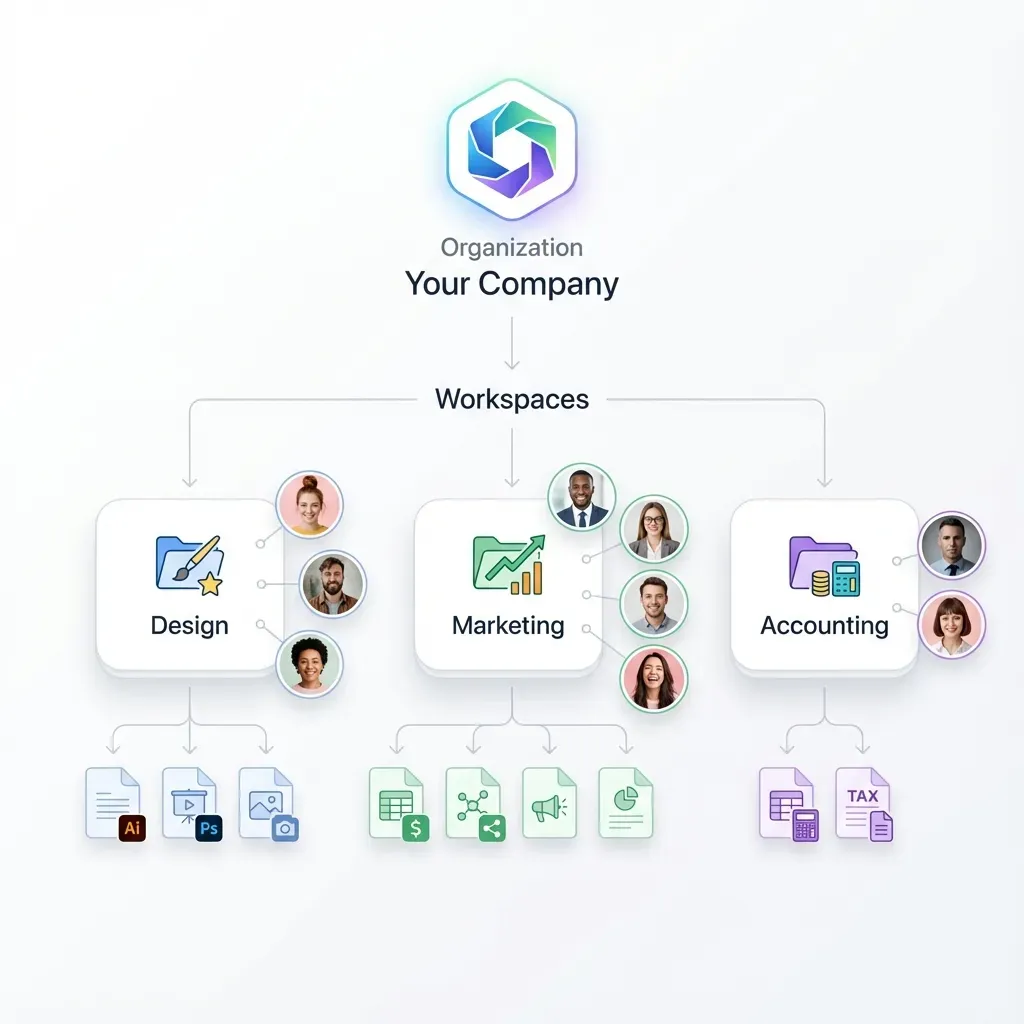
Fastio Workspaces as AI-Enabled Data Rooms
Fastio workspaces match VDR security and add built-in AI. Build branded portals with your logo, colors, custom URLs. Permissions cover org roles, workspace levels, folders, files. Audit logs track logins, uploads, downloads, views, changes. MFA and encryption protect files in transit and at rest. Data rooms show viewer time per doc, popular parts, heatmaps. Secure links have passwords, expiry, domain limits. Agents join fully. They preview with HLS video streaming, audio waveforms, CAD viewers. Comments go on frames or pages. Semantic search and shares work once Intelligence is enabled. Remote MCP server matches UI with programmatic tools. Realtime activity feed and WebSocket events track workspace actions. Agents summarize new docs or flag issues with citations.


Get Started with Fastio
Generous storage, a consolidated MCP toolset, and persistent workspaces for AI agents and deal teams. Built for virtual data room workflows.
Step-by-Step VDR AI Integration Guide
This guide sets up a VDR with AI agents using Fastio APIs and MCP.
1. Sign up for Fastio. fast.io/pricing provides a 14-day Business Trial (credit card required).
2. Create org and workspace. Connect your MCP client to https://mcp.fast.io/mcp/tools using your scoped API key to create an org and workspace with granular permissions.
3. Set as data room. Add branding, guest portals, and link controls.
4. Upload docs. Drag-drop or use the REST API with chunked uploads for large files.
5. Turn on Intelligence Mode. Settings toggle. Files are indexed and searchable once Intelligence is enabled for the workspace.
6. Connect agent. Connect your MCP client to https://mcp.fast.io/mcp/tools or use the REST API.
7. Test AI. Chat: "List risks in financials." Cited answers. Search: "IP agreements." 8. Activity monitoring. Poll the realtime activity feed or connect to the WebSocket events feed to react to changes.
9. Version control. Automatic version history and a detailed activity log track all revisions without file locks.
10. Ownership transfer. Agents can create the org and transfer ownership to a human through a claim link.
Advanced Features for VDR Agents
Fastio handles complex VDR agent needs.
Cloud Import: One-time import from Google Drive, OneDrive, Box, Dropbox, and public URLs. Consolidate client clouds.
Scoped RAG: Limit to folders once Intelligence is enabled. "Summarize cap table in finance." Cited results. Summaries cover audit logs and transcripts.
Multi-LLM: Works with Claude, GPT-4o, Gemini, and local models via MCP. Connect any MCP client to https://mcp.fast.io/mcp/tools. Agents handle CRUD, search, and share operations programmatically.
Version History: Automatic version history and granular permissions prevent overwrites across multi-agent workflows.
Event-Driven Automation: Use the WebSocket events feed or poll the realtime activity feed to chain actions: upload -> index -> scan -> alert. Agents flag missing agreements, summarize threads, and prepare bundles securely.

Real-World VDR AI Use Cases
VDR AI helps in practice.
M&A Due Diligence: Upload docs. Agent RAGs: "Flag change-of-control provisions." Risk reports with cites. Activity feed updates on filings check compliance.
Legal Reviews: Summarize depositions, track PDF comments, bundle redacted files. Branded portals for counsel.
Real Estate: Folders for photos, plans, appraisals. Import Drives, previews, memo summaries. Transfer to buyer.
Construction Bids: CAD/specs for subs. Track revisions, activity feed updates, blueprint comments. Mobile previews.
Pharma Trials: Secure CRO rooms. Semantic queries on data, adverse event summaries, audit bundles.
Integrated AI speeds work while keeping security.
Document access rules, audit trails, and retention policies before rollout so staging results are repeatable in production. This avoids late surprises and helps teams debug issues with confidence.
Troubleshooting VDR AI Integration Issues
Common fixes here.
Slow indexing: Big batches run async. Check Intelligence status. Refresh if stuck.
Auth errors: Scoped API key permissions? Verify MCP endpoint URL.
Feed sync: Check WebSocket connection or polling interval.
Bad RAG: Verify Intelligence Mode is enabled for the workspace. Scope to folders. Precise prompts. Verify cites.
Credits out: Dashboard usage. Storage and AI credits scale with Starter, Business, and Enterprise plans.
Conflicts: Rely on version history and audit logs to inspect and restore revisions.
Check audit logs and MCP docs.
For example, one pharma due diligence team found that batch-indexing folders of 300 to 500 documents kept processing under 20 minutes per folder, while larger batches caused timeouts. The key constraint is ensuring idempotent event handling as documents process. After switching from manual review to agent-assisted summaries, their deal team cut initial risk assessment from three days to four hours.

Best Practices for Production VDR AI Deployments
Pilot: Test non-critical deals. Track review time, errors, satisfaction.
Specialize agents: Risk scanners, summarizers, notifiers. Set tool chains.
Security: Least privilege. Rotate keys. Review logs daily.
Fallbacks: Retries, offline, multi-LLM.
Monitor: Activity feed alerts, dashboard.
Handovers: Doc workflows, train on outputs.
Scale: Start small, grow.
Set access rules, audits, retention early. Repeatable staging avoids prod surprises.
Run your agent pipeline against a test deal room with synthetic documents for at least one full week before connecting it to live data. Rotate API keys on a 90-day cycle and restrict each agent to the minimum workspace scope it needs.
Sources
Frequently Asked Questions
How to integrate AI in a VDR?
Create Fastio workspace as data room. Enable intelligence for RAG. Connect agents via MCP for search/automation.
What are the best VDR AI tools?
Fastio MCP tools, semantic search once Intelligence is enabled, RAG queries, activity feeds, and ownership transfer. All in secure workspaces.
How do AI agents work in virtual data rooms?
Agents join workspaces. Use API/MCP for CRUD, search, queries. Humans use UI.
What VDR AI features does Fastio support?
Intelligence mode, semantic search once enabled, RAG queries, version history, audit logs, and branded portals.
Can agents transfer VDR ownership?
Yes. Build room, transfer to human. Agents keep admin.
How much does Fastio cost for VDR AI?
Fastio offers a 14-day Business Trial requiring a credit card, followed by Starter at $9.99/mo, Business at $49.99/mo, and Enterprise at $199.99/mo.
What is the fastest way to start with this setup?
Start with one workspace and one pilot workflow, then validate permissions, upload flow, and collaboration handoffs before scaling to production.
How do teams keep files secure while collaborating?
Use role-based access, folder-level permissions, audit logs, and expiring share links so each stakeholder only sees what they need.
When should we use Fastio for this workflow?
Use Fastio when you need shared file storage, controlled access, and reliable API or MCP integrations for multi-agent or cross-team processes.
Related Resources

Get Started with Fastio
Generous storage, a consolidated MCP toolset, and persistent workspaces for AI agents and deal teams. Built for virtual data room workflows.